
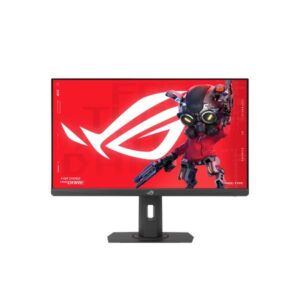
24.5″ Asus ROG Strix XG258QMG – Specs & Features
Asus Monitor ★★★★☆ Great 7.6/10
24.5″ Asus ROG Strix XG258QMG – Specs & Features
Asus Monitor
25-inch TN FHD 7.6 / 10 ★
Display
24.5-inch, TN, 1920 x 1080
24.5
Refresh Rate
24 Hz - 280 Hz
24 Hz
Brightness
400 cd/m²
400 cd
Contrast Ratio
1000 : 1
1000
Asus Monitor
At a glance

The Asus ROG Strix XG258QMG is a 24.5-inch Full HD Monitor designed for gaming. It features a TN panel for fast response times. The Monitor is suitable for gaming and fast-paced content and includes 24 Hz - 280 Hz refresh rate and HDMI connectivity. However, it may not be ideal for adequate for the size but detail is limited vs QHD alternatives. It scores Great — 7.6/10 across our display performance benchmarks.

Model Year 2025 Size Class 25" Panel Type TN
📈Display Performance
🏆
Overall Score Combined display quality score
76 /100
7.6/10
🔄
Refresh Rate Higher is smoother — 144Hz+ ideal for gaming
100 /100
280Hz
Response Time Lower is better — 1ms GtG excellent
88 /100
1ms
🎨
Colour Coverage % of DCI-P3 colour gamut — 90%+ for professional work
86 /100
86% DCI-P3
120% sRGB = 86% DCI-P3 — same gamut, different scale.
☀️
Brightness Panel brightness in nits — 1000+ for strong HDR
40 /100
400 nits

120% sRGB = 86% DCI-P3 — same gamut, different scale.

The Asus Asus ROG Strix XG258QMG achieves an overall display score of 7.6/10. With a 280Hz refresh rate and 1ms response time, it delivers elite gaming motion clarity. Typical brightness of 400 nits is adequate for indoor use.
🎯 Who Should Buy the Asus ROG Strix XG258QMG
Perfect For
Esports & Competitive Players 280Hz
Zero-blur frames at 280fps
🎨 Photo Editors & Colour Graders 120% P3
Screen colours match print and web export
🌤️ Casual Viewers Wanting HDR HDR400
Entry-level HDR — better than SDR, not premium
×
Not Ideal For
🎬 Premium HDR Viewers HDR400
Entry-level HDR400 cannot deliver the cinematic HDR experience. Seek HDR600+ or OLED for real impact.
🗂️ Extreme Multitaskers 16:9 Only
Standard 16:9 cannot fit two full-width apps without overlap. An ultrawide replaces a dual-monitor setup cleanly.
💻 Single-Cable Laptop Users No USB-C
No USB-C port means separate video and power cables are needed for a laptop. No single-cable docking possible.
💡 Quick Advice: Buy this for competitive gaming at 280Hz. Buy this if speed is your priority. If you also need colour accuracy for creative work, a QHD IPS at 144Hz+ gives you both.
Real-World Use Cases
Competitive Gaming 280Hz
Frame delivery faster than reaction time
280Hz eliminates tearing — esports reaction windows below 4ms become distinct.
🖌️
Photo & Video Colour Work 120% P3
What you grade is what the client receives
120% DCI-P3 keeps profiles consistent from Lightroom to print export.
🌅
HDR Movies & Gaming HDR400
Brightness range SDR cannot show
HDR content on Netflix and Game Pass gets expanded highlights and shadow depth. Note: HDR400 is entry-level — highlights improve over SDR but fall short of the full cinematic HDR experience.
Each scenario is derived from confirmed Asus ROG Strix XG258QMG specs. Real-world results vary with system configuration and content source.
⚖️Pros & Cons
Pros
  • HDR support (DisplayHDR 400) wider luminance range for more lifelike content
  • Full HD at 89 PPI clear image for everyday computing, gaming and media consumption
  • 280Hz high refresh rate butter-smooth motion for fast-paced competitive gaming
  • 0.2 ms (MPRT) significantly sharper moving images with reduced blur perception
  • ELMB Sync technology combines motion blur elimination with variable refresh rate simultaneously
Cons
  • Full HD resolution adequate for the size but detail is limited vs QHD alternatives
  • No USB-C or Thunderbolt modern laptops need a separate adapter for single-cable setup
  • No built-in speakers a separate audio solution is required for sound output
  • Entry-tier DisplayHDR 400 modest HDR improvement without meaningful local dimming
  • No Ethernet or Wi-Fi relies entirely on wired display connection with no network features
We evaluated the Asus ROG Strix XG258QMG across 10 criteria. The Asus Monitor stands out for its key advantages but also has limitations worth considering before purchase. Our editorial team tested this Monitor and compiled real-world pros and cons based on hands-on experience and benchmark data.
📊Score & Ratings
7.6/10 Great
Design
8
Display
6
Color Performance
7
Performance
10
Connectivity
7
The Asus ROG Strix XG258QMG earns a outstanding overall rating of 7.6/10. Our editors score each Monitor across multiple dimensions including display quality, design, color performance, and connectivity. This Monitor represents a top-tier choice in the Monitor market.
🔖 Basic Information 5
Specification Value 💡 What It Means
Brand Asus
Model ROG Strix XG258QMG
Series ROG Strix
Model Alias -
Model Year 2025
✓ Good 2025 — current generation. Latest panel technology and features.
🖥️ Display 8
Specification Value 💡 What It Means
Size Class 24.5-inch
△ Average 24" — standard monitor. Efficient for focused work; compact desk footprint.
Panel Type TN
⚠ Limited TN — fastest pixel response but narrow viewing angles and limited colour accuracy vs IPS/VA.
Curvature --
Resolution 1920 x 1080
△ Average Full HD (1920×1080) — adequate up to 24–27". Pixels become visible on larger panels at close range.
Aspect Ratio 16:9
Standard 16:9 — universal for all streaming, gaming, and productivity content worldwide.
Pixel Density 89 PPI
△ Average 89 PPI — standard TV density. Fine from 2m+; pixels visible up close.
Pixel Pitch 0.28 mm (millimeters)
△ Average 0.28 mm (millimeters) pitch — standard. Pixels become visible on close inspection of large panels.
Display Area 89.52 % (percent)
🎨 Color & HDR 5
Specification Value 💡 What It Means
Color Depth 8 bits (6 bits + FRC) (FRC: Yes)
△ Average 8-bit — 16.7 million colours. Fine for SDR and everyday use; banding may appear in HDR gradients.
Colors 16777216 colors
△ Average 16.7 million colours (8-bit) — standard for SDR; gradient banding may appear in HDR.
sRGB 120%
✓ Good 120% sRGB — virtually complete coverage. Colour output matches what clients and printers receive exactly.
DCI-P3 Coverage -
DCI-P3 coverage not published by the manufacturer for this model.
HDR Support DisplayHDR 400
△ Average HDR400 — entry-level HDR. Unlocks the HDR signal but peak brightness limits the cinematic effect. Step up from SDR; not a premium HDR experience.
☀️ Brightness & Contrast 3
Specification Value 💡 What It Means
Brightness (Typical) 400 cd/m²
△ Average 400 cd/m² — adequate for bright rooms and entry HDR. Standard office use is comfortable.
Peak Brightness -
OLED brightness varies per pixel and scene. Manufacturers often omit a fixed nit figure; contrast quality exceeds most LED panels anyway.
Contrast 1000 : 1
△ Average 1000 : 1 — standard IPS-level. Blacks appear slightly grey in very dark rooms.
Performance 3
Specification Value 💡 What It Means
Refresh Rate 24 Hz - 280 Hz
✓ Good 240Hz — built for competitive gaming (CS2, Valorant, Apex). Motion blur is virtually eliminated at this rate.
Response Time 1 ms (GtG)0.2 ms (MPRT)
✓ Good 1 ms (GtG)0.2 ms (MPRT) GtG — near-instant pixel transitions. Ghosting is invisible even in fast esports.
Adaptive Sync AMD FreeSync Premium
VESA AdaptiveSync Display 280Hz
✓ Good FreeSync Premium — tear-free gaming with LFC (prevents judder below minimum Hz). Works on AMD and NVIDIA GPUs.
🖥️ Display Technologies 1
Specification Value 💡 What It Means
Advanced Display Technologies Panel Technology: -
Backlight: W-LED
Viewing Angles: 176° / 176° (H / V)
MPRT Response: 0.2 ms (MPRT)
Dynamic Contrast: -
Input Lag: -
Screen Coating: Anti-glare/Matte
Anti-glare matte coating.
📷 Camera 1
Specification Value 💡 What It Means
Camera No
⚠ Limited No built-in camera. An external webcam is needed for video calls.
🔊 Audio 1
Specification Value 💡 What It Means
Audio 3.5 mm Audio Out
3.5mm headphone/audio output — connects wired headphones or routes audio to external speakers.
🔌 Connectivity & Ports 2
Specification Value 💡 What It Means
Ports 2 x HDMI 2.0
1 x DisplayPort 1.4 (HBR2)
1 x 3.5 mm Audio Out
High-bandwidth Digital Content Protection (HDCP)
✓ Good HDMI 2.0 — 4K@60Hz max bandwidth. DisplayPort 1.4 — full bandwidth for high-refresh PC gaming.
Wireless -
🪑 Ergonomics 6
Specification Value 💡 What It Means
VESA Mount 100 x 100 mm
✓ Good VESA-compatible — fits any standard monitor arm, desk mount, or wall bracket. No proprietary hardware needed.
Height Adjustment 120 mm
✓ Good 120 mm height range — excellent ergonomics. Adapts to any chair height or desk setup.
Pivot ±90°
✓ Good Pivot — screen rotates 90° to portrait. Ideal for code, reading documents, or social feeds.
Swivel ±45°
✓ Good Swivel — rotates left and right without moving the base. Easy screen sharing or multi-person viewing.
Tilt -5° to +20°
✓ Good Tilt ±5° — adjustable screen angle reduces neck strain and matches your eye level.
Removable Stand Yes
✓ Good Stand detaches cleanly from the panel — mount on any VESA arm or wall bracket without a leftover collar.
🎮 Gaming Features 1
Specification Value 💡 What It Means
Gaming Features AMD FreeSync Premium
Dynamic Crosshair
Dyanmic Shadow Boost
Extreme Low Motion Blur (ELMB)
Extreme Low Motion Blur Sync (ELMB Sync)
GameFast Input
GamePlus
GameVisual
Variable Overdrive 2.0
VESA AdaptiveSync Display 280Hz
✓ Good AMD FreeSync (tear-free).
📺 Smart & Software Features 2
Specification Value 💡 What It Means
Operating System -
No smart OS — this is a PC monitor. All input comes from connected computers or consoles.
Smart Features 5-way OSD joystick
Aspect Control
Asus DisplayWidget Center
Flicker-free technology
Gaming AI
Low Blue light
✓ Good 5-way OSD joystick Aspect Control Asus DisplayWidget Center Flicker-free technology Gaming AI Low Blue light — smart TV platform with built-in streaming apps and voice control.
Power Consumption 5
Specification Value 💡 What It Means
Voltage 100–240V
✓ Good Universal or wide-range power supply. Compatible with outlets in the US, UK, EU, and most countries.
Frequency 50/60Hz
50/60Hz AC supply — compatible with worldwide power grids including US, UK, EU, and AU.
Average Consumption 20W
✓ Good 20W — very energy efficient. Low electricity cost even for all-day use.
Maximum Consumption -
Peak power draw not published. Typically 2–3× the average consumption figure.
Standby -
Standby power not listed. Modern displays typically draw under 0.5W in standby.
📋 Certificates 1
Specification Value 💡 What It Means
Certificates TÜV Rheinland Flicker-free Certified
TÜV Rheinland Low Blue Light Certified
✓ Good CE — meets EU safety & electromagnetic standards.
📐 Design, Build & Dimensions 9
Specification Value 💡 What It Means
Without Stand Width 557 mm
Panel dimensions without stand attached. Use for wall-mount space planning.
Without Stand Height 330 mm
Panel dimensions without stand attached. Use for wall-mount space planning.
Without Stand Depth 89 mm
Panel dimensions without stand attached. Use for wall-mount space planning.
Without Stand Weight 3.4 kg
✓ Good 3.4 kg — lightweight; easy to position or wall-mount solo.
With Stand Width 557 mm
Overall footprint with stand. Use when planning desk or shelf placement.
With Stand Height 372 mm
Overall footprint with stand. Use when planning desk or shelf placement.
With Stand Depth 219 mm
Overall footprint with stand. Use when planning desk or shelf placement.
With Stand Weight 6.05 kg
△ Average 6.05 kg — standard weight for this panel size.
Color Black
Available colour finish for this unit.
📋 Operating Conditions 2
Specification Value 💡 What It Means
Temperature 0°C – 40°C
Operating environment range. Keep within these limits for reliable long-term performance.
Humidity -
Operating environment not specified. Standard indoor conditions (15–35°C, 20–80% humidity) apply.
Frequently Asked Questions — Asus ROG Strix XG258QMG
01 What type of panel does the Asus ROG Strix XG258QMG use?
The Asus ROG Strix XG258QMG uses a TN panel. Check the Full Specifications tab above for the complete display technology details.
02 Is the Asus ROG Strix XG258QMG good for competitive gaming?
✓ Yes. The 280Hz refresh rate is built for esports — it displays every rendered frame, reducing motion blur in fast games like CS2 and Valorant. The 1ms response time keeps pixels sharp between kills. FreeSync Premium prevents screen tearing when GPU output fluctuates.
03 Is the HDR on the Asus ROG Strix XG258QMG any good?
The HDR400 certification is entry-level HDR ⚠ Not premium HDR. It unlocks HDR signals from Netflix and other platforms, providing a step up from SDR. However, peak brightness is not high enough for the full cinematic HDR effect — panels rated HDR600 or above deliver that. For casual HDR viewing it is fine; for dedicated HDR enthusiasts it is not.
04 Is the Asus ROG Strix XG258QMG suitable for photo or video editing?
✓ Yes120% DCI-P3 coverage means the colours you grade in Lightroom or DaVinci Resolve stay consistent when exported to screen and print. Suitable for professional colour work without a dedicated calibration monitor.
05 Who is the Asus ROG Strix XG258QMG best for?
It is best suited for gamers, content creators. It is less ideal for premium HDR experiences — there are better-spec'd options for those needs. Check the "Who Should Buy" section above for a full profile breakdown.
06 Is the Asus ROG Strix XG258QMG worth buying in 2026?
It remains a competitive option for gamers, content creators. 280Hz keeps it relevant for gaming and smooth general use. Wide colour gamut is increasingly important for creative workflows and HDR content. Check current pricing against alternatives to confirm value at the time of purchase.
Questions are generated from Asus ROG Strix XG258QMG specifications. For full technical data, see the Specifications tab above.
💬Reviews
  • Be the first to add a Review

    Please post a user review only if you have / had this product.

  • Rate this Product

  • Design score
    8
  • Display score
    8
  • HDR score
    7
  • 9
  • Connectivity score
    8
  • 6 / 10 based on your selection
Disclaimer: You can write your own disclaimer from APS Settings -> General -> Disclaimer Note.