
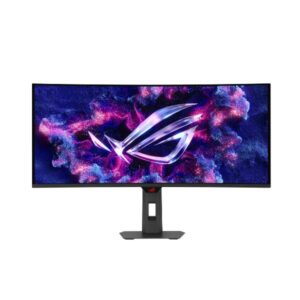
34.18″ Asus ROG Strix OLED XG34WCDMS – Full Specifications
The ASUS ROG Strix OLED XG34WCDMS is a 3440 x 1440 pixels QD-OLED monitor rated for a 48 Hz - 280 Hz refresh range.
Overview
The ASUS ROG Strix OLED XG34WCDMS is a 3440 x 1440 pixels QD-OLED monitor rated for a 48 Hz - 280 Hz refresh range. On the response-time front, it’s specified at 0.03 ms GtG. Tearing is addressed through FreeSync, G-Sync, VESA AdaptiveSync Display 280Hz. On the picture-quality side, it’s specified at 300 cd/m² typical brightness, 1500000 : 1 contrast and 135 % sRGB coverage. For hookups, there’s 2x HDMI 2.1, 1x DisplayPort 1.4, 3x USB-A.
Key Highlights
- QD-OLED panel at 3440 x 1440 pixels
- 48 Hz - 280 Hz refresh range — built for competitive, fast-paced gaming
- 0.03 ms GtG response time
- 1500000 : 1 contrast ratio
- 300 cd/m² typical brightness
- 135 % sRGB colour coverage
- FreeSync, G-Sync, VESA AdaptiveSync Display 280Hz
- Connectivity: 2x HDMI 2.1, 1x DisplayPort 1.4, 3x USB-A
Who Should Buy the Asus ROG Strix OLED XG34WCDMS
Display Performance
Gaming Performance
HDR & Brightness Reality
DisplayHDR 500 True Black is a real, meaningful tier for OLED - it certifies deep blacks and around 500-nit fullscreen highlights, while the 1300-nit peak only applies to small bright areas. So bright HDR scenes genuinely pop, but a fully white HDR image will not hit that headline number. For dark-room HDR movies and games it looks excellent; in a bright room the ~300-nit typical brightness is the real limit, so treat this as a controlled-lighting display rather than an all-conditions HDR panel.
Connectivity & Ports
Desk Fit & Ergonomics
Real-World Use Cases
Pros & Cons
- 48 Hz 280 Hz refresh range with 0.03 ms GtG response is built for competitive, fast-paced gaming
- 1500000 : 1 contrast delivers near-infinite black depth
- FreeSync, G-Sync, VESA AdaptiveSync Display 280Hz give broad adaptive-sync compatibility
- 135 % sRGB coverage solid coverage for everyday colour accuracy
- Built-in USB hub adds convenient peripheral connectivity
- No listed built-in speakers
- No energy-efficiency certification (e.g. ENERGY STAR, TCO) is listed
- HDCP support isn’t explicitly confirmed for protected 4K/HDR streaming
- No factory or hardware colour calibration is listed
Score & Ratings
| Specification | Value |
|---|---|
| Brand | ASUS |
| Series | ROG Strix |
| Model | ROG Strix OLED XG34WCDMS |
| Model Alias | ROG Strix OLED XG34WCDMS |
| Full Product Name | ASUS ROG Strix OLED XG34WCDMS |
| Model Year | 2026 |
| Monitor Type | Gaming Monitor |
| Market Position | Upper-Mid to High-End Gaming |
| Primary Use | Competitive & Immersive Gaming |
| Available Colors | Black |
| Warranty | 3 years (36 months) standard limited warranty from date of purchase |
| Panel Warranty | 3 years |
| Burn-In Warranty | 3 years (36 months) OLED panel burn-in coverage on most models |
| Specification | Value | What It Means |
|---|---|---|
| Screen Size | 34.18 in | |
| Exact Diagonal | 868.16 mm (34.18 in) | |
| Radius of Curvature | 1800 mm (70.87 in) | |
| Aspect Ratio | 2.389:1 | |
| Active Display Width | 800.06 mm (31.50 in) | |
| Active Display Height | 337.06 mm (13.27 in) | |
| Display Area | 88.88 % | |
| Panel Type | QD-OLED | QD-OLED affects viewing angles, black depth and color consistency — each panel technology trades these off differently. |
| Panel Technology | OLED | |
| Panel Manufacturer | Samsung Display | |
| OLED Technology | QD-OLED | |
| OLED Generation | 4th Gen QD-OLED | |
| Self-Emissive Display | Yes | |
| Quantum Dot | Yes | |
| 3D Support | No | |
| Screen Coating | Anti-glare/Matte (3H) / EL Gen 3 technology / Black Shield Film |
| Specification | Value | What It Means |
|---|---|---|
| Native Resolution | 3440 x 1440 pixels | |
| Pixel Density | 109 ppi / 42 ppcm | 109 ppi / 42 ppcm indicates how much scaling may be needed in the operating system for comfortable reading. |
| Pixel Pitch | 0.231 mm (0.01 in) | |
| Subpixel Layout | V-Stripe (RGB Stripe) sub-pixel layout |
| Specification | Value | What It Means |
|---|---|---|
| Panel Bit Depth | 10 bits | |
| FRC | No | |
| Display Colors | 1073741824 colors / 30 bits | |
| Typical Brightness | 300 cd/m² | |
| Peak Brightness | 1300 cd/m² | |
| Static Contrast Ratio | 1500000 : 1 | |
| Horizontal Viewing Angle | 178 ° | |
| Vertical Viewing Angle | 178 ° | |
| HDR Support | DisplayHDR 500 True BlackHDR10 |
|
| HDR10 | Yes | |
| sRGB Coverage | 135 % | 135 % indicates how much of that color space the panel can reproduce, which affects color accuracy for photo/video work. |
| DCI-P3 Coverage | 99 % |
| Specification | Value |
|---|---|
| Native Refresh Rate | 280 Hz |
| Refresh Rate Range | 48 Hz - 280 Hz |
| Minimum Response Time | 0.03 ms |
| AMD FreeSync | Yes |
| NVIDIA G-Sync | Yes |
| Motion Blur Reduction | Yes |
| Shadow Boost | Yes |
| Crosshair | Yes |
| Dynamic Crosshair | Yes |
| AI Gaming Features | Yes |
| GameFast Input | Yes |
| GameVisual | Yes |
| Specification | Value |
|---|---|
| HDMI Ports | 2 |
| HDMI Version | 2.1 |
| HDMI FRL | Yes |
| DisplayPort Input | 1 |
| DisplayPort Version | 1.4 |
| USB-C Video Input | 1× USB-C |
| Display Stream Compression | Yes |
| USB-C Data Speed | 5 Gbps (USB 3.2 Gen 1) |
| USB-C Power Delivery | 15 W |
| USB-A Ports | 3 |
| KVM Switch | Yes |
| Audio Output | 3.5 mm |
| Headphone Output | 3.5 mm Audio Out |
| Specification | Value |
|---|---|
| Built-In Camera | No |
| Specification | Value | What It Means |
|---|---|---|
| VESA Mount | Yes | |
| VESA Size | 100 x 100 mm | |
| Removable Stand | Yes | |
| Height Adjustment | Yes | 110 mm (4.33 in) of travel allows the screen to be raised or lowered for a comfortable eye-level position. |
| Height Adjustment Range | 110 mm (4.33 in) | |
| Tilt Adjustment | Yes | |
| Forward Tilt | 3 ° | |
| Backward Tilt | 20 ° / 1/4" Tripod Socket | |
| Swivel Adjustment | Yes | |
| Left Swivel | 30 ° | |
| Right Swivel | 30 ° | |
| Portrait Mode | No | |
| Security Lock | Yes | |
| Anti-Theft Lock | Kensington Lock |
| Specification | Value |
|---|---|
| Dimensions Without Stand | 812.8 mm x 373.3 mm x 107.9 mm (W x H x D) |
| Weight With Stand | 8.3 kg |
| Weight Without Stand | 5.6 kg (12.35 lbs) |
| RGB Lighting | Yes |
| Specification | Value |
|---|---|
| Power Input | 100 V - 120 V / 220 V - 240 V |
| 110V Input Range | 100 V - 120 V |
| 220V Input Range | 220 V - 240 V |
| AC Frequency | 50 Hz - 60 Hz |
| Average Power Consumption | 85 W |
| Sleep Consumption | 0.5 W |
| Off Consumption | 0.3 W |
| Operating Temperature | 0 °C - 40 °C / 32 °F - 104 °F |
| Operating Humidity | 20 % - 80 % |
| Operating Altitude | 3658 m / 12001.3 ft |
| Storage Temperature | -20 °C - 60 °C / -4 °F - 140 °F |
| Storage Humidity | 20 % - 80 % |
| Storage Altitude | 12192 m / 40000 ft |
| Specification | Value |
|---|---|
| Flicker-Free | Yes |
| Low Blue Light | Yes |
| Proximity Sensor | Yes |
| OLED Protection | Yes |
| OLED Care | Yes |
| Burn-In Protection | Yes (ASUS OLED Care / OLED Care Pro) |
| Thermal Management | Yes |
| Custom Heatsink | Yes |
| Desktop Control Software | Yes |
| Monitor Management Software | Yes |
| Aura Sync | Yes |
| Anti-Theft Slot | Yes (Kensington lock slot) |
| Additional Monitor Features | Aspect Control; Asus DisplayWidget Center; Aura Sync Lighting Effect; AI Visual; Custom heatsink; GamePlus; GameFast Input; GameVisual; Luminance Compensation Algorithm; Neo Proximity Sensor; ROG OLED Anti-Flicker 2.0 technology; Uniform Brightness |
| Specification | Value |
|---|---|
| TÜV Flicker-Free | Yes |
| TÜV Low Blue Light | Yes |
| VESA DisplayHDR | DisplayHDR 500 True Black |
| VESA AdaptiveSync | Display 280Hz |
| Specification | Value |
|---|---|
| HDMI Cable | HDMI cable |
| DisplayPort Cable | DisplayPort cable |
| USB-C Cable | USB Type-C cable |
| USB Upstream Cable | USB 3.2 cable |