
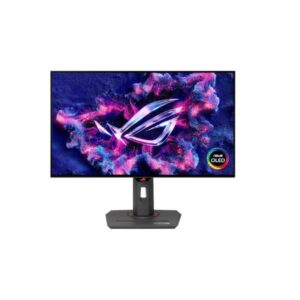
26.5″ Asus ROG Strix OLED XG27AQDNG – Specs & Features
Built around a QD-OLED panel, the ASUS ROG Strix OLED XG27AQDNG runs at 2560 x 1440 pixels / Quad HD (QHD) / 1440p with a 48 Hz - 360 Hz refresh range.
Overview
Built around a QD-OLED panel, the ASUS ROG Strix OLED XG27AQDNG runs at 2560 x 1440 pixels / Quad HD (QHD) / 1440p with a 48 Hz - 360 Hz refresh range. Motion handling is rated at 0.03 ms GtG. Colour and light output come in at 1500000 : 1 contrast and 135 % sRGB coverage. For adaptive sync, it supports FreeSync, G-Sync, VESA AdaptiveSync Display 360 Hz. Ports include 2x HDMI 2.1, 1x DisplayPort 1.4, 2x USB-A, Yesx USB-B upstream.
Key Highlights
- QD-OLED panel at 2560 x 1440 pixels / Quad HD (QHD) / 1440p
- 48 Hz - 360 Hz refresh range — built for competitive, fast-paced gaming
- 0.03 ms GtG response time
- 1500000 : 1 contrast ratio
- 135 % sRGB colour coverage
- FreeSync, G-Sync, VESA AdaptiveSync Display 360 Hz
- Connectivity: 2x HDMI 2.1, 1x DisplayPort 1.4, 2x USB-A, Yesx USB-B upstream
- Stand: 110 mm (4.33 in) height travel, swivel, pivot
Who Should Buy the Asus ROG Strix OLED XG27AQDNG
Display Performance
Gaming Performance
HDR & Brightness Reality
DisplayHDR 400 True Black is more relevant on QD-OLED than ordinary DisplayHDR 400 is on an LCD because each pixel can switch itself off. The sheet also claims a 1,000 cd/m² peak and 1,500,000:1 contrast. However, typical brightness and the peak test window are not published, so full-screen and sustained output remain unknown. Expect the specification to favour dark detail and small highlights rather than proving consistently bright HDR scenes.
Connectivity & Ports
Desk Fit & Ergonomics
Real-World Use Cases
Pros & Cons
- 48 Hz 360 Hz refresh range with 0.03 ms GtG response is built for competitive, fast-paced gaming
- 1500000 : 1 contrast delivers near-infinite black depth
- FreeSync, G-Sync, VESA AdaptiveSync Display 360 Hz give broad adaptive-sync compatibility
- 135 % sRGB coverage solid coverage for everyday colour accuracy
- Built-in USB hub adds convenient peripheral connectivity
- No listed built-in speakers
- No KVM switch for controlling two PCs from one keyboard/mouse
- No energy-efficiency certification (e.g. ENERGY STAR, TCO) is listed
- No factory or hardware colour calibration is listed
Score & Ratings
| Specification | Value |
|---|---|
| Brand | ASUS |
| Series | ROG Strix |
| Model | ROG Strix OLED XG27AQDNG |
| Model Alias | XG27AQDNG |
| Full Product Name | ASUS ROG Strix OLED XG27AQDNG |
| Model Year | 2025 |
| Monitor Type | Gaming Monitor |
| Market Position | Upper-Mid to High-End Gaming |
| Primary Use | Competitive & Immersive Gaming |
| Launch Status | 2025 |
| Available Colors | Black |
| Warranty | 3 years (36 months) standard limited warranty from date of purchase |
| Panel Warranty | 3 years |
| Burn-In Warranty | 3 years (36 months) OLED panel burn-in coverage on most models |
| Specification | Value | What It Means |
|---|---|---|
| Screen Size | 26.5 in | |
| Exact Diagonal | 678.2 mm (26.70 in) | |
| Aspect Ratio | 16:9 | |
| Active Display Width | 590.42 mm (23.24 in) | |
| Active Display Height | 333.72 mm (13.14 in) | |
| Display Area | 87.24 % | |
| Panel Type | QD-OLED | QD-OLED affects viewing angles, black depth and color consistency — each panel technology trades these off differently. |
| Panel Technology | OLED | |
| Panel Manufacturer | Samsung | |
| OLED Technology | QD-OLED | |
| Backlight Type | Self-emissive (no backlight — OLED) | |
| Self-Emissive Display | Yes | |
| Quantum Dot | Yes | |
| 3D Support | No | |
| Screen Coating | Anti-glare/Matte / Gen 3 QD-OLED display panel |
| Specification | Value | What It Means |
|---|---|---|
| Native Resolution | 2560 x 1440 pixels / Quad HD (QHD) / 1440p | |
| Pixel Density | 110 ppi / 43 ppcm | 110 ppi / 43 ppcm indicates how much scaling may be needed in the operating system for comfortable reading. |
| Pixel Pitch | 0.229 mm (0.01 in) |
| Specification | Value | What It Means |
|---|---|---|
| Panel Bit Depth | 10 bits | |
| FRC | No | |
| Display Colors | 1073741824 colors / 30 bits | |
| Peak Brightness | 1000 cd/m² | |
| Static Contrast Ratio | 1500000 : 1 | |
| Horizontal Viewing Angle | 178 ° | |
| Vertical Viewing Angle | 178 ° | |
| HDR Support | DisplayHDR 400 True BlackHDR10 |
|
| HDR10 | Yes | |
| sRGB Coverage | 135 % | 135 % indicates how much of that color space the panel can reproduce, which affects color accuracy for photo/video work. |
| DCI-P3 Coverage | 99 % | |
| Gamma Adjustment | Yes | |
| Color Adjustment | Yes |
| Specification | Value |
|---|---|
| Native Refresh Rate | 360 Hz |
| Refresh Rate Range | 48 Hz - 360 Hz |
| Minimum Response Time | 0.03 ms |
| AMD FreeSync | Yes |
| NVIDIA G-Sync | Yes |
| Motion Blur Reduction | Yes |
| Shadow Boost | Yes |
| Crosshair | Yes |
| FPS Counter | Yes |
| Sniper Mode | Yes |
| AI Gaming Features | Yes |
| GameFast Input | Yes |
| GameVisual | Yes |
| Specification | Value |
|---|---|
| HDMI Ports | 2 |
| HDMI Version | 2.1 |
| HDMI Bandwidth | 26.2 kHz - 935.48 kHz |
| DisplayPort Input | 1 |
| DisplayPort Version | 1.4 |
| Display Stream Compression | Yes |
| HDCP Support | Yes |
| USB-A Ports | 2 |
| USB-B Upstream | Yes |
| Audio Output | 3.5 mm |
| Headphone Output | 3.5 mm Audio Out |
| Specification | Value |
|---|---|
| Built-In Camera | No |
| Specification | Value | What It Means |
|---|---|---|
| VESA Mount | Yes | |
| VESA Size | 100 x 100 mm | |
| Removable Stand | Yes | |
| Height Adjustment | Yes | 110 mm (4.33 in) of travel allows the screen to be raised or lowered for a comfortable eye-level position. |
| Height Adjustment Range | 110 mm (4.33 in) | |
| Tilt Adjustment | Yes | |
| Forward Tilt | 5 ° | |
| Backward Tilt | 20 ° / 1/4" Tripod Socket | |
| Swivel Adjustment | Yes | |
| Left Swivel | 45 ° | |
| Right Swivel | 45 ° | |
| Left Pivot | 90 ° | |
| Right Pivot | 90 ° | |
| Portrait Mode | Yes | |
| Security Lock | Yes | |
| Anti-Theft Lock | Kensington Lock |
| Specification | Value |
|---|---|
| Dimensions With Stand | 611.1 mm x 392.5 mm x 169.4 mm (W x H x D) |
| Dimensions Without Stand | 611.1 mm x 369.6 mm x 66.5 mm (W x H x D) |
| Weight With Stand | 6.1 kg (13.45 lbs) |
| Weight Without Stand | 4.1 kg (9.04 lbs) |
| Stand Depth | 169.4 mm (6.67 in) |
| RGB Lighting | Yes |
| Specification | Value |
|---|---|
| Power Input | 100–240V |
| 110V Input Range | 100 V - 120 V |
| 220V Input Range | 220 V - 240 V |
| AC Frequency | 50 Hz - 60 Hz |
| Average Power Consumption | 60 W |
| Sleep Consumption | 0.5 W |
| Off Consumption | 0.3 W |
| Operating Temperature | 0 °C - 40 °C / 32 °F - 104 °F |
| Storage Temperature | -20 °C - 60 °C / -4 °F - 140 °F |
| Specification | Value |
|---|---|
| Flicker-Free | Yes |
| Low Blue Light | Yes |
| Proximity Sensor | Yes |
| OLED Protection | Yes |
| OLED Care | Yes |
| Burn-In Protection | Yes (ASUS OLED Care / OLED Care Pro) |
| Custom Heatsink | Yes |
| Desktop Control Software | Yes |
| Monitor Management Software | Yes |
| Aura Sync | Yes |
| Anti-Theft Slot | Yes (Kensington lock slot) |
| Additional Monitor Features | Adjustable HDR; AI Visual; Asus Aura Sync Lighting; Asus DisplayWidget Center; Aspect Control; Asus Power Sync; Clear Pixel Edge; Color Temperature Selection; Customized heatsink; GameFast Input; GameVisual; Intelligent voltage optimization; Neo Proximity Sensor; OLED Anti-flicker technology; ROG Gaming A.I.; Trace Free Technology; Uniform Brightness |
| Specification | Value |
|---|---|
| TÜV Flicker-Free | Yes |
| TÜV Low Blue Light | Yes |
| VESA DisplayHDR | DisplayHDR 400 True Black |
| VESA AdaptiveSync | Display 360 Hz |
| Specification | Value |
|---|---|
| HDMI Cable | HDMI cable |
| DisplayPort Cable | DisplayPort cable |
| USB Upstream Cable | USB Type-B to Type-A cable |
| Specification | Value |
|---|---|
| Package Dimensions | 860 mm x 500 mm x 163 mm (W x H x D) |
| Package Width | 860 mm (33.86 in) |
| Package Height | 500 mm (19.68 in) |
| Package Depth | 163 mm (6.42 in) |
| Package Weight | 9 kg (19.84 lbs) |