
24.1″ BenQ ZOWIE XL2586X – Specs & Features
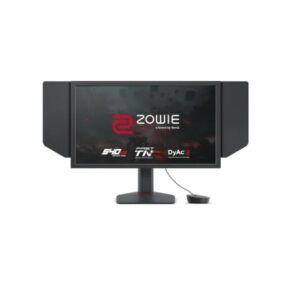
The BenQ ZOWIE XL2586X is a 24.1-inch Full HD Monitor designed for gaming and multimedia. It features a TN (AU Optronics) panel for fast response times. The Monitor is suitable for gaming and creative work and includes 48 Hz - 540 Hz refresh rate and HDMI connectivity. However, it may not be ideal for narrower viewing angles and weaker color accuracy vs IPS or VA alternatives. It scores Great — 7.6/10 across our display performance benchmarks.
Scores and analysis are based on DisplayInput – Monitor & TV Specs Comparison's display benchmark methodology across 6 verified specifications. Data sourced from Benq's official specifications and independent lab measurements.
Display Performance
Who Should Buy the Benq ZOWIE XL2586X
Real-World Use Cases
Pros & Cons
- TN panel with 540Hz lightning-fast pixel response and record-breaking refresh for esports
- 350 cd/m² calibrated display consistent, eye-friendly brightness for extended work sessions
- Full HD at 91 PPI clear, clean image for everyday computing and gaming
- World-class 540Hz refresh rate the definitive competitive advantage for professional esports
- 99% sRGB near-complete standard gamut for consistent, accurate colors across content
- TN panel narrower viewing angles and weaker color accuracy vs IPS or VA alternatives
- Full HD at 91 PPI pixel density adequate for esports but lower than QHD alternatives
- No USB-C or Thunderbolt single-cable connectivity with modern laptops requires a separate adapter
- No built-in speakers a separate audio solution is required for any sound output
- No HDR certification standard dynamic range only; HDR content is tone-mapped without uplift
Score & Ratings
| Specification | Value | 💡 What It Means |
|---|---|---|
| Brand | BenQ | |
| Model | ZOWIE XL2586X | |
| Series | ZOWIE | |
| Model Alias | XL2586X | |
| Model Year | 2023 |
△ Average 2023 — 3-year-old model. May lack the latest HDR or refresh-rate standards.
|
| Specification | Value | 💡 What It Means |
|---|---|---|
| Size Class | 24.1-inch |
△ Average 24" — standard monitor. Efficient for focused work; compact desk footprint.
|
| Panel Type | TN (AU Optronics) |
⚠ Limited TN — fastest pixel response but narrow viewing angles and limited colour accuracy vs IPS/VA.
|
| Curvature | -- | |
| Resolution | 1920 x 1080 |
△ Average Full HD (1920×1080) — adequate up to 24–27". Pixels become visible on larger panels at close range.
|
| Aspect Ratio | 16:9 |
Standard 16:9 — universal for all streaming, gaming, and productivity content worldwide.
|
| Pixel Density | 91 PPI |
△ Average 91 PPI — adequate sharpness for monitor use. Comfortable for text and media at 50–80cm.
|
| Pixel Pitch | 0.283 mm (millimeters) |
△ Average 0.283 mm (millimeters) pitch — standard. Pixels become visible on close inspection of large panels.
|
| Display Area | - |
| Specification | Value | 💡 What It Means |
|---|---|---|
| Color Depth | 8 bits |
△ Average 8-bit — 16.7 million colours. Fine for SDR and everyday use; banding may appear in HDR gradients.
|
| Colors | 16777216 colors |
△ Average 16.7 million colours (8-bit) — standard for SDR; gradient banding may appear in HDR.
|
| sRGB | 99% |
✓ Good 99% sRGB — virtually complete coverage. Colour output matches what clients and printers receive exactly.
|
| DCI-P3 Coverage | - |
DCI-P3 coverage not published by the manufacturer for this model.
|
| HDR Support | - |
| Specification | Value | 💡 What It Means |
|---|---|---|
| Brightness (Typical) | 350 cd/m² |
△ Average 350 cd/m² — comfortable indoors. May wash out next to a bright window or in direct sunlight.
|
| Peak Brightness | 400 cd/m² |
△ Average 400 cd/m² — adequate for bright rooms and entry HDR. Standard office use is comfortable.
|
| Contrast | 1300 : 1 |
△ Average 1300 : 1 — standard IPS-level. Blacks appear slightly grey in very dark rooms.
|
| Specification | Value | 💡 What It Means |
|---|---|---|
| Refresh Rate | 48 Hz - 540 Hz |
✓ Good 360Hz — elite-tier esports. Every rendered frame displayed; reaction windows below 2ms are visually distinct.
|
| Response Time | - |
Response time not published. OLED panels typically achieve under 1ms; LCD response depends on overdrive settings.
|
| Adaptive Sync | VESA AdaptiveSync |
✓ Good VESA AdaptiveSync — industry-standard VRR. Tear-free gaming across GPU brands.
|
| Specification | Value | 💡 What It Means |
|---|---|---|
| Advanced Display Technologies | Panel Technology: - Backlight: W-LED Viewing Angles: 170° / 160° (H / V) MPRT Response: - Dynamic Contrast: 100000000 : 1 Input Lag: 1.7 ms Screen Coating: Anti-glare/Matte |
Anti-glare matte coating.
|
| Specification | Value | 💡 What It Means |
|---|---|---|
| Camera | No |
⚠ Limited No built-in camera. An external webcam is needed for video calls.
|
| Specification | Value | 💡 What It Means |
|---|---|---|
| Audio | 3.5 mm Audio Out |
3.5mm headphone/audio output — connects wired headphones or routes audio to external speakers.
|
| Specification | Value | 💡 What It Means |
|---|---|---|
| Ports | 3 x HDMI 2.1 1 x DisplayPort 1.4 1 x 3.5 mm Audio Out High-bandwidth Digital Content Protection (HDCP) |
✓ Good HDMI 2.1 — supports 4K@144Hz or 8K@60Hz bandwidth. DisplayPort 1.4 — full bandwidth for high-refresh PC gaming.
|
| Wireless | - |
| Specification | Value | 💡 What It Means |
|---|---|---|
| VESA Mount | 100 x 100 mm |
✓ Good VESA-compatible — fits any standard monitor arm, desk mount, or wall bracket. No proprietary hardware needed.
|
| Height Adjustment | 155 mm |
✓ Good 155 mm height range — excellent ergonomics. Adapts to any chair height or desk setup.
|
| Pivot | ±0° | |
| Swivel | ±45° |
✓ Good Swivel — rotates left and right without moving the base. Easy screen sharing or multi-person viewing.
|
| Tilt | -5° to +35° |
✓ Good Tilt ±5° — adjustable screen angle reduces neck strain and matches your eye level.
|
| Removable Stand | Yes |
✓ Good Stand detaches cleanly from the panel — mount on any VESA arm or wall bracket without a leftover collar.
|
| Specification | Value | 💡 What It Means |
|---|---|---|
| Gaming Features | Adaptive-Sync technology Black eQualizer Color Mode by Game Titles Color Vibrance DyAc 2 technology Fast TN Input Key K Locker SHIELD S Switch XL Setting To Share with Auto Game Mode |
✓ Good Auto Game Mode (auto-enables low latency). Black Equalizer (reveals dark-area detail).
|
| Specification | Value | 💡 What It Means |
|---|---|---|
| Operating System | - |
No smart OS — this is a PC monitor. All input comes from connected computers or consoles.
|
| Smart Features | 5-way controller Flicker-free technology Low Blue Light |
✓ Good 5-way controller
Flicker-free technology
Low Blue Light — software features including OSD controls and display calibration tools.
|
| Specification | Value | 💡 What It Means |
|---|---|---|
| Voltage | 100–240V |
✓ Good Universal or wide-range power supply. Compatible with outlets in the US, UK, EU, and most countries.
|
| Frequency | 50/60Hz |
50/60Hz AC supply — compatible with worldwide power grids including US, UK, EU, and AU.
|
| Average Consumption | - |
Power consumption data not published for this model. Check the energy label on packaging.
|
| Maximum Consumption | 65W | |
| Standby | 0.5W |
✓ Good 0.5W standby — near-zero idle power. Excellent energy compliance.
|
| Specification | Value | 💡 What It Means |
|---|---|---|
| Certificates | Energy Star REACH RoHS TCO Certified UKCA WEEE |
✓ Good ENERGY STAR — US energy efficiency standard. RoHS — EU hazardous substances compliant. WEEE — EU electronics recycling compliant. CE — meets EU safety & electromagnetic standards. TCO Certified — sustainable IT product standard.
|
| Specification | Value | 💡 What It Means |
|---|---|---|
| Without Stand Width | 576 mm |
Panel dimensions without stand attached. Use for wall-mount space planning.
|
| Without Stand Height | - |
Dimension data not published by manufacturer.
|
| Without Stand Depth | - |
Dimension data not published by manufacturer.
|
| Without Stand Weight | - |
Weight not specified by manufacturer.
|
| With Stand Width | 576 mm |
Overall footprint with stand. Use when planning desk or shelf placement.
|
| With Stand Height | 362 mm |
Overall footprint with stand. Use when planning desk or shelf placement.
|
| With Stand Depth | 209 mm |
Overall footprint with stand. Use when planning desk or shelf placement.
|
| With Stand Weight | 5.8 kg |
△ Average 5.8 kg — standard weight for this panel size.
|
| Color | Black |
Available colour finish for this unit.
|
| Specification | Value | 💡 What It Means |
|---|---|---|
| Temperature | - |
Operating environment not specified. Standard indoor conditions (15–35°C, 20–80% humidity) apply.
|
| Humidity | - |
Operating environment not specified. Standard indoor conditions (15–35°C, 20–80% humidity) apply.
|