
RATED
Great
8.0/10
24.1″ BenQ ZOWIE XL2586X – Specs & Features
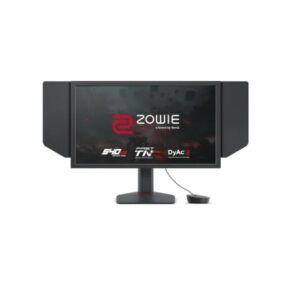
At the extreme end of esports hardware, the 24.1" BenQ ZOWIE XL2586X is a specialist 540 Hz esports monitor for elite competitive play.
Benq●Monitor
Display
24.1-inch, TN, 1920 x 1080
24.1
Refresh Rate
48 Hz - 540 Hz
48 Hz
Brightness
350 cd/m² (peak 400 cd/m²)
350 cd
Contrast Ratio
1300 : 1 / Dynamic 100000000 : 1
1300
Pros & Cons
Pros
- ZOWIE XL2586X core strength The 24.1-inch Fast TN panel, 540 Hz ceiling, DyAc 2, 1.7 ms published input lag and three HDMI 2.1 inputs concentrate almost entirely on motion clarity and tournament-style control
- ZOWIE XL2586X's 1920 x 1080 and 91 PPI clearly define its workspace and sharpness
- ZOWIE XL2586X connectivity The connection set covers 3 x HDMI 2.1; 1 x DisplayPort 1.4.
- ZOWIE XL2586X ergonomics The stand lists 155 mm height adjustment, ±45° swivel, no functional pivot and -5° to +35° tilt.
- ZOWIE XL2586X's closest comparison is BenQ ZOWIE XL2566X+; the XL2586X raises the refresh ceiling from the XL2566X+’s 400 Hz to 540 Hz and uses HDMI 2.1, but both remain Full HD TN esports tools
Cons
- ZOWIE XL2586X main compromise Full HD at 91 PPI, TN viewing angles, no speakers and no HDR tier make it a poor fit for cinema, content creation or general premium desktop use
- ZOWIE XL2586X's missing values remain unpublished rather than being copied from BenQ ZOWIE XL2566X+.
- Before choosing ZOWIE XL2586X over BenQ ZOWIE XL2566X+, verify that its exact ports, stand and motion ceiling match the intended use
Score & Ratings
8.0/10
Great
Model Information
15
| Specification | Value |
|---|---|
| Brand | BenQ |
| Series | ZOWIE |
| Model | ZOWIE XL2586X |
| Model Alias | XL2586X |
| Full Product Name | BenQ ZOWIE XL2586X |
| Model Year | 2023 |
| Monitor Type | Gaming Monitor |
| Monitor Category | Esports Monitor |
| Market Position | Competitive Esports |
| Primary Use | Competitive Esports & Professional FPS Gaming |
| Region / Variant | Not specified |
| Launch Status | Model year 2023 |
| Available Colors | Black |
| Warranty | 3 years (36 months) |
| Burn-In Warranty | Not applicable (non-OLED panel) |
Display & Panel
11
| Specification | Value |
|---|---|
| Screen Size | 24.1-inch |
| Exact Diagonal | 611.32 mm / 61.132 cm / 24.0677 in / 2.0056 ft |
| Screen Format | 16:9 |
| Aspect Ratio | 16:9 |
| Active Display Width | 535.68 mm / 53.568 cm / 21.0898 in / 1.7575 ft |
| Active Display Height | 298.08 mm / 29.808 cm / 11.7354 in / 0.978 ft |
| Panel Type | TN (AU Optronics) |
| Panel Manufacturer | AU Optronics |
| Backlight Type | W-LED |
| 3D Support | No |
| Screen Coating | Anti-glare / Matte |
24.1" Display Size (61.3 cm) 16:9
Resolution & Pixel Details
3
| Specification | Value |
|---|---|
| Native Resolution | 1920 × 1080 |
| Pixel Density | 91 PPI |
| Pixel Pitch | 0.283 mm (millimeters) |
Resolution at a Glance
Picture Quality & Color
11
| Specification | Value |
|---|---|
| Panel Bit Depth | 8 bits |
| FRC | No |
| Display Colors | 16777216 colors |
| Typical Brightness | 350 cd/m² |
| Peak Brightness | 400 cd/m² |
| Static Contrast Ratio | 1300 : 1 |
| Dynamic Contrast Ratio | 100000000 : 1 |
| Horizontal Viewing Angle | 170 ° |
| Vertical Viewing Angle | 160 ° |
| sRGB Coverage | 99% |
| Color Temperature Modes | Yes |
DESK DISTANCE FIT
65cm
CompactIdeal FitWideUltra-Wide
Fills central vision comfortably at a typical desk distance — no head movement needed.
Refresh Rate, Response & Gaming
6
| Specification | Value |
|---|---|
| Native Refresh Rate | 540 Hz |
| Refresh Rate Range | 48 Hz - 540 Hz |
| Input Lag | 1.7 ms / 0.0017 s |
| Adaptive-Sync | VESA AdaptiveSync |
| Motion Blur Reduction | Yes |
| Black Equalizer | Yes |
Ports & Connectivity
7
| Specification | Value |
|---|---|
| HDMI Ports | 3× HDMI 2.1 |
| HDMI Version | HDMI 2.1 |
| DisplayPort Input | 1× DisplayPort 1.4 |
| DisplayPort Version | DisplayPort 1.4 |
| HDCP Support | Yes |
| Audio Output | 3.5 mm |
| Headphone Output | 3.5 mm Audio Out |
Ports & Connections
Audio, Camera, Network & Smart Features
1
| Specification | Value |
|---|---|
| Built-In Camera | No |
Ergonomics & Stand
17
| Specification | Value |
|---|---|
| VESA Mount | 100 x 100 mm |
| VESA Size | 100 × 100 mm |
| Removable Stand | Yes |
| Height Adjustment | 155 mm |
| Height Range | 155 mm |
| Height Adjustment Range | 155 mm / 15.5 cm / 6.1024 in / 0.5085 ft |
| Tilt Adjustment | Yes |
| Forward Tilt | 5 ° |
| Backward Tilt | 35 ° / Cable management / Headphone hook - 499 g max load capacity |
| Swivel Adjustment | Yes |
| Left Swivel | 45 ° |
| Right Swivel | 45 ° |
| Left Pivot | 0 ° |
| Right Pivot | 90 ° |
| Portrait Mode | Yes |
| Security Lock | Yes |
| Anti-Theft Lock | Kensington Lock |
Dimensions, Weight & Design
3
| Specification | Value |
|---|---|
| Dimensions With Stand | 576 mm x 362 mm x 209 mm (W x H x D) |
| Weight With Stand | 5.8 kg |
| Stand Depth | 209 mm / 20.9 cm / 8.2283 in / 0.6857 ft |
Power & Operating Conditions
7
| Specification | Value |
|---|---|
| Power Input | 100–240V |
| 110V Input Range | 100 V - 120 V |
| 220V Input Range | 220 V - 240 V |
| AC Frequency | 50/60Hz |
| Maximum Power Consumption | 65W |
| Sleep Consumption | 0.5W |
| Off Consumption | 0.5 W |
Eye Care, Protection & Additional Features
5
| Specification | Value |
|---|---|
| Flicker-Free | Yes |
| Low Blue Light | Yes |
| Desktop Control Software | Yes |
| Anti-Theft Slot | Yes (Kensington lock slot) |
| Additional Monitor Features | 5-way controller, Adaptive-Sync technology, Black eQualizer, Color Mode by Game Titles, Color Vibrance, DyAc 2 technology, Fast TN, Flicker-free technology, Input Key, K Locker, Low Blue Light, SHIELD, S Switch, XL Setting To Share with Auto Game Mode; Anti-theft stand lock slot - Kensington; Other certifications: REACH, UKCA |
Certifications, Standards & Licenses
4
| Specification | Value |
|---|---|
| Energy Star | Energy Star |
| TCO Certified | TCO Certified |
| RoHS | RoHS |
| WEEE | Yes |
Included Accessories
2
| Specification | Value |
|---|---|
| HDMI Cable | HDMI cable |
| DisplayPort Cable | DisplayPort cable |
Packaging Information
1
| Specification | Value |
|---|---|
| Package Weight | 9.7 kg / 21.38 lbs |
⚡
Estimated Running Cost
Based on this product's rated power draw, not an independent lab measurement — actual usage varies with settings and content.
Daily—
Monthly—
Annually—
Uses about 0% less power than the average we track in this category.
Reviews
DISPLAYINPUT · INDEPENDENT · SPEC-BASED · NO SPONSORED PLACEMENT
SHEET № ZOWIE XL2586X