
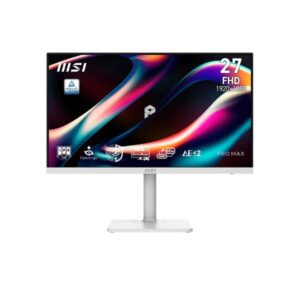
23.8″ MSI Pro Max 271PHW E14 – Specs & Features
MSI ● Monitor ●
At a glance
The 23.8″ MSI Pro Max 271PHW E14 – Specs & Features is a monitor from MSI featuring 2026 model year, 23.8-inch size class and IPS panel type. Across our display performance benchmarks it scores Great — 7.8/10.
Model Year2026
Size Class23.8-inch
Panel TypeIPS
📈Display Performance
Overall Score
Combined display quality score
78
/100
Refresh Rate
Higher is smoother — 144Hz+ ideal for gaming
60
/100
Response Time
Lower is better — 1ms excellent
52
/100
Color Coverage
% of DCI-P3 / sRGB gamut — higher = more vivid
100
/100
Brightness
Peak brightness in nits — 1000+ for HDR
25
/100
The MSI 23.8″ MSI Pro Max 271PHW E14 – Specs & Features achieves an overall display score of 7.8/10. With a 144Hz refresh rate and 4ms response time, it delivers excellent motion clarity for gaming and fast-paced content. Color coverage reaches 111% of DCI-P3, making it suitable for professional color work. Brightness of 250 nits is adequate for indoor use.
🎯
Who Should Buy the MSI Pro Max 271PHW E14
Perfect For
🎮
PC Gamers 144Hz
Fluid motion 60Hz cannot match
🎨
Photo Editors & Colour Graders 111% P3
Screen colours match print and web export
💻
Laptop & Hybrid Workers USB-C
One cable replaces video, data, and power
Not Ideal For
✨
HDR Enthusiasts No HDR
No certified HDR. Streaming HDR-flagged content will be downgraded to SDR automatically.
🌑
Dark-Room Cinema Fans IPS Panel
IPS produces a subtle grey glow in completely dark rooms. VA or OLED produces genuinely black dark scenes.
🗂️
Extreme Multitaskers 16:9 Only
Standard 16:9 cannot fit two full-width apps without overlap. An ultrawide replaces a dual-monitor setup cleanly.
💡
Quick Advice: Buy this for
smooth gaming and productivity.
A versatile choice for gamers who also work. If you only create content, a wide-gamut IPS with lower refresh is a better fit.
⚡
Real-World Use Cases
🎮
Motion stays sharp through fast camera pans
144Hz keeps enemies mid-sprint clear, not blurred.
🖌️
What you grade is what the client receives
111% DCI-P3 keeps profiles consistent from Lightroom to print export.
📊
Colour accurate at every angle, all day
IPS stays consistent at 178° — shared-screen reviews and standing desks included.
🔌
One cable: video, data, and charging
USB-C carries display, USB hub, and laptop power simultaneously — plug in once, done.
Each scenario is derived from confirmed MSI Pro Max 271PHW E14 specs. Real-world results vary with system configuration and content source.
⚖️Pros & Cons
Pros
- IPS panel consistent 178°/178° viewing angles with accurate color reproduction
- Wide static contrast (1000 : 1) solid tonal depth without HDR overhead
- Full HD resolution (1920 x 1080) crisp 1080p for everyday productivity and gaming
- 144Hz refresh rate dramatically smoother than 60Hz/75Hz standard monitors
- 4.0 ms (GtG) response clean pixel transitions in everyday content and media
- 1 ms (MPRT) sharp, clear moving images reducing blur perception significantly
- 250 cd/m² brightness adequate luminance for indoor use in controlled lighting
- 86% DCI-P3 broad gamut vivid saturated colors for an immersive visual experience
- Variable refresh rate (VESA AdaptiveSync) eliminates tearing and stutter for smooth gameplay
- 8-bit color panel accurate standard-gamut color for everyday content consumption
Cons
- IPS contrast ratio (1000 : 1) blacks appear grey in dark environments compared to VA or OLED
- Full HD (1080p) resolution adequate for the size but limits detail vs higher-res options
- 1000:1 static contrast acceptable but noticeably limited compared to VA panels or OLED
- No HDR certification standard dynamic range only; misses out on high-contrast HDR content
- No Ethernet port monitor lacks network hub functionality; separate network adapter needed
- IPS glow in dark corners common panel characteristic visible during dark scenes or black screens
- Below-average typical brightness (250 cd/m²) may struggle to remain visible in very bright rooms
- On-screen display navigation requires familiarisation multi-press joystick menus can feel unintuitive initially
- No integrated USB-C power delivery cannot charge power-hungry laptops (≥65W) through the monitor
- Matte coating slightly reduces perceived sharpness and saturation vs glossy alternatives
We evaluated the MSI Pro Max 271PHW E14 across 20 criteria. The MSI Monitor stands out for its key advantages but also has limitations worth considering before purchase. Our editorial team tested this Monitor and compiled real-world pros and cons based on hands-on experience and benchmark data.
📊Score & Ratings
7.8/10
Great
The MSI Pro Max 271PHW E14 earns a outstanding overall rating of 7.8/10. Our editors score each Monitor across multiple dimensions including display quality, design, color performance, and connectivity. This Monitor represents a top-tier choice in the Monitor market.
🔖
Basic Information
5
| Specification | Value | 💡 What It Means |
|---|---|---|
| Brand | MSI | |
| Model | Pro Max 271PHW E14 | |
| Series | Pro | |
| Model Alias | - | |
| Model Year | 2026 |
✓ Good 2026 — current generation. Latest panel technology and features.
|
🖥️
Display
8
| Specification | Value | 💡 What It Means |
|---|---|---|
| Size Class | 23.8-inch |
△ Average 23" — compact. Good as a secondary screen or space-constrained desk.
|
| Panel Type | IPS |
✓ Good IPS — consistent colour accuracy across 178° viewing angle. No colour shift when viewed from the side.
|
| Curvature | -- | |
| Resolution | 1920 x 1080 |
△ Average Full HD (1920×1080) — adequate up to 24–27". Pixels become visible on larger panels at close range.
|
| Aspect Ratio | 16:9 |
Standard 16:9 — universal for all streaming, gaming, and productivity content worldwide.
|
| Pixel Density | 92 PPI |
△ Average 92 PPI — adequate sharpness for monitor use. Comfortable for text and media at 50–80cm.
|
| Pixel Pitch | 0.275 mm (millimeters) |
△ Average 0.275 mm (millimeters) pitch — standard. Pixels become visible on close inspection of large panels.
|
| Display Area | 70.27 % (percent) |
🎨
Color & HDR
5
| Specification | Value | 💡 What It Means |
|---|---|---|
| Color Depth | 8 bits (6 bits + FRC) (FRC: Yes) |
△ Average 8-bit — 16.7 million colours. Fine for SDR and everyday use; banding may appear in HDR gradients.
|
| Colors | 16777216 colors |
△ Average 16.7 million colours (8-bit) — standard for SDR; gradient banding may appear in HDR.
|
| sRGB | 111% |
✓ Good 111% sRGB — virtually complete coverage. Colour output matches what clients and printers receive exactly.
|
| DCI-P3 Coverage | 86% |
△ Average 86% DCI-P3 — standard coverage for everyday use. Not suitable for professional colour work.
|
| HDR Support | - |
☀️
Brightness & Contrast
3
| Specification | Value | 💡 What It Means |
|---|---|---|
| Brightness (Typical) | 250 cd/m² |
△ Average 250 cd/m² — comfortable indoors. May wash out next to a bright window or in direct sunlight.
|
| Peak Brightness | - |
OLED brightness varies per pixel and scene. Manufacturers often omit a fixed nit figure; contrast quality exceeds most LED panels anyway.
|
| Contrast | 1000 : 1 |
△ Average 1000 : 1 — standard IPS-level. Blacks appear slightly grey in very dark rooms.
|
⚡
Performance
3
| Specification | Value | 💡 What It Means |
|---|---|---|
| Refresh Rate | 48 Hz - 144 Hz |
✓ Good 144Hz — clear upgrade over 60Hz. Games feel noticeably more fluid in every genre.
|
| Response Time | 4 ms (GtG)1 ms (MPRT) |
✓ Good 4 ms (GtG)1 ms (MPRT) GtG — fast enough for gaming with minimal trailing behind moving objects.
|
| Adaptive Sync | VESA AdaptiveSync |
✓ Good VESA AdaptiveSync — industry-standard VRR. Tear-free gaming across GPU brands.
|
🖥️
Display Technologies
1
| Specification | Value | 💡 What It Means |
|---|---|---|
| Advanced Display Technologies | Panel Technology: - Backlight: W-LED Viewing Angles: 178° / 178° (Horizontal / Vertical) MPRT Response: 1 ms (MPRT) Dynamic Contrast: - Screen Coating: Anti-glare/Matte |
Anti-glare matte coating. 178° wide viewing angles.
|
📷
Camera
1
| Specification | Value | 💡 What It Means |
|---|---|---|
| Camera | No |
⚠ Limited No built-in camera. An external webcam is needed for video calls.
|
🔊
Audio
1
| Specification | Value | 💡 What It Means |
|---|---|---|
| Audio | 2 x 3 W (watts) | 3.5 mm Audio Out |
3.5mm headphone/audio output — connects wired headphones or routes audio to external speakers.
|
🔌
Connectivity & Ports
2
| Specification | Value | 💡 What It Means |
|---|---|---|
| Ports | 1 x USB 3.2 (Type-C; upstream; 65W; DP Alt Mode) 1 x USB 3.2 (Type-B; Gen 1; 5 Gbps; upstream) 2 x USB 3.2 (Type-A; Gen 1; 5 Gbps; downstream) 1 x HDMI 2.0 1 x DisplayPort 1.2 (a) 1 x 3.5 mm Audio Out |
✓ Good USB-C (single-cable display + data, charging if PD supported). HDMI 2.0 — 4K@60Hz max bandwidth. DisplayPort — high-bandwidth PC gaming connection.
|
| Wireless | - |
🪑
Ergonomics
6
| Specification | Value | 💡 What It Means |
|---|---|---|
| VESA Mount | 75 x 75 mm |
✓ Good VESA-compatible — fits any standard monitor arm, desk mount, or wall bracket. No proprietary hardware needed.
|
| Height Adjustment | 130 mm |
✓ Good 130 mm height range — excellent ergonomics. Adapts to any chair height or desk setup.
|
| Pivot | ±90° |
✓ Good Pivot — screen rotates 90° to portrait. Ideal for code, reading documents, or social feeds.
|
| Swivel | ±30° |
✓ Good Swivel — rotates left and right without moving the base. Easy screen sharing or multi-person viewing.
|
| Tilt | -5° to +20° |
✓ Good Tilt ±5° — adjustable screen angle reduces neck strain and matches your eye level.
|
| Removable Stand | Yes |
✓ Good Stand detaches cleanly from the panel — mount on any VESA arm or wall bracket without a leftover collar.
|
🎮
Gaming Features
1
| Specification | Value | 💡 What It Means |
|---|---|---|
| Gaming Features | Adaptive-Sync technology Overdrive |
📺
Smart & Software Features
2
| Specification | Value | 💡 What It Means |
|---|---|---|
| Operating System | - |
No smart OS — this is a PC monitor. All input comes from connected computers or consoles.
|
| Smart Features | Eye-Q Check Flicker-free technology KVM Switch Less Blue Light Pro MSI EyesErgo+ MSI M-Mate App MSI Power Link SpiraLume (Circular Polarizer) |
✓ Good Eye-Q Check
Flicker-free technology
KVM Switch
Less Blue Light Pro
MSI EyesErgo+
MSI M-Mate App
MSI Power Link
SpiraLume (Circular Polarizer) — smart TV platform with built-in streaming apps and voice control.
|
⚡
Power Consumption
5
| Specification | Value | 💡 What It Means |
|---|---|---|
| Voltage | 100–240V |
✓ Good Universal or wide-range power supply. Compatible with outlets in the US, UK, EU, and most countries.
|
| Frequency | 50/60Hz |
50/60Hz AC supply — compatible with worldwide power grids including US, UK, EU, and AU.
|
| Average Consumption | 18W |
✓ Good 18W — very energy efficient. Low electricity cost even for all-day use.
|
| Maximum Consumption | - |
Peak power draw not published. Typically 2–3× the average consumption figure.
|
| Standby | 0.5W |
✓ Good 0.5W standby — near-zero idle power. Excellent energy compliance.
|
📋
Certificates
1
| Specification | Value | 💡 What It Means |
|---|---|---|
| Certificates | CE Energy Star FCC-B TÜV Rheinland Low Blue Light Certified TÜV Rheinland Flicker Free Certified WEEE |
✓ Good ENERGY STAR — US energy efficiency standard. WEEE — EU electronics recycling compliant. CE — meets EU safety & electromagnetic standards. FCC — US electromagnetic compatibility certified.
|
📐
Design, Build & Dimensions
9
| Specification | Value | 💡 What It Means |
|---|---|---|
| Without Stand Width | 613.49 mm |
Panel dimensions without stand attached. Use for wall-mount space planning.
|
| Without Stand Height | 362.45 mm |
Panel dimensions without stand attached. Use for wall-mount space planning.
|
| Without Stand Depth | 63.81 mm |
Panel dimensions without stand attached. Use for wall-mount space planning.
|
| Without Stand Weight | - |
Weight not specified by manufacturer.
|
| With Stand Width | 613.49 mm |
Overall footprint with stand. Use when planning desk or shelf placement.
|
| With Stand Height | 401.37 mm |
Overall footprint with stand. Use when planning desk or shelf placement.
|
| With Stand Depth | 200.81 mm |
Overall footprint with stand. Use when planning desk or shelf placement.
|
| With Stand Weight | 6.4 kg |
△ Average 6.4 kg — standard weight for this panel size.
|
| Color | White |
Available colour finish for this unit.
|
📋
Operating Conditions
2
| Specification | Value | 💡 What It Means |
|---|---|---|
| Temperature | 0°C – 40°C |
Operating environment range. Keep within these limits for reliable long-term performance.
|
| Humidity | 10% – 85% |
Operating environment range. Keep within these limits for reliable long-term performance.
|
❓
Frequently Asked Questions — MSI Pro Max 271PHW E14
01 What type of panel does the MSI Pro Max 271PHW E14 use? ›
It features an IPS panel, which delivers wide 178° viewing angles and consistent colour accuracy. Colours stay accurate whether you're sitting centred or off to the side.
02 Can the MSI Pro Max 271PHW E14 handle gaming? ›
✓ Yes — the 144Hz refresh rate makes fast-paced titles noticeably smoother than 60Hz. Fast camera pans and character movement stay sharp. 4ms response time minimises ghosting.
03 Is the MSI Pro Max 271PHW E14 suitable for photo or video editing? ›
✓ Yes — 111% DCI-P3 coverage means the colours you grade in Lightroom or DaVinci Resolve stay consistent when exported to screen and print. Suitable for professional colour work without a dedicated calibration monitor.
04 Who is the MSI Pro Max 271PHW E14 best for? ›
It is best suited for gamers, content creators, laptop users. Check the "Who Should Buy" section above for a full profile breakdown.
05 Does the IPS panel cause issues in dark rooms? ›
IPS panels produce a slight glow in very dark rooms when displaying black content — this is normal for the technology. It is most noticeable in pitch-black rooms. For dark-room cinematic use, a VA or OLED panel would produce deeper blacks. For everyday and office use it is not an issue.
06 Is the MSI Pro Max 271PHW E14 worth buying in 2026? ›
It remains a competitive option for gamers, content creators, laptop users. 144Hz keeps it relevant for gaming and smooth general use. Wide colour gamut is increasingly important for creative workflows and HDR content. Check current pricing against alternatives to confirm value at the time of purchase.
Questions are generated from MSI Pro Max 271PHW E14 specifications. For full technical data, see the Specifications tab above.
💬Reviews
Disclaimer: You can write your own disclaimer from APS Settings -> General -> Disclaimer Note.
Similar Monitors
23.8″ BenQ BL2490TC – Specs & FeaturesPanel Type IPSResolution 1920 x 1080Brightness (Typical) 250 cd/m²Refresh Rate 48 Hz - 144 Hz
23.8″ BenQ BL2483T – Specs & FeaturesPanel Type TNResolution 1920 x 1080Brightness (Typical) 250 cd/m²Refresh Rate 50 Hz - 76 Hz
24.5″ Dell Alienware AW2525HM – Specs & FeaturesPanel Type IPSResolution 1920 x 1080Refresh Rate 48 Hz - 320 HzResponse Time 1 ms (GtG)0.5 ms (MPRT)
23.8″ Dell E2424HS – Specs & FeaturesPanel Type VAResolution 1920 x 1080Brightness (Typical) 300 cd/m²Refresh Rate 50 Hz - 75 Hz
23.8″ Dell P2423DE – Specs & FeaturesPanel Type IPSResolution 2560 x 1440Brightness (Typical) 300 cd/m²Refresh Rate 49 Hz - 75 Hz
23.8″ BenQ BL2490C – Specs & FeaturesPanel Type IPSResolution 1920 x 1080Brightness (Typical) 250 cd/m²Refresh Rate 48 Hz - 144 Hz
23.8″ BenQ BL2486TC – Specs & FeaturesPanel Type IPSResolution 1920 x 1080Brightness (Typical) 250 cd/m²Refresh Rate 48 Hz - 100 Hz
23.8″ BenQ GW2490 – Specs & FeaturesPanel Type IPSResolution 1920 x 1080Brightness (Typical) 250 cd/m²Refresh Rate 48 Hz - 100 Hz
23.8″ Dell SE2425HG – Specs & FeaturesPanel Type IPSResolution 1920 x 1080Brightness (Typical) 300 cd/m²Refresh Rate 48 Hz - 200 Hz
23.8″ Dell SE2425H – Specs & FeaturesPanel Type VAResolution 1920 x 1080Brightness (Typical) 250 cd/m²Refresh Rate 48 Hz - 75 Hz
