
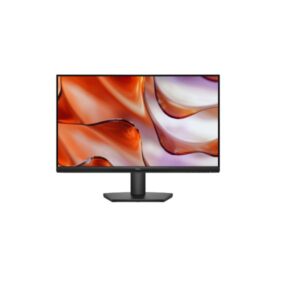
23.8″ Dell SE2425HM – Specs & Features
The Dell SE2425HM is a 23.8-inch Full HD Monitor designed for gaming and multimedia. It features a IPS panel for accurate colours and wide viewing angles. The Monitor is suitable for gaming and creative work and includes 50 Hz - 100 Hz refresh rate and HDMI connectivity. However, it may not be ideal for blacks look grey in dark viewing environments vs VA/OLED. It scores Great — 7.2/10 across our display performance benchmarks.
- IPS panel delivers consistent colour accuracy across a 178° horizontal and vertical viewing angle.
Scores and analysis are based on DisplayInput – Monitor & TV Specs Comparison's display benchmark methodology across 6 verified specifications. Data sourced from Dell's official specifications and independent lab measurements.
Display Performance
Who Should Buy the Dell SE2425HM
Real-World Use Cases
Pros & Cons
- IPS panel wide 178°/178° viewing angles with accurate, consistent color reproduction
- Anti-glare matte coating effective reflections control for comfortable all-day use
- Full HD (1920 x 1080) at 92 PPI sharp, clear image for everyday work and entertainment
- 100Hz refresh rate standard rate suitable for productivity and media consumption
- 5.0 ms (GtG) clean pixel transitions for everyday content and media
- 250 cd/m² brightness adequate luminance for typical indoor lighting conditions
- Calibrated color display with 72% NTSC coverage
- Flicker-free backlight technology reduces eye fatigue during extended use sessions
- 8-bit color panel accurate standard-gamut color for everyday content consumption
- VESA 100×100 mm compatible works with monitor arms and aftermarket mounting solutions
- IPS contrast ratio (1000 : 1) blacks look grey in dark viewing environments vs VA/OLED
- Full HD only limits sharpness for detailed productivity work at this screen size
- Tilt-only stand no height, swivel or portrait pivot adjustment available
- No USB-C or Thunderbolt cannot connect modern laptops with single-cable convenience
- No integrated speakers an external audio solution (speakers or headphones) is required
- 1000:1 static contrast noticeably limited compared to VA (3000:1) or OLED panels
- No HDR certification standard dynamic range only; HDR content will be tone-mapped
- 100Hz max refresh not competitive for fast-paced gaming; limits motion smoothness
- No built-in Ethernet network hub functionality absent; separate adapter required
- No DisplayPort HDMI-only video; may limit resolution/refresh on older GPU outputs
Score & Ratings
| Specification | Value | 💡 What It Means |
|---|---|---|
| Brand | Dell | |
| Model | SE2425HM | |
| Series | - | |
| Model Alias | - | |
| Model Year | 2025 |
✓ Good 2025 — current generation. Latest panel technology and features.
|
| Specification | Value | 💡 What It Means |
|---|---|---|
| Size Class | 23.8-inch |
△ Average 23" — compact. Good as a secondary screen or space-constrained desk.
|
| Panel Type | IPS |
✓ Good IPS — consistent colour accuracy across 178° viewing angle. No colour shift when viewed from the side.
|
| Curvature | -- | |
| Resolution | 1920 x 1080 |
△ Average Full HD (1920×1080) — adequate up to 24–27". Pixels become visible on larger panels at close range.
|
| Aspect Ratio | 16:9 |
Standard 16:9 — universal for all streaming, gaming, and productivity content worldwide.
|
| Pixel Density | 92 PPI |
△ Average 92 PPI — adequate sharpness for monitor use. Comfortable for text and media at 50–80cm.
|
| Pixel Pitch | 0.275 mm (millimeters) |
△ Average 0.275 mm (millimeters) pitch — standard. Pixels become visible on close inspection of large panels.
|
| Display Area | 89.49 % (percent) |
| Specification | Value | 💡 What It Means |
|---|---|---|
| Color Depth | 8 bits |
△ Average 8-bit — 16.7 million colours. Fine for SDR and everyday use; banding may appear in HDR gradients.
|
| Colors | 16777216 colors |
△ Average 16.7 million colours (8-bit) — standard for SDR; gradient banding may appear in HDR.
|
| sRGB | - |
sRGB not listed separately. DCI-P3 coverage (above) is the more relevant metric for modern HDR content.
|
| DCI-P3 Coverage | - |
DCI-P3 coverage not published by the manufacturer for this model.
|
| HDR Support | - |
| Specification | Value | 💡 What It Means |
|---|---|---|
| Brightness (Typical) | 250 cd/m² |
△ Average 250 cd/m² — comfortable indoors. May wash out next to a bright window or in direct sunlight.
|
| Peak Brightness | - |
OLED brightness varies per pixel and scene. Manufacturers often omit a fixed nit figure; contrast quality exceeds most LED panels anyway.
|
| Contrast | 1000 : 1 |
△ Average 1000 : 1 — standard IPS-level. Blacks appear slightly grey in very dark rooms.
|
| Specification | Value | 💡 What It Means |
|---|---|---|
| Refresh Rate | 50 Hz - 100 Hz |
△ Average 75Hz — minor improvement over 60Hz for scrolling and animations. Not a meaningful gaming upgrade.
|
| Response Time | 5 ms (GtG) |
△ Average 5 ms (GtG) GtG — acceptable for office and casual gaming. Some blur visible in very fast scenes.
|
| Adaptive Sync | - |
| Specification | Value | 💡 What It Means |
|---|---|---|
| Advanced Display Technologies | Panel Technology: - Backlight: W-LED Viewing Angles: 178° / 178° (Horizontal / Vertical) MPRT Response: - Dynamic Contrast: - Input Lag: - Screen Coating: Anti-glare/Matte (3H) |
Anti-glare matte coating. 178° wide viewing angles.
|
| Specification | Value | 💡 What It Means |
|---|---|---|
| Camera | No |
⚠ Limited No built-in camera. An external webcam is needed for video calls.
|
| Specification | Value | 💡 What It Means |
|---|---|---|
| Audio | - |
| Specification | Value | 💡 What It Means |
|---|---|---|
| Ports | 1 x HDMI 1.4 1 x D-sub High-bandwidth Digital Content Protection (HDCP) 1.4 |
✓ Good HDMI — standard display connection for consoles and laptops.
|
| Wireless | - |
| Specification | Value | 💡 What It Means |
|---|---|---|
| VESA Mount | 100 x 100 mm |
✓ Good VESA-compatible — fits any standard monitor arm, desk mount, or wall bracket. No proprietary hardware needed.
|
| Height Adjustment | No | |
| Pivot | No |
⚠ Limited No pivot — cannot rotate to portrait orientation.
|
| Swivel | No |
⚠ Limited No swivel — stand cannot rotate left/right. Adjust by moving the whole monitor.
|
| Tilt | -5° to +21° |
✓ Good Tilt ±5° — adjustable screen angle reduces neck strain and matches your eye level.
|
| Removable Stand | Yes |
✓ Good Stand detaches cleanly from the panel — mount on any VESA arm or wall bracket without a leftover collar.
|
| Specification | Value | 💡 What It Means |
|---|---|---|
| Gaming Features | - |
No dedicated gaming overlay features listed for this model.
|
| Specification | Value | 💡 What It Means |
|---|---|---|
| Operating System | - |
No smart OS — this is a PC monitor. All input comes from connected computers or consoles.
|
| Smart Features | Flicker-free technology Low Blue Light |
✓ Good Flicker-free technology
Low Blue Light — software features including OSD controls and display calibration tools.
|
| Specification | Value | 💡 What It Means |
|---|---|---|
| Voltage | 100–240V |
✓ Good Universal or wide-range power supply. Compatible with outlets in the US, UK, EU, and most countries.
|
| Frequency | 50/60Hz |
50/60Hz AC supply — compatible with worldwide power grids including US, UK, EU, and AU.
|
| Average Consumption | 14.3W |
✓ Good 14.3W — very energy efficient. Low electricity cost even for all-day use.
|
| Maximum Consumption | 28.5W | |
| Standby | 0.3W |
✓ Good 0.3W standby — near-zero idle power. Excellent energy compliance.
|
| Specification | Value | 💡 What It Means |
|---|---|---|
| Certificates | ENERGY STAR 8.0 EPEAT RoHS TCO Certified TÜV Rheinland Eye Comfort - 3 star TÜV Rheinland Flicker Free Certified TÜV Rheinland Low Blue Light Certified |
✓ Good ENERGY STAR — US energy efficiency standard. EPEAT — sustainable electronics certification. RoHS — EU hazardous substances compliant. CE — meets EU safety & electromagnetic standards. TCO Certified — sustainable IT product standard.
|
| Specification | Value | 💡 What It Means |
|---|---|---|
| Without Stand Width | 538.73 mm |
Panel dimensions without stand attached. Use for wall-mount space planning.
|
| Without Stand Height | 324.1 mm |
Panel dimensions without stand attached. Use for wall-mount space planning.
|
| Without Stand Depth | 47.75 mm |
Panel dimensions without stand attached. Use for wall-mount space planning.
|
| Without Stand Weight | 2.8 kg |
✓ Good 2.8 kg — lightweight; easy to position or wall-mount solo.
|
| With Stand Width | 538.73 mm |
Overall footprint with stand. Use when planning desk or shelf placement.
|
| With Stand Height | 412.24 mm |
Overall footprint with stand. Use when planning desk or shelf placement.
|
| With Stand Depth | 178.82 mm |
Overall footprint with stand. Use when planning desk or shelf placement.
|
| With Stand Weight | 3.47 kg |
✓ Good 3.47 kg — lightweight; easy to position or wall-mount solo.
|
| Color | Black |
Available colour finish for this unit.
|
| Specification | Value | 💡 What It Means |
|---|---|---|
| Temperature | 0°C – 40°C |
Operating environment range. Keep within these limits for reliable long-term performance.
|
| Humidity | 10% – 80% |
Operating environment range. Keep within these limits for reliable long-term performance.
|
Frequently Asked Questions
01 What type of panel does the Dell SE2425HM use? ›
02 How smooth is the Dell SE2425HM for everyday use? ›
03 Who is the Dell SE2425HM best for? ›
04 Does the IPS panel cause issues in dark rooms? ›
05 Is the Dell SE2425HM worth buying in 2026? ›
Reviews
Related Comparisons
VS
Dell SE2425HM vs Dell S2425HSMView Comparison
VS
Dell SE2425HM vs Dell P2426View Comparison
VS
Dell SE2425HM vs Dell P2426EView Comparison
VS
Dell SE2425HM vs Dell SE2426HView Comparison
VS
Dell SE2425HM vs Dell E2425HMView Comparison
VS
Dell SE2425HM vs MSI MAG 275QF E21View Comparison
VS
Dell SE2425HM vs Benq GW2790QTView Comparison