🖥 Monitor Comparison

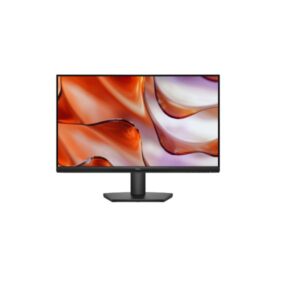
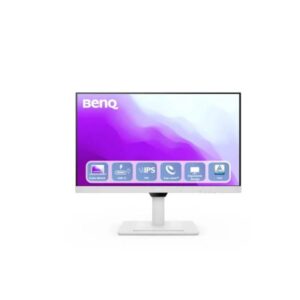
Dell SE2425HM vs Benq GW2790QT

🎮 Best for Gaming
🖥 Full HD💡 IPS⚡ 100Hz
Dell Dell SE2425HM

Dell SE2425HM

3.6 /5 ★★★★
24-inchSize Class
IPSPanel Type
1920 x 1080Resolution
92 PPIPixel Density
🏆 Best Overall
🖥 QHD 2K💡 IPS⚡ 75Hz
Benq Benq GW2790QT

Benq GW2790QT

3.7 /5 ★★★★
27-inchSize Class
IPSPanel Type
2560 x 1440Resolution
108 PPIPixel Density
🖥 Monitor Comparison Overview

The clearest split between the Dell SE2425HM and the Benq GW2790QT is refresh rate. Dell SE2425HM runs at 100Hz versus 75Hz on the Benq GW2790QT. That gap is meaningful in fast-paced games — enemies move more smoothly, tracking feels more responsive, and the transition from 60fps to higher frame rates is clearly visible. For everyday desktop use and productivity, both feel identically fluid.

🎯 Who Should Buy Which?
Dell SE2425HM
Dell SE2425HM
🏆 Best Overall

Buy the Dell SE2425HM if you need Full HD (1080p resolution — sharp everyday display).

  • IPS panel — wide 178°/178° viewing angles with accurate, consistent color reproduction
  • Anti-glare matte coating — effective reflections control for comfortable all-day use
  • Full HD (1920 x 1080) at 92 PP — sharp, clear image for everyday work and entertainment
Skip it if: blacks look grey in dark viewing environments vs VA/OLED
Benq GW2790QT
Benq GW2790QT
💼 Productivity Pick

Buy the Benq GW2790QT if you need USB-C (USB-C — single-cable connection for modern laptops).

  • Daisy-chain — DisplayPort MST out — chain multiple monitors from one cable
  • QHD — sharp, high-density display for detailed productivity work
  • Ergonomics — 110 mm height, pivot — adjustable for any desk setup
Skip it if: blacks appear grey in dark environments compared to VA or OLED panels
⚡ Quick Answer -- Who Wins Each Category?
🎮 Best for Gaming Dell SE2425HM 100Hz · 5ms GtG response · VRR -
💼 Best for Productivity Benq GW2790QT QHD -- balanced clarity and GPU load · 108 PPI
🖼 Best Display Quality Benq GW2790QT IPS -- accurate colour, wide angles · -
⚡ Best Motion Clarity Dell SE2425HM 5 ms (GtG) response
🔌 Best Connectivity Benq GW2790QT Strongest port selection
Score Summary 16 spec groups analysed
DisplayBenq GW2790QT
GamingDell SE2425HM
OfficeBenq GW2790QT
ValueDell SE2425HM
Size Class23.8-inch vs 27-inch
Panel TypeIPS vs IPS
🏆
Overall WinnerBenq GW2790QT
⭐ 3.7/5 Benq View Specs →
🔑 Key Differences
Dell SE2425HM
  • Dell SE2425HM -- Refresh Rate: 100Hz (max) -- higher max Hz -- smoother motion, competitive advantage
  • Dell SE2425HM -- Brightness (Typical): 250 cd/m² -- ⚠️ lower typical brightness -- HDR scenes still benefit from panel contrast, but bright-room visibility is reduced versus higher-nit alternatives
  • Dell SE2425HM -- Pixel Density: 92 PPI -- lower pixel density -- softer at close viewing distances
  • Dell SE2425HM -- Display Size: 23.8-inch -- smaller screen
Benq GW2790QT
  • Benq GW2790QT -- Refresh Rate: 75Hz (max) -- lower max Hz -- less fluid gameplay
  • Benq GW2790QT -- Brightness (Typical): 350 cd/m² -- brighter -- better HDR impact and bright-room visibility
  • Benq GW2790QT -- Pixel Density: 108 PPI -- sharper image -- more pixels per inch
  • Benq GW2790QT -- Display Size: 27-inch -- bigger screen -- more immersive for gaming and media
🏆 Best For
🎮 Best for Gaming Dell SE2425HM ⚡ 100Hz · 5ms GtG response · VRR: -
💼 Best for Office Benq GW2790QT 🔬 108 PPI
🎨 Best for Design Dell SE2425HM 🖌 IPS
🎬 Best for Movies Benq GW2790QT 📺 -
💰 Best Value Dell SE2425HM 🏅 Best price-to-perf
⚡ Pros & Cons
Dell SE2425HM ★★★★ 3.6/5
Pros
  • IPS panel — wide 178°/178° viewing angles with accurate, consistent color reproduction
  • Anti-glare matte coating — effective reflections control for comfortable all-day use
  • Full HD (1920 x 1080) at 92 PPI — sharp, clear image for everyday work and entertainment
  • 100Hz refresh rate — standard rate suitable for productivity and media consumption
  • 5.0 ms (GtG) — clean pixel transitions for everyday content and media
  • 250 cd/m² brightness — adequate luminance for typical indoor lighting conditions
  • Calibrated color display with 72% NTSC coverage
  • Flicker-free backlight technology — reduces eye fatigue during extended use sessions
  • 8-bit color panel — accurate standard-gamut color for everyday content consumption
  • VESA 100×100 mm compatible — works with monitor arms and aftermarket mounting solutions
Cons
  • IPS contrast ratio (1000 : 1) — blacks look grey in dark viewing environments vs VA/OLED
  • Full HD only — limits sharpness for detailed productivity work at this screen size
  • Tilt-only stand — no height, swivel or portrait pivot adjustment available
  • No USB-C or Thunderbolt — cannot connect modern laptops with single-cable convenience
  • No integrated speakers — an external audio solution (speakers or headphones) is required
  • 1000:1 static contrast — noticeably limited compared to VA (3000:1) or OLED panels
  • No HDR certification — standard dynamic range only; HDR content will be tone-mapped
  • 100Hz max refresh — not competitive for fast-paced gaming; limits motion smoothness
  • No built-in Ethernet — network hub functionality absent; separate adapter required
  • No DisplayPort — HDMI-only video; may limit resolution/refresh on older GPU outputs
Benq GW2790QT ★★★★ 3.7/5
Pros
  • IPS panel — consistent 178°/178° viewing angles with accurate, uniform color reproduction
  • 350 cd/m² calibrated display — consistent, eye-friendly brightness for extended work sessions
  • QHD resolution (2560 x 1440) — 78% more pixels than Full HD for noticeably sharper visuals
  • 5.0 ms (GtG) at 75Hz — accurate, responsive motion for productive and media use
  • 99% sRGB — near-complete standard gamut for consistent, accurate colors across content
Cons
  • IPS contrast (1000 : 1) — blacks appear grey in dark environments compared to VA or OLED panels
  • No Thunderbolt 4 — USB-C available but limited to lower bandwidth without 40 Gbps capability
  • No HDR certification — standard dynamic range only; HDR content is tone-mapped without uplift
  • 75Hz refresh rate — noticeably less smooth than 120/144Hz options for fast motion content
  • No built-in Ethernet — monitor lacks wired network hub; separate dongle or switch required
🎯 Use Case Analysis
🎮
Gaming Performance

Dell SE2425HM at 100Hz versus 75Hz -- 25Hz more smoothness for fast-paced games. Entry gaming.

🏆 Dell SE2425HM
💼
Office & Productivity

Benq GW2790QT at QHD offers noticeably sharper text and more screen real estate than FHD -- a real advantage for long coding or document sessions.

🏆 Benq GW2790QT
🎨
Colour & Design Work

Colour accuracy depends on gamut coverage -- see the specification table for DCI-P3 and sRGB figures. Wide-gamut panels benefit photo editors and video colourists working in HDR workflows. Neither includes a factory calibration cert — colour-critical work may require professional calibration post-purchase.

🏆 Benq GW2790QT
🎬
Multimedia & HDR

For movies and multimedia, contrast ratio and peak brightness have the biggest real-world impact. Check the spec table for HDR certification and nits figures.

🏆 Dell SE2425HM
📊 Full Specification Comparison
Specification
Overview
Rating
7.2/10★★★★
7.4/10★★★★
Brand Dell Benq
Category Monitor Monitor
Basic Information
Brand Dell BenQ
Model SE2425HM GW2790QT
Series - GW
Model Alias - -
Model Year 2025 2023
Display
Size Class 23.8-inch 27-inch
💡Panel Type ? IPS IPS
Curvature -- --
🖥️Resolution 1920 x 1080 2560 x 1440
Aspect Ratio 16:9 16:9
🔬Pixel Density 92 PPI 108 PPI
Pixel Pitch 0.275 mm (millimeters) 0.233 mm (millimeters)
Display Area 89.49 % (percent) 87.96 % (percent)
Color & HDR
Color Depth 8 bits 8 bits
Colors 16777216 colors 16777216 colors
sRGB - 99%
DCI-P3 Coverage - -
HDR Support ? - -
Brightness & Contrast
☀️Brightness (Typical) 250 cd/m² 350 cd/m²
☀️Peak Brightness - -
🌗Contrast 1000 : 1 1000 : 1
Performance
🎮Refresh Rate 50 Hz - 100 Hz 48 Hz - 75 Hz
Response Time 5 ms (GtG) 5 ms (GtG)
Adaptive Sync ? - -
Display Technologies
Advanced Display Technologies Panel Technology: -
Backlight: W-LED
Viewing Angles: 178° / 178° (Horizontal / Vertical)
MPRT Response: -
Dynamic Contrast: -
Input Lag: -
Screen Coating: Anti-glare/Matte (3H)
Panel Technology: -
Backlight: W-LED
Viewing Angles: 178° / 178° (H / V)
MPRT Response: -
Dynamic Contrast: -
Input Lag: -
Screen Coating: Anti-glare/Matte (3H)
Camera
Camera No No
Audio
🔊Audio - 2 x 2 W (watts) | 3.5 mm Audio Out
Connectivity & Ports
Ports 1 x HDMI 1.4
1 x D-sub
High-bandwidth Digital Content Protection (HDCP) 1.4
1 x USB (Type-C; upstream; 65W; DP Alt Mode)
1 x USB (Type-C; downstream)
3 x USB 3.2 (Type-A; downstream)
1 x HDMI 1.4
1 x DisplayPort 1.2 (out with MST)
1 x DisplayPort 1.2
1 x 3.5 mm Audio Out
High-bandwidth Digital Content Protection (HDCP) 1.4
Wireless - -
Ergonomics
VESA Mount 100 x 100 mm 100 x 100 mm
Height Adjustment No 110 mm
Pivot No ±0°
Swivel No ±20°
Tilt -5° to +21° -5° to +20°
Removable Stand Yes Yes
Gaming Features
Gaming Features - AMA (Advanced Motion Accelerator)
Smart & Software Features
Operating System - -
Smart Features Flicker-free technology
Low Blue Light
Brightness Intelligence Gen 2 (B.I. Gen 2)
Color Weakness
Eye Reminder
ePaper
Flicker-free technology
Light Sensor
Low Blue Light
Power Consumption
Voltage 100–240V 100–240V
Frequency 50/60Hz 50/60Hz
Average Consumption 14.3W -
Maximum Consumption 28.5W 150W
Standby 0.3W -
Certificates
Certificates ENERGY STAR 8.0
EPEAT
RoHS
TCO Certified
TÜV Rheinland Eye Comfort - 3 star
TÜV Rheinland Flicker Free Certified
TÜV Rheinland Low Blue Light Certified
Energy Star 8.0
EPEAT
TCO Certified 9.0
TÜV RheinlandLow Blue Light
TÜV RheinlandFlicker-free
Design, Build & Dimensions
Without Stand Width 538.73 mm 614 mm
Without Stand Height 324.1 mm 372.3 mm
Without Stand Depth 47.75 mm 62 mm
⚖️Without Stand Weight 2.8 kg 5.5 kg
With Stand Width 538.73 mm 614 mm
With Stand Height 412.24 mm 424.3 mm
With Stand Depth 178.82 mm 238.5 mm
⚖️With Stand Weight 3.47 kg 8.4 kg
Color Black White
Operating Conditions
Temperature 0°C – 40°C -
Humidity 10% – 80% -
🖥 Display Quality Analysis 🏆 Benq GW2790QT

Both displays use IPS panel technology, so panel-level contrast and viewing angles are comparable. The differences come down to calibration, brightness, and HDR tier.

Dell SE2425HM
IPS
1,000:1 contrast
Benq GW2790QT
IPS
1,000:1 contrast · 99% sRGB
Display winner: Benq GW2790QT -- IPS panel · -
🎮 Gaming Performance Analysis 🏆 Dell SE2425HM

Refresh rate is the headline gaming spec. Dell SE2425HM runs at 100Hz versus 75Hz on Benq GW2790QT -- a 25Hz gap. Both monitors sit below 144Hz. The Dell SE2425HM at 100Hz is smoother for gaming, but neither is optimised for fast-paced competitive titles. For serious gaming, consider monitors with 144Hz or above; these are better suited to productivity and general use.Both display the same response time spec (5 ms (GtG)). VRR (Variable Refresh Rate) eliminates screen tearing by syncing the monitor to your GPU's frame output. Both monitors support adaptive sync: Dell SE2425HM with -, and Benq GW2790QT with -.

Dell SE2425HM
100Hz
5ms GtG · VRR: -
Benq GW2790QT
75Hz
5ms GtG · VRR: -
Higher Hz: Dell SE2425HM -- 100Hz · 5ms GtG response · VRR: - (neither monitor is optimised for competitive gaming)
🌟 HDR & OLED Analysis

HDR certification not disclosed for either display. Assume SDR-only output unless confirmed by the manufacturer.

Dell SE2425HM
HDR certification not disclosed
1,000:1 · IPS
Benq GW2790QT
HDR certification not disclosed
1,000:1 · IPS
💼 Productivity Analysis 🏆 Benq GW2790QT

Benq GW2790QT at QHD gives noticeably sharper text than FHD -- more pixels per inch means finer fonts and crisper UI at close desk distances. Neither monitor offers full ergonomic adjustment. A VESA monitor arm is recommended for proper positioning if you spend long hours at your desk.

Dell SE2425HM
Resolution
1920 x 1080
Pixel Density
92 PPI
Panel Type
IPS
Screen Coating
--
Viewing Angle
--
Aspect Ratio
--
Colour Depth
--
sRGB
-
DCI-P3
-
Brightness
250 cd/m²
Eye Care / Certs
Not specified
Stand Adjust
Pivot, Height (No)
VESA Mount
Not specified
USB-C
✗ No USB-C
USB Hub
--
KVM Switch
--
Refresh Rate
50 Hz - 100 Hz
Screen Size
23.8-inch
Productivity Score
34% of max score
Score based on: USB-C PD (20%), Resolution/PPI (20%), KVM (15%), Ergonomic range (15%), Ethernet (10%), Webcam (10%), sRGB accuracy (10%)
Benq GW2790QT 🏆
Resolution
2560 x 1440
Pixel Density
108 PPI
Panel Type
IPS
Screen Coating
--
Viewing Angle
--
Aspect Ratio
--
Colour Depth
--
sRGB
99%
DCI-P3
-
Brightness
350 cd/m²
Eye Care / Certs
Not specified
Stand Adjust
Pivot, Height (110 mm)
VESA Mount
Not specified
USB-C
✓ USB-C
USB Hub
✓ USB Hub
KVM Switch
--
Refresh Rate
48 Hz - 75 Hz
Screen Size
27-inch
Productivity Score
100% of max score
Score based on: USB-C PD (20%), Resolution/PPI (20%), KVM (15%), Ergonomic range (15%), Ethernet (10%), Webcam (10%), sRGB accuracy (10%)
🎯 GPU Requirements

These two monitors have different resolution targets, so GPU requirements differ. Dell SE2425HM at FHD (1080p) and 100Hz demands more GPU headroom than Benq GW2790QT at QHD (1440p) and 75Hz. GPU tiers below cover both monitors.

🖥 Dell SE2425HM
FHD (1080p) 100Hz -
🖥 Benq GW2790QT
QHD (1440p) 75Hz -
🖥
Dell SE2425HM
FHD (1080p) 100Hz -
🏆 Top-Tier Top-Tier -- Max Settings, 100Hz+ Guaranteed FHD 100Hz
NVIDIA GeForce RTX 5060 Ti / RTX 4070
Overkill for 1080p 100Hz -- max settings guaranteed.
AMD Radeon RX 9060 XT / RX 7800 XT
More than enough for 1080p at this refresh rate.
⭐ Mid-Tier · Sweet Spot Mid-Tier -- Up to 100Hz FHD 100–100Hz
NVIDIA GeForce RTX 5060 / RTX 4060
Best value for FHD 100Hz -- max settings with DLSS.
AMD Radeon RX 7600 XT / RX 7600
Excellent budget 1080p pick -- solid frame rates at high settings.
💰 Budget-Tier Budget-Tier -- Medium-High Settings FHD 60–100Hz
NVIDIA GeForce RTX 3060 / GTX 1660 Super
Handles 1080p -- demanding titles may need settings reduction.
AMD Radeon RX 7500 XT / RX 6600
Entry-level 1080p gaming -- good for esports at full refresh.
🖥
Benq GW2790QT
QHD (1440p) 75Hz -
🏆 Top-Tier Top-Tier -- Max Settings QHD 75Hz
NVIDIA GeForce RTX 5060 Ti / RTX 4070
Overkill for QHD 75Hz -- max settings guaranteed.
AMD Radeon RX 9060 XT / RX 7800 XT
More than enough for QHD at this refresh rate.
⭐ Mid-Tier · Sweet Spot Mid-Tier -- Up to 75Hz QHD 75–75Hz
NVIDIA GeForce RTX 5060 / RTX 4060
Best value -- max settings in most games with DLSS.
AMD Radeon RX 7600 XT / RX 7600
Solid budget 1440p pick -- strong frame rates at high settings.
💰 Budget-Tier Budget-Tier -- Medium Settings QHD 60–75Hz
NVIDIA GeForce RTX 3060 / GTX 1660 Super
Handles QHD -- demanding titles may need settings reduction.
AMD Radeon RX 7500 XT / RX 6600
Entry-level 1440p -- good for esports at full refresh.
💡 DLSS 4 / FSR 4: Modern upscaling significantly reduces GPU load while maintaining visual quality. NVIDIA RTX 50-series cards support DLSS 4 Multi-Frame Generation; AMD RX 9000-series support FSR 4. Both can effectively double or triple frame rates in supported titles at the cost of minor image softening.
🔌 Connectivity & Features 🏆 Benq GW2790QT

Benq GW2790QT has a significantly richer connectivity package. Key advantages: USB-C 65W -- single cable powers and connects a laptop. The Dell SE2425HM covers standard display inputs but lacks these hub and convenience features -- if you work at a desk and connect a laptop daily, this gap matters considerably.

Dell SE2425HM
HDMI
Connectivity score: 1/10
Benq GW2790QT
USB-C 65W PD + DP 1.x
USB Hub · Connectivity score: 6/10
Connectivity winner: Benq GW2790QT -- USB-C 65W

Connectivity score methodology: USB-C Power Delivery (2 pts) · USB hub ports (2 pts) · Ethernet (1 pt) · HDMI 2.1 (1 pt) · KVM switch (2 pts) · Thunderbolt (2 pts). Higher score = more complete connectivity package. Ties broken in favour of USB-C power delivery.

💺 Design & Ergonomics

Both monitors have basic stand adjustment. If you need precise positioning, a VESA-compatible monitor arm is recommended -- check the spec table for VESA mount support (typically 75×75mm or 100×100mm).

Dell SE2425HM
Basic / VESA
Ergo score: 0/8
Benq GW2790QT
Basic / VESA
Ergo score: 0/8
🏆 Final Verdict 2 monitors compared
🎮 Gaming
Dell SE2425HM
100Hz · VRR - · 5ms GtG
🖥 Display Quality
Benq GW2790QT
IPS, -
💼 Office & Work
Benq GW2790QT
QHD
🏆
Overall Winner Benq GW2790QT 3.7/5 editorial rating · wins 4 of 8 use-case categories 🏆 Best Overall Pick
View Full Specs →

Bottom line: For most buyers, the Benq GW2790QT is the stronger choice, leading on USB-C single-cable connectivity, full height and tilt adjustment, QHD resolution. The Dell SE2425HM is worth considering if cost is the deciding factor or if its specific connectivity or form factor better matches your desk setup. Check the use-case categories above to see which display wins for your primary activity.

Dell SE2425HM vs Benq GW2790QT: What Actually Matters

The headline difference is refresh rate: Dell SE2425HM runs at 50Hz versus 48Hz on Benq GW2790QT. That gap matters most in competitive gaming where consistent frame delivery reduces perceived input lag. For everyday desktop use, movies, and productivity work, both feel comparably fluid.

On the sharpness question: QHD resolution on the Benq GW2790QT renders noticeably crisper text and finer detail than Full HD -- particularly visible on a 27-inch panel where pixel density directly affects how clean fonts and fine UI elements look at normal viewing distances. The trade-off is GPU demand; pushing QHD at high refresh rates requires meaningfully more graphics horsepower.

Strengths Worth Knowing

The Dell SE2425HM stands out for ips panel — wide 178°/178° viewing angles with accurate, consistent color reproduction and anti-glare matte coating — effective reflections control for comfortable all-day use. The main compromise: ips contrast ratio (1000 : 1) — blacks look grey in dark viewing environments vs va/oled.

The Benq GW2790QT stands out for ips panel — consistent 178°/178° viewing angles with accurate, uniform color reproduction and 350 cd/m² calibrated display — consistent, eye-friendly brightness for extended work sessions. The main compromise: ips contrast (1000 : 1) — blacks appear grey in dark environments compared to va or oled panels.

❓ Frequently Asked Questions

For gaming, the Dell SE2425HM has the edge thanks to its 100Hz maximum refresh rate. Higher refresh rates produce smoother motion and reduce perceived input lag -- critical advantages in competitive shooters and action titles. If both share the same Hz, compare response time in the spec table above.

Both the Dell SE2425HM and Benq GW2790QT use IPS -- the differences lie in resolution: 1080p versus QHD. Resolution affects pixel sharpness, screen real estate, and the GPU horsepower needed to run games at full Hz.

The Benq GW2790QT runs at QHD versus 1080p on the other. QHD resolution means more pixels per inch -- sharper detail in games and more screen real estate for multitasking. The trade-off is that QHD gaming requires more GPU or console horsepower to maintain high frame rates. If you are on a mid-range setup, 1080p will achieve higher, smoother frame rates more easily.

For all-day productivity work -- documents, spreadsheets, coding, and content creation -- resolution and panel colour accuracy matter most. The Benq GW2790QT is the stronger daily driver based on overall specification score. For long hours, also look for a model with flicker-free backlight and low blue-light mode -- check the spec table above for those details.

The Benq GW2790QT is the stronger all-round choice based on its overall score of 3.7/5. That said, if your priority is specifically competitive gaming at the highest possible refresh rate, see the Quick Answer section at the top of this page for use-case-specific recommendations. The Dell SE2425HM is not a bad choice -- it simply trails on overall specification weight, which may not reflect the single spec most important to your setup.

IPS (In-Plane Switching) panels are the most common in quality monitors -- they offer wide viewing angles and accurate colour reproduction, making them ideal for design work, general use, and brightly lit rooms. VA (Vertical Alignment) panels have a higher native contrast ratio, producing deeper blacks, which benefits dark-room gaming and movie watching. OLED panels work differently: each pixel emits its own light, enabling true blacks, near-infinite contrast, and perfect viewing angles -- at the cost of higher price and some burn-in risk with static content.

For non-gaming use -- web browsing, documents, video calls -- 60Hz to 75Hz is completely adequate and you will not feel the difference from a 144Hz or 240Hz panel. Where higher refresh rates genuinely improve the experience beyond gaming is in cursor smoothness during scrolling and desktop navigation, which some users appreciate. In short: the step from 60Hz to 75Hz has minimal benefit; the step from 60Hz to 144Hz is noticeable but not essential for productivity.

🖥
Editorial Display Input -- Monitor & TV Comparison Database Specifications verified from manufacturer data · Updated May 2026 · No sponsored rankings
✓ Verified Specs ✓ No Paid Placements ✓ 16 Spec Groups

Disclaimer: You can write your own disclaimer from APS Settings -> General -> Disclaimer Note.