
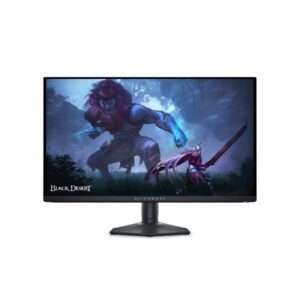
26.5″ Dell Alienware AW2725D – Specs & Features
The Dell Alienware AW2725D pairs a 26.5-inch QD-OLED panel at 2560 × 1440 with a refresh rate of up to 280 Hz.
Overview
The Dell Alienware AW2725D pairs a 26.5-inch QD-OLED panel at 2560 × 1440 with a refresh rate of up to 280 Hz. It offers 110 ppi pixel density, 250 nits typical brightness (1000 nits peak) and 99.3% DCI-P3 coverage. Variable refresh covers 48–280 Hz, quotes 0.03 ms response and supports FreeSync Premium Pro and G-Sync. Inputs include 2× HDMI 2.1, 1× DisplayPort 1.4, USB-C 15 W and 3× USB-A. The stand offers 110 mm of height adjustment, swivel and pivot. There are no speakers, and it weighs 6.79 kg with the stand. It suits players who want OLED contrast with very fast response. The main trade-off: USB-C output is only 15 W, too little to charge most laptops.
- 26.5-inch QD-OLED, 2560 × 1440 at 110 ppi
- 48–280 Hz, 0.03 ms response, FreeSync Premium Pro and G-Sync
- 250 nits (1000 peak), near-infinite OLED contrast, 99.3% DCI-P3, DisplayHDR 400 True Black
- 2× HDMI 2.1, 1× DisplayPort 1.4, USB-C 15 W, 3× USB-A
- 110 mm height, swivel, pivot, no speakers, 6.79 kg
Pros & Cons
- 280 Hz refresh delivers top-tier motion clarity for competitive play
- 0.03 ms response leaves very little pixel blur in motion
- QD-OLED panel gives per-pixel black levels and strong contrast
- Built-in KVM switch shares one keyboard and mouse between two computers
- Stand offers 110 mm height, swivel and pivot adjustment
- USB-C output is only 15 W, too little to charge most laptops
- 250 nits typical SDR brightness is lower than many LCD rivals
- OLED carries burn-in risk with static desktop elements
- No built-in speakers, so headphones or external audio are needed
Score & Ratings
| Specification | Value |
|---|---|
| Brand | Dell |
| Model | Alienware AW2725D |
| Full Product Name | Dell Alienware AW2725D |
| Model Year | 2025 |
| Available Colors | Black |
| Specification | Value |
|---|---|
| Screen Size | 26.5 in |
| Exact Diagonal | 673.2 mm (26.50 in) |
| Aspect Ratio | 16:9 |
| Active Display Width | 589.97 mm (23.23 in) |
| Active Display Height | 332.93 mm (13.11 in) |
| Screen-to-Body Ratio | 90.53% |
| Panel Type | QD-OLED (Samsung) |
| Backlight Type | Self-emissive (no backlight — OLED) |
| 3D Support | No |
| Screen Coating | Anti-glare / Matte |
26.5" Display Size (67.3 cm) 16:9
| Specification | Value |
|---|---|
| Native Resolution | 2560 x 1440 pixels |
| Pixel Density | 110 PPI |
| Pixel Pitch | 0.229 mm (millimeters) |
Resolution at a Glance
| Specification | Value |
|---|---|
| Panel Bit Depth | 10 bits |
| FRC | No |
| Display Colors | 1073.7 million colors (30 bits) |
| Typical Brightness | 250 cd/m² |
| Static Contrast Ratio | 1500000 : 1 |
| Horizontal Viewing Angle | 178 ° |
| Vertical Viewing Angle | 178 ° |
| HDR Support |
|
| HDR10 | Yes |
| DCI-P3 Coverage | 99.3% |
Fills central vision comfortably at a typical desk distance — no head movement needed.
| Specification | Value |
|---|---|
| Refresh Rate Range | 48 Hz - 280 Hz |
| Minimum Response Time | 0.03 ms |
| AMD FreeSync | Yes (Premium Pro) |
| NVIDIA G-Sync | Compatible |
| Specification | Value |
|---|---|
| HDMI Ports |
|
| HDMI Version | 2.1 |
| HDMI eARC | Yes |
| DisplayPort Input | 1 |
| DisplayPort Version | 1.4 |
| USB-C Video Input | 1× USB-C |
| HDCP Support | Yes |
| HDCP Version | HDCP 2.2 |
| USB-A Ports |
|
| USB-B Upstream | 1× USB-B |
Ports & Connections
| Specification | Value |
|---|---|
| Built-In Camera | No |
| Specification | Value |
|---|---|
| VESA Mount | 100 x 100 mm |
| VESA Size | 100 x 100 mm |
| Removable Stand | Yes |
| Height Adjustment | 110 mm |
| Height Adjustment Range | 110 mm (4.33 in) |
| Tilt Adjustment | Yes |
| Forward Tilt | 5 ° |
| Backward Tilt | 21 ° |
| Swivel Adjustment | Yes |
| Left Swivel | 20 ° |
| Right Swivel | 20 ° |
| Pivot Adjustment | Yes |
| Left Pivot | 90 ° |
| Right Pivot | 90 ° |
| Specification | Value |
|---|---|
| Dimensions With Stand | 609.51 × 406.01 × 210 mm |
| Dimensions Without Stand | 609.51 × 355.97 × 72.63 mm |
| Weight With Stand | 6.79 kg (14.97 lbs) |
| Weight Without Stand | 4.3 kg (9.48 lbs) |
| Stand Width | 240 mm (9.45 in) |
| Stand Depth | 210 mm (8.27 in) |
Power & Operating Conditions 12
| Specification | Value |
|---|---|
| Power Input | 100–240V |
| 110V Input Range | 100 V - 120 V |
| 220V Input Range | 220 V - 240 V |
| AC Frequency | 50 Hz - 60 Hz |
| Sleep Consumption | 0.5 W |
| Off Consumption | 0.3 W |
| Operating Temperature | 0 °C - 40 °C (32 °F - 104 °F) |
| Operating Humidity | 10% – 80% |
| Operating Altitude | 5000 m |
| Storage Temperature | -20 °C - 60 °C (-4 °F - 140 °F) |
| Storage Humidity | 5% - 90% |
| Storage Altitude | 12192 m |
| Specification | Value |
|---|---|
| Flicker-Free | Yes |
| Low Blue Light | Yes |
| ComfortView Plus | Yes |
| Additional Monitor Features |
|
Certifications, Standards & Licenses 4
| Specification | Value |
|---|---|
| TÜV Flicker-Free | TÜV Rheinland Flicker-free |
| TÜV Low Blue Light | TÜV Rheinland Low Blue Light (Hardware Solution) |
| VESA DisplayHDR | Display / HDR 400 |
| VESA AdaptiveSync | Display 240Hz |
| Specification | Value |
|---|---|
| HDMI Cable | Yes |
| DisplayPort Cable | Yes |
| USB Type-A to Type-B Cable | Yes |
Estimated Running Cost
Based on this product's rated power draw, not an independent lab measurement — actual usage varies with settings and content.
Draws more power than 100% of the 701 comparable displays we track.