
RATED
Good
6.6/10
24″ BenQ ZOWIE XL2411K – Specs & Features
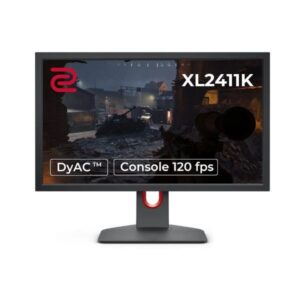
As an accessible ZOWIE option, the 24" BenQ ZOWIE XL2411K is an entry-level ZOWIE esports monitor built around 144 Hz Full HD play.
Benq●Monitor
Display
24-inch, TN, 1920 x 1080
24
Refresh Rate
24 Hz - 144 Hz
24 Hz
Brightness
320 cd/m²
320 cd
Contrast Ratio
1000 : 1 / Dynamic 12000000 : 1
1000
Pros & Cons
Pros
- ZOWIE XL2411K core strength Its 1 ms GtG TN panel, DyAc, Black eQualizer and fully adjustable stand provide the core competitive tools without moving into the cost of 240 Hz or faster models
- ZOWIE XL2411K's 1920 x 1080 and 91 PPI clearly define its workspace and sharpness
- ZOWIE XL2411K connectivity The connection set covers 2 x HDMI 1.4, 1 x HDMI 2.0; 1 x DisplayPort 1.2.
- ZOWIE XL2411K ergonomics The stand lists 155 mm height adjustment, ±45° swivel, no functional pivot and -5° to +23° tilt.
- ZOWIE XL2411K's closest comparison is BenQ ZOWIE XL2540K; the XL2411K tops out at 144 Hz, while the XL2540K reaches 240 Hz and adds FreeSync; both retain Full HD TN panels and similar stand flexibility
Cons
- ZOWIE XL2411K main compromise The 144 Hz ceiling, 1000:1 contrast, narrow TN viewing angles and lack of adaptive sync in the published sheet limit its appeal beside newer gaming monitors
- ZOWIE XL2411K's missing values remain unpublished rather than being copied from BenQ ZOWIE XL2540K.
- Before choosing ZOWIE XL2411K over BenQ ZOWIE XL2540K, verify that its exact ports, stand and motion ceiling match the intended use
Score & Ratings
6.6/10
Good
Model Information
15
| Specification | Value |
|---|---|
| Brand | BenQ |
| Series | ZOWIE |
| Model | ZOWIE XL2411K |
| Model Alias | XL2411K |
| Full Product Name | BenQ ZOWIE XL2411K |
| Model Year | 2020 |
| Monitor Type | Gaming Monitor |
| Monitor Category | Esports Monitor |
| Market Position | Competitive Esports |
| Primary Use | Competitive Esports & Professional FPS Gaming |
| Region / Variant | Not specified |
| Launch Status | Model year 2020 |
| Available Colors | Black |
| Warranty | 3 years (36 months) |
| Burn-In Warranty | Not applicable (non-OLED panel) |
Display & Panel
10
| Specification | Value |
|---|---|
| Screen Size | 24-inch |
| Exact Diagonal | 609.7 mm / 60.97 cm / 24.0039 in / 2.0003 ft |
| Screen Format | 16:9 |
| Aspect Ratio | 16:9 |
| Active Display Width | 531.36 mm / 53.136 cm / 20.9197 in / 1.7433 ft |
| Active Display Height | 298.89 mm / 29.889 cm / 11.7673 in / 0.9806 ft |
| Panel Type | TN |
| Backlight Type | W-LED |
| 3D Support | No |
| Screen Coating | Anti-glare / Matte |
24" Display Size (61 cm) 16:9
Resolution & Pixel Details
3
| Specification | Value |
|---|---|
| Native Resolution | 1920 × 1080 |
| Pixel Density | 91 PPI |
| Pixel Pitch | 0.277 mm (millimeters) |
Resolution at a Glance
Picture Quality & Color
8
| Specification | Value |
|---|---|
| Panel Bit Depth | 8 bits (6 bits + FRC) (FRC: Yes) |
| FRC | Yes |
| Display Colors | 16777216 colors |
| Typical Brightness | 320 cd/m² |
| Static Contrast Ratio | 1000 : 1 |
| Dynamic Contrast Ratio | 12000000 : 1 |
| Horizontal Viewing Angle | 170 ° |
| Vertical Viewing Angle | 160 ° |
DESK DISTANCE FIT
65cm
CompactIdeal FitWideUltra-Wide
Fills central vision comfortably at a typical desk distance — no head movement needed.
Refresh Rate, Response & Gaming
5
| Specification | Value |
|---|---|
| Native Refresh Rate | 144 Hz |
| Refresh Rate Range | 24 Hz - 144 Hz |
| Minimum Response Time | 1 ms / 0.0010 s |
| Motion Blur Reduction | Yes |
| Black Equalizer | Yes |
Ports & Connectivity
8
| Specification | Value |
|---|---|
| HDMI Ports | 2× HDMI 1.4 · 1× HDMI 2.0 |
| HDMI Version | HDMI 1.4 |
| HDMI Bandwidth | 15 kHz - 140 kHz |
| DisplayPort Input | 1× DisplayPort 1.2 |
| DisplayPort Version | DisplayPort 1.2 |
| HDCP Support | Yes |
| Audio Output | 3.5 mm |
| Headphone Output | 3.5 mm Audio Out |
Ports & Connections
Audio, Camera, Network & Smart Features
1
| Specification | Value |
|---|---|
| Built-In Camera | No |
Ergonomics & Stand
17
| Specification | Value |
|---|---|
| VESA Mount | 100 x 100 mm |
| VESA Size | 100 × 100 mm |
| Removable Stand | Yes |
| Height Adjustment | 155 mm |
| Height Range | 155 mm |
| Height Adjustment Range | 155 mm / 15.5 cm / 6.1024 in / 0.5085 ft |
| Tilt Adjustment | Yes |
| Forward Tilt | 5 ° |
| Backward Tilt | 23 ° |
| Swivel Adjustment | Yes |
| Left Swivel | 45 ° |
| Right Swivel | 45 ° |
| Left Pivot | 0 ° |
| Right Pivot | 90 ° |
| Portrait Mode | Yes |
| Security Lock | Yes |
| Anti-Theft Lock | Kensington Lock |
Dimensions, Weight & Design
2
| Specification | Value |
|---|---|
| Dimensions With Stand | 571 mm x 443 mm x 200 mm (W x H x D) |
| Weight With Stand | 5.9 kg |
Power & Operating Conditions
12
| Specification | Value |
|---|---|
| Power Input | 100–240V |
| 110V Input Range | 100 V - 120 V |
| 220V Input Range | 220 V - 240 V |
| AC Frequency | 50/60Hz |
| Typical Power Consumption | 45W |
| Average Power Consumption | 45W |
| Sleep Consumption | 0.5W |
| Off Consumption | 0.5 W |
| Operating Temperature | 5 °C - 40 °C / 41 °F - 104 °F |
| Operating Humidity | 20 % - 90 % |
| Storage Temperature | -20 °C - 60 °C / -4 °F - 140 °F |
| Storage Humidity | 10 % - 90 % |
Eye Care, Protection & Additional Features
4
| Specification | Value |
|---|---|
| Flicker-Free | Yes |
| Low Blue Light | Yes |
| Anti-Theft Slot | Yes (Kensington lock slot) |
| Additional Monitor Features | Black eQualizer, Color Vibrance, DyAc technology, Flicker-free technology, Game Modes, Low Blue Light, SHIELD (optional), S-Switch (optional), XL Setting To Share; Anti-theft stand lock slot - Kensington |
Certifications, Standards & Licenses
3
| Specification | Value |
|---|---|
| Energy Star | ENERGY STAR |
| TCO Certified | Yes |
| CE | Yes |
Packaging Information
1
| Specification | Value |
|---|---|
| Package Weight | 8.5 kg / 18.74 lbs |
⚡
Estimated Running Cost
Based on this product's rated power draw, not an independent lab measurement — actual usage varies with settings and content.
Daily—
Monthly—
Annually—
Uses about 0% less power than the average we track in this category.
Reviews
DISPLAYINPUT · INDEPENDENT · SPEC-BASED · NO SPONSORED PLACEMENT
SHEET № ZOWIE XL2411K