
RATED
Great
8.4/10
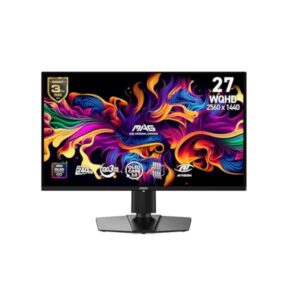
26.5″ MSI MAG 272QPW QD-OLED X24 – Specs & Features
Built around a QD-OLED panel, the MSI MAG 272QPW QD-OLED X24 runs at 2560 x 1440 pixels / Quad HD (QHD) / 1440p with a 48 Hz - 240 Hz refresh range.
MSI●Monitor
Display
26.5 in, QD-OLED, 2560 x 1440 pixels / Quad HD (QHD) / 1440p
26.5
Refresh Rate
48 Hz - 240 Hz
48 Hz
Brightness
200 cd/m²
200 cd
Contrast Ratio
1500000 : 1
1500000
Pros & Cons
Pros
- 48 Hz 240 Hz refresh range with 0.03 ms GtG response is built for competitive, fast-paced gaming
- 1500000 : 1 contrast delivers near-infinite black depth
- 138 % sRGB coverage solid coverage for everyday colour accuracy
- Stand offers 110 mm (4.33 in) height adjustment, swivel, pivot
- Backed by 3 years standard limited warranty
- 110 ppi / 43 ppcm keeps text and UI edges crisp at normal desk distance
- OLED per-pixel dimming gives true blacks and instant pixel response
- 100 x 100 mm VESA mount compatibility works with third-party arms and stands
- Low blue light and/or flicker-free modes support longer viewing comfort
- 3 combined HDMI/DisplayPort inputs support multiple sources
Cons
- No USB-C or USB hub for peripheral connectivity
- No listed built-in speakers
- No KVM switch for controlling two PCs from one keyboard/mouse
- No energy-efficiency certification (e.g. ENERGY STAR, TCO) is listed
- HDCP support isn’t explicitly confirmed for protected 4K/HDR streaming
- Limited or no USB-A downstream ports for connecting multiple accessories
Score & Ratings
8.4/10
Great
Model Information
14
| Specification | Value |
|---|---|
| Brand | MSI |
| Series | MAG |
| Model | MAG 272QPW QD-OLED X24 |
| Full Product Name | MSI MAG 272QPW QD-OLED X24 |
| Model Year | 2025 |
| Monitor Type | Gaming Monitor |
| Market Position | Mainstream Gaming |
| Primary Use | Competitive & Immersive Gaming |
| Region / Variant | Global (regional SKU suffixes may vary, e.g. US / EU / APAC) |
| Launch Status | Available (2025 model-year, per manufacturer data) |
| Available Colors | Black |
| Warranty | 3 years standard limited warranty (MSI global policy; exact term / region may vary by country - see msi.com / page / warranty) |
| Panel Warranty | 3 years |
| Burn-In Warranty | 3 years OLED burn-in coverage (MSI's OLED panel guarantee, backed by MSI OLED Care) |
Display & Panel
16
| Specification | Value |
|---|---|
| Screen Size | 26.5 in |
| Exact Diagonal | 673.1 mm (26.50 in) |
| Aspect Ratio | 16:9 |
| Active Display Width | 590.42 mm (23.24 in) |
| Active Display Height | 333.72 mm (13.14 in) |
| Display Area | 90.07 % (percent) |
| Panel Type | QD-OLED (Samsung) |
| Panel Technology | OLED |
| Panel Manufacturer | Samsung |
| OLED Technology | QD-OLED |
| OLED Generation | 3rd Gen QD-OLED |
| Backlight Type | Self-emissive (no backlight — OLED) |
| Self-Emissive Display | Yes |
| Quantum Dot | Yes |
| 3D Support | No |
| Screen Coating | Anti-glare / Matte (3H) |
26.5" Display Size (67.3 cm) 16:9
Resolution & Pixel Details
3
| Specification | Value |
|---|---|
| Native Resolution | 2560 x 1440 pixels / Quad HD (QHD) / 1440p |
| Pixel Density | 110 ppi / 43 ppcm |
| Pixel Pitch | 0.229 mm (millimeters) |
Resolution at a Glance
Picture Quality & Color
12
| Specification | Value |
|---|---|
| Panel Bit Depth | 10 bits |
| FRC | No |
| Display Colors | 1073741824 colors / 30 bits |
| Typical Brightness | 200 cd/m² |
| Peak Brightness | 400 cd/m² |
| Static Contrast Ratio | 1500000 : 1 |
| Horizontal Viewing Angle | 178 ° |
| Vertical Viewing Angle | 178 ° |
| HDR Support | Display / HDR 400 True Black |
| sRGB Coverage | 138 % |
| DCI-P3 Coverage | 99% |
| Adobe RGB Coverage | 98 % |
DESK DISTANCE FIT
65cm
CompactIdeal FitWideUltra-Wide
Fills central vision comfortably at a typical desk distance — no head movement needed.
Refresh Rate, Response & Gaming
9
| Specification | Value |
|---|---|
| Native Refresh Rate | 240 Hz |
| Refresh Rate Range | 48 Hz - 240 Hz |
| Minimum Response Time | 0.03 ms |
| Adaptive-Sync | VESA AdaptiveSync |
| Crosshair | Yes |
| AI Gaming Features | Yes |
| Console Mode | Yes |
| Picture-by-Picture | Yes |
| Picture-in-Picture | Yes |
Ports & Connectivity
13
| Specification | Value |
|---|---|
| HDMI Ports | 2 |
| HDMI Version | 2.1 |
| HDMI Bandwidth | 30 kHz - 390 kHz |
| HDMI FRL | Yes |
| HDMI CEC | Yes |
| DisplayPort Input | 1 |
| DisplayPort Version | 1.4 |
| DisplayPort Bandwidth | HBR3 |
| USB-C Video Input | Yes |
| DisplayPort Alt Mode | Yes |
| USB-C Power Delivery | 15W |
| Audio Output | 3.5 mm |
| Headphone Output | 3.5 mm Audio Out |
Ports & Connections
Audio, Camera, Network & Smart Features
1
| Specification | Value |
|---|---|
| Built-In Camera | No |
Ergonomics & Stand
16
| Specification | Value |
|---|---|
| VESA Mount | 100 x 100 mm |
| VESA Size | 100 x 100 mm |
| Removable Stand | Yes |
| Height Adjustment | 110 mm |
| Height Adjustment Range | 110 mm (4.33 in) |
| Tilt Adjustment | Yes |
| Forward Tilt | 5 ° |
| Backward Tilt | 20 ° |
| Swivel Adjustment | Yes |
| Left Swivel | 30 ° |
| Right Swivel | 30 ° |
| Left Pivot | 90 ° |
| Right Pivot | 90 ° |
| Portrait Mode | Yes |
| Security Lock | Yes |
| Anti-Theft Lock | Kensington Lock |
Dimensions, Weight & Design
4
| Specification | Value |
|---|---|
| Dimensions With Stand | 611.6 mm x 423 mm x 241.9 mm (W x H x D) |
| Dimensions Without Stand | 611.6 mm x 357.7 mm x 55.76 mm (W x H x D) |
| Weight With Stand | 5.7 kg (12.57 lbs) |
| Stand Depth | 241.9 mm (9.52 in) |
Power & Operating Conditions
12
| Specification | Value |
|---|---|
| Power Input | 100–240V |
| 110V Input Range | 100 V - 120 V |
| 220V Input Range | 220 V - 240 V |
| AC Frequency | 50 Hz - 60 Hz |
| Sleep Consumption | 0.5 W |
| Off Consumption | 0.3 W |
| Operating Temperature | 0 °C - 40 °C / 32 °F - 104 °F |
| Operating Humidity | 10 % - 85 % |
| Operating Altitude | 3657.6 m / 12000 ft |
| Storage Temperature | -25 °C - 55 °C / -13 °F - 131 °F |
| Storage Humidity | 5 % - 93 % |
| Storage Altitude | 12192 m / 40000 ft |
Eye Care, Protection & Additional Features
16
| Specification | Value |
|---|---|
| Flicker-Free | Yes |
| Low Blue Light | Yes |
| OLED Protection | Yes |
| OLED Care | Yes |
| Burn-In Protection | Yes (MSI OLED Care) |
| Thermal Management | Yes |
| Custom Heatsink | Yes |
| Graphene Cooling Film | Yes |
| Desktop Control Software | Yes |
| Monitor Management Software | Yes |
| OSD Software | Yes |
| On-Screen Display | Yes |
| Screen Split | Yes |
| AI Visual | Yes |
| Anti-Theft Slot | Yes (Kensington lock slot) |
| Additional Monitor Features | 5-way Joystick Navigator; AI Vision; Aspect Ratio Options; Gaming Intelligence App; HDR Ready; Optix Scope; Other certifications: CCC; CEL |
Certifications, Standards & Licenses
8
| Specification | Value |
|---|---|
| TÜV Flicker-Free | Yes |
| TÜV Low Blue Light | Yes |
| VESA DisplayHDR | Display / HDR 400 True Black |
| ClearMR | 13000 |
| RoHS | Yes |
| CE | Yes |
| FCC | Yes |
| UL | Yes |
Included Accessories
1
| Specification | Value |
|---|---|
| DisplayPort Cable | DisplayPort 1.4 cable |
Packaging Information
5
| Specification | Value |
|---|---|
| Package Dimensions | 820 mm x 513 mm x 169 mm (W x H x D) |
| Package Width | 820 mm (32.28 in) |
| Package Height | 513 mm (20.20 in) |
| Package Depth | 169 mm (6.65 in) |
| Package Weight | 9.4 kg (20.72 lbs) |
⚡
Estimated Running Cost
Based on this product's rated power draw, not an independent lab measurement — actual usage varies with settings and content.
Daily—
Monthly—
Annually—
Uses about 85% less power than the average we track in this category.
Reviews
Related Comparisons
DISPLAYINPUT · INDEPENDENT · SPEC-BASED · NO SPONSORED PLACEMENT
SHEET № MAG 272QPW QD-OLED X24