
Skip to content
Dell Dell P2426 – Specs & Features Monitor
RATED
Good
5.8/10

24.1″ Dell P2426 – Specs & Features

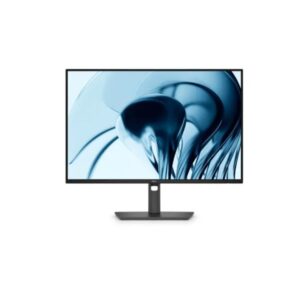
The simpler sibling, the Dell P2426 places a 1920 x 1200 (WUXGA) IPS panel inside a 24.1-inch monitor focused on routine office and home use.

24.1″ · 16:10 · MODEL YEAR 2026
DellMonitor
Dell Monitor
Display
24.1", IPS, 1920 × 1200 (WUXGA)
24.1
Refresh Rate
48Hz – 100Hz
48Hz
Brightness
300 nits
Contrast Ratio
1,500:1
1

Overview

The simpler sibling, the Dell P2426 places a 1920 x 1200 (WUXGA) IPS panel inside a 24.1-inch monitor focused on routine office and home use. Its 94 PPI pixel density, 300 cd/m² typical brightness and 1,500:1 contrast define the everyday image in practical terms. Motion is rated at 5 ms (GtG). The useful part is simple connectivity, readable text and low running demands. The usb hub reduces desk clutter. The trade-offs are clear: there is no published HDR tier; USB-C does not provide full laptop-class charging; speakers are not included. Compared with the P2426E, the choice rests on the published size, resolution, stand or hub differences. Buy it if your needs are straightforward and the listed limitations fit your desk; skip it if you need modern USB-C docking, HDR or stronger ergonomics.

BrandDellPanel TypeIPSResolution1920 x 1200 (WUXGA)Refresh Rate48Hz - 100Hz

Key Highlights

  • 1920 x 1200 (WUXGA) at 24.1-inch gives 94 PPI for a practical but visibly coarser desktop image.
  • The 48Hz - 100Hz range makes Dell P2426 smoother than a standard 60 Hz office screen.
  • The integrated USB hub adds peripheral connectivity even though laptop-class USB-C charging is not listed.
  • A 150 mm height range, ±45° swivel and ±90° pivot give the stand useful adjustment.
  • P2426E adds 100W USB-C, Ethernet and MST; P2426 uses USB-B for its hub and cannot charge a laptop.

Who Should Buy the Dell P2426

+ Best For
Office users
1920 x 1200 (WUXGA) resolution and 48Hz - 100Hz motion suit everyday documents.
Home desks
24.1-inch keeps the workspace compact.
Long-session users
the adjustable stand supports eye-level positioning.
× Not Ideal For
Buyers wanting USB-C charging or a dock
see the P2426E variant instead
HDR or wide-gamut colour work
Fast-paced gaming

Display Performance

Refresh Rate Standard a productivity panel
Response Time Standard IPS fine for office use
Brightness Check sheet typical for the class
Contrast Check sheet standard IPS figure
Colour Gamut Standard sRGB no wide-gamut claim
HDR Not listed none claimed - 94 PPI is close to but slightly softer than the 21.5-inch P2226H's 102 PPI, trading a touch of sharpness for the larger 16:10 canvas

Gaming Performance

Refresh Rate48Hz - 100HzA useful step above 60 Hz for everyday desktop work.
Response Time5 ms (GtG)Adequate for the monitor's stated use, though overdrive behaviour is not published.
VRR / Adaptive SyncNot publishedThe sheet does not confirm VRR, so do not assume tear control.
GPU RequirementModest GPUFull HD at 60-120 Hz is not especially demanding.

HDR & Brightness Reality

Nothing in the Dell P2426 sheet supports a meaningful HDR claim. Typical brightness is 300 cd/m², native contrast is 1,500:1, and the listed gamut is Not fully published. Without a peak figure, local dimming detail or an HDR tier, highlight separation remains unproven. Its money is going into the panel's everyday resolution, motion or desk features instead. Use it as an SDR monitor and regard HDR playback as outside its stated strengths.

Connectivity & Ports

USB-CData-only, no power deliverywill not charge a laptop or phone
HDMIHDMI inputfor a second machine
DisplayPortNot confirmed on the sheetcheck before relying on it
USB HubNot confirmedbasic connectivity only

Desk Fit & Ergonomics

Size / Footprint24.1-inch, 16:10more vertical space than a 16:9 panel at this size
StandIncludedcheck height/pivot/swivel range on the sheet
VESA MountStandard patternfor arm or wall mounting
Weight4.89 kg without stand, 3.07 kg withlighter than the P2426E's 5.18/3.45 kg, which carries extra dock hardware

Real-World Use Cases

Everyday productivity
Documents, browsing and spreadsheets suit the 24.1-inch 1920 x 1200 (WUXGA) panel.
Video and calls
No means separate audio is required.
Light gaming
48Hz - 100Hz motion is usefully smooth, with no published adaptive-sync support.
Long work sessions
The adjustable stand supports better posture.

Pros & Cons

Pros
  • 1920 x 1200 (WUXGA) resolution at 24.1-inch delivers 94 PPI for this desk size.
  • 48Hz 100Hz motion is smoother than 60 Hz.
  • 1,500:1 contrast gives predictable everyday image depth.
  • The adjustable stand supports better desk ergonomics.
  • 1 × HDMI 1.4 and 1 × DisplayPort 1.4 cover core video inputs.
Cons
  • No USB-C charging or dock data-only Type-C, unlike the P2426E hub variant
  • No HDR tier is published
  • No built-in speakers
  • Fixed 16:10 aspect ratio needs software support in some older apps

Score & Ratings

5.8/10 Good
Design
7
Display
5
Color Performance
7
Performance
5
Connectivity
7
Model Information 7
Specification Value
Brand Dell
Series Pro
Model P2426
Model Alias Dell Pro P 24 16:10 Monitor
Full Product Name Dell P2426
Model Year 2026
Available Colors Dark Gray
Display & Panel 5
Specification Value What It Means
Screen Size 24.1-inch
Aspect Ratio 16:10
Display Area 91.89%
Panel Type IPS IPS - broad viewing angles suit shared desks, while 1,500:1 contrast limits dark-room depth.
Panel Technology
IPS panel with wide 178°/178° viewing angles16:10 aspect ratio for enhanced vertical workspaceEdge LED backlight99% sRGB color coverageAnti-glare/Matte (3H) coatingFlicker-free technologyComfortView Plus (Low Blue Light)
Resolution & Pixel Details 3
Specification Value What It Means
Native Resolution 1920 × 1200 (WUXGA)
Pixel Density 94 PPI 94 PPI - 94 PPI is coarse enough that close seating reveals pixels.
Pixel Pitch 0.270 mm
Picture Quality & Color 2
Specification Value
Panel Bit Depth 8-bit
Display Colors 16.7 Million
Refresh Rate, Response & Gaming 1
Specification Value
Refresh Rate Range 48Hz – 100Hz
Ports & Connectivity 7
Specification Value
HDMI Ports
1× HDMI 1.4
HDMI Version HDMI 1.4
DisplayPort Input 1× DisplayPort 1.4
DisplayPort Version DisplayPort 1.4
USB-C Video Input 1× USB-C
HDCP Support Yes
HDCP Version HDCP 1.4
Audio, Camera, Network & Smart Features 1
Specification Value
Built-In Camera No
Ergonomics & Stand 5
Specification Value What It Means
VESA Mount 100 × 100 mm
VESA Size 100 × 100 mm
Removable Stand Yes
Height Adjustment 150 mm 150 mm - 150 mm means the screen can be brought closer to eye level.
Height Range 150 mm
Dimensions, Weight & Design 2
Specification Value
Weight With Stand 4.89 kg
Weight Without Stand 3.07 kg
Power & Operating Conditions 6
Specification Value
Power Input 100–240V
AC Frequency 50/60Hz
Typical Power Consumption 11.7W
Average Power Consumption 11.7W
Maximum Power Consumption 74W
Sleep Consumption 0.3W
Certifications, Standards & Licenses 7
Specification Value
Energy Star ENERGY STAR
EPEAT EPEAT Climate+
EPEAT Climate+ EPEAT Climate+
TCO Certified TCO Certified Displays
TCO Certified Edge TCO Certified Edge
TÜV Eye Comfort TÜV Eye Comfort - 4 star
RoHS RoHS

Frequently Asked Questions

01 What does 94 PPI mean on the Dell P2426? +
At 24.1-inch, 94 PPI makes text visibly less dense at close range. Viewing distance and operating-system scaling still affect perceived sharpness.
02 How flexible is the Dell P2426 stand for a full working day? +
It provides 150 mm height adjustment, ±45° swivel, ±90° pivot and -5° to +21° tilt. That is a strong ergonomic set.
03 Where does the Dell P2426 differ from the P2426E? +
Both belong to a closely related family, but the published size, resolution, stand or hub details are not automatically identical. Compare those fields directly rather than choosing by suffix alone.
04 What is the biggest image limitation of the Dell P2426? +
There is no published HDR tier or peak-brightness figure. The sheet does not replace independent response, calibration or uniformity testing.
05 Which published specification should buyers verify on the Dell P2426? +
The source dimensions appear to swap panel-only and assembled depth/weight fields; verify physical measurements before mounting or desk planning. This is a source-data warning, not a replacement measurement.

Reviews

NO REVIEWS YET Own this display? Your rating helps calibrate the score for everyone.
DISPLAYINPUT · INDEPENDENT · SPEC-BASED · NO SPONSORED PLACEMENT SHEET № P2426