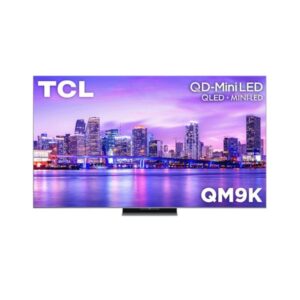
Overview
Large lounges wanting a wide-gamut 144 Hz Google TV can look at the TCL 75QM9K (74.5 in). Its HVA panel shows 3840 × 2160 at 59 ppi over a 48-144 Hz range with VRR and AMD FreeSync Premium Pro, and lists 97 percent DCI-P3. Dolby Vision, Dolby Vision IQ, HDR10+ Gaming and HLG are supported, and two of four HDMI inputs are HDMI 2.1. Weight is 30.4 kg with the stand and 28.4 kg without it, VESA is 400 × 400 mm, and two USB ports are fitted.
74.5 in HVA, 3840 × 2160, 59 ppi 48-144 Hz, VRR, FreeSync Premium Pro 97 percent DCI-P3, Dolby Vision IQ 4 HDMI (2 × 2.1), 2 × USB 30.4 kg with stand, 400 × 400 VESA
Pros & Cons
Pros
97 percent DCI-P3 gamut at 75 inches
Two HDMI 2.1 ports for consoles on 75QM9K
75QM9K offers a 144 Hz range
75QM9K: Dolby Vision IQ and HDR10+ Gaming
Two USB ports serve more accessories on 75QM9K
Cons
Backlight details are missing for 75QM9K
Weighs 30.4 kg with stand fitted
75QM9K: Only half the HDMI ports are 2.1
VA-type panel loses some contrast and colour from off-centre seats
Television Identity & Market
5
Specification
Value
Brand
TCL
Series
QM9K
Model
75QM9K
Model Year
2025
Available Colors
Black
Screen Geometry & Format
4
Specification
Value
Screen Size
74.5 in
Marketed Screen Size
74.5 in
Aspect Ratio
16:9
Screen-to-Body Ratio
102.84 %
74.5" Display Size (189.2 cm) 16:9
Resolution at a Glance
3840×2160
This screen
8K — 7,680×4,320
4K — 3,840×2,160
FHD — 1,920×1,080
HD — 1,280×720
8.3 MP — 4× the pixels of Full HD
Panel Architecture & Light Control
3
Specification
Value
Panel Type
HVA
Panel Bit Depth
10 bits
Display Colors
1.07 billion colors / 30-bit
Resolution, Scaling & Signal
4
Specification
Value
Native Resolution
3840 x 2160 pixelsUltra HD (UHD) / 4K / 2160p
Pixel Density
59 ppi
Pixel Pitch
0.43 mm
HDCP Support
Yes
◑
Luminance, Blacks & Contrast
3
Specification
Value
Static Contrast
7000 : 1
Static Contrast Ratio
7000 : 1
Viewing Angles
178 ° / 178 °
Color Reproduction & Calibration
1
Specification
Value
DCI-P3 Coverage
97 %
RECOMMENDED VIEWING DISTANCE
75"
Viewing Distance = 1.5–2.5 × Screen Size
HDR Formats & Tone Mapping
2
Specification
Value
HDR Support
Dolby Vision IQ Dolby Vision HDR10+ Gaming HDR10+ HDR10 HLG
IMAX Enhanced
Yes
Motion Processing & Response
2
Specification
Value
Maximum Refresh Rate
48 Hz - 144 Hz
Motion Processing
Ai-MEMCMEMC (Motion Estimation Motion Compensation)
Console, VRR & Game Tools
5
Specification
Value
Variable Refresh Rate
Variable Refresh Rate (VRR)
Auto Low Latency Mode
Auto Low Latency Mode (ALLM)
High Frame Rate
Yes
AMD FreeSync
AMD FreeSync Premium Pro
Game Bar
Game Master 2.0 with Game Bar
Picture Intelligence & AI
2
Specification
Value
AI Upscaling
Yes
Ambient Mode
Yes
Broadcast Tuners & Reception
6
Specification
Value
Built-In TV Tuner
Tuner Configuration
Analog (NTSC / PAL / SECAM) ATSC ATSC 3.0 Clear QAM
Analog Tuner
NTSC / PAL / SECAM
North American Digital Tuner
ATSC
NextGen TV Tuner
Clear QAM
clear qam
Compute, Memory & Storage
1
Specification
Value
Processor Brand Name
TSR AIPQ Processor
Smart Platform & System
2
Specification
Value
Smart TV
Yes
Operating System
Google TV
Voice Assistants & Search
1
Specification
Value
Google Assistant
Yes
HDMI Signal Interface
10
Specification
Value
Total HDMI Ports
HDMI 2.1 Ports
HDMI 2.0 Ports
HDMI CEC
Yes
Audio Return Channel
Yes
Enhanced Audio Return Channel
Yes
Auto Low Latency Mode
Auto Low Latency Mode (ALLM)
High Frame Rate
Yes
Variable Refresh Rate
Variable Refresh Rate (VRR)
HDCP Support
Yes
USB, Audio & Legacy I/O
5
Specification
Value
Total USB Ports
USB-A 2.0 Ports
USB-A 3.0 Ports
Ethernet Port
1× RJ45
Optical Audio Output
1× S/PDIF
Wireless, LAN & Casting
9
Specification
Value
LAN
Yes
Wi-Fi
Wi-Fi 8
Wi-Fi Standards
802.11a
Bluetooth
Bluetooth 5.4
Wi-Fi Direct
Yes
DLNA
Yes
Apple AirPlay
Yes
Chromecast
Yes
Multi-View
Yes
Camera & Video Calling
1
Specification
Value
Built-In Camera
No
Panel-Only Size & Mass
4
Specification
Value
Width Without Stand
1568 mm
Height Without Stand
950 mm
Depth Without Stand
51 mm
Weight Without Stand
28.4 kg
Assembled TV Size & Mass
4
Specification
Value
Width With Stand
1568 mm
Height With Stand
986 mm
Depth With Stand
368 mm
Weight With Stand
30.4 kg
Shipping Carton Measurements
5
Specification
Value
Box Dimensions
Width: 1850 mm Height: 1125 mm Depth: 178 mm
Box Width
1850 mm (millimeters)
Box Height
1125 mm (millimeters)
Box Depth
178 mm (millimeters)
Box Weight
40.2 kg (kilograms) / 88.63 lbs (pounds)
Exterior Styling & Stand Footprint
1
Specification
Value
Chassis Color
Black
Wall Mounting & Installation
8
Specification
Value
VESA Mount
400 x 400 mm
VESA Interface
400 x 400 mm
VESA Size
400 x 400 mm
Removable Stand
Yes
Height Adjustment
NoLandscape / portrait pivot: NoLeft / right swivel: NoForward / backward tilt: No
Swivel Adjustment
No
Tilt Adjustment
No
Pivot Adjustment
No
Electrical Load & Efficiency
3
Specification
Value
Power Input
100 V - 120 V / 220 V - 240 V
AC Frequency
50 Hz - 60 Hz
Standby Consumption
0.5 W
Environmental Operating Limits
4
Specification
Value
Operating Temperature
5 °C - 35 °C (degrees Celsius) / 41 °F - 95 °F (degrees Fahrenheit)
Operating Humidity
20 % - 80 % (percent)
Storage Temperature
-15 °C - 45 °C (degrees Celsius) / 5 °F - 113 °F (degrees Fahrenheit)
Storage Humidity
10 % - 90 % (percent)
Picture Feature Inventory
1
Specification
Value
IMAX Enhanced
Yes
Gaming Validation & Compatibility
2
Specification
Value
Game Bar
Game Master 2.0 with Game Bar
ALLM
Auto Low Latency Mode (ALLM)
Regulatory & Industry Approvals
2
Specification
Value
CE
Yes
IMAX Enhanced
Yes
In-the-Box Components
1
Specification
Value
Screen Size
74.5 in
⚡
Estimated Running Cost
Based on this product's rated power draw, not an independent lab measurement — actual usage varies with settings and content.
Country & rate
India — ₹8/kWh
USA — $0.15/kWh
UK — £0.30/kWh
EU — €0.25/kWh
Australia — A$0.28/kWh
Canada — C$0.13/kWh
Japan — ¥0.22/kWh
Custom rate…
Custom rate
$
Hours used per day
Daily —
Monthly —
Annually —
Draws more power than 82% of the 447 comparable displays we track.