
RATED
Great
8/10
27″ Dell U2723QX – Specs & Features
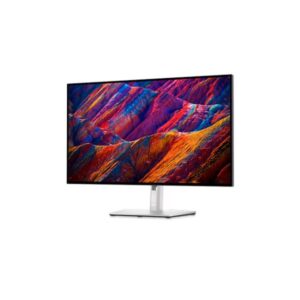
Built around an IPS panel, the Dell U2723QX runs at 3840 x 2160 pixels with a 23 Hz - 87 Hz refresh range.
Dell●Monitor
Display
27 in, IPS, 3840 x 2160 pixels
27
Refresh Rate
23 Hz - 87 Hz
23 Hz
Brightness
400 cd/m²
400 cd
Contrast Ratio
2000 : 1
2000
Pros & Cons
Pros
- 23 Hz 87 Hz refresh range with 5 ms GtG response supports fast-paced use
- Built-in USB hub adds convenient peripheral connectivity
- Stand offers 150 mm (5.91 in) height adjustment, swivel, pivot
- 100% sRGB coverage is published for the panel
Cons
- No listed built-in speakers
Score & Ratings
8/10
Great
Model Information
7
| Specification | Value |
|---|---|
| Brand | Dell |
| Series | UltraSharp |
| Model | U2723QX |
| Model Alias | UltraSharp U2723QX |
| Full Product Name | Dell U2723QX |
| Model Year | 2022 |
| Available Colors | Black and Silver |
Display & Panel
11
| Specification | Value |
|---|---|
| Screen Size | 27 in |
| Exact Diagonal | 684.667 mm (26.96 in) |
| Aspect Ratio | 16:9 |
| Active Display Width | 596.736 mm (23.49 in) |
| Active Display Height | 335.664 mm (13.22 in) |
| Screen-to-Body Ratio | 92.8% |
| Panel Type | IPS (LG Display) |
| Panel Manufacturer | LG Display |
| Backlight Type | W-LED |
| 3D Support | No |
| Screen Coating | Anti-glare / Matte (3H) |
27" Display Size (68.6 cm) 16:9
Resolution & Pixel Details
3
| Specification | Value |
|---|---|
| Native Resolution | 3840 x 2160 pixels |
| Pixel Density | 163 PPI |
| Pixel Pitch | 0.155 mm (millimeters) |
Resolution at a Glance
Picture Quality & Color
8
| Specification | Value |
|---|---|
| Panel Bit Depth | 10 bits |
| Display Colors | 1073.7 million colors (30 bits) |
| Typical Brightness | 400 cd/m² |
| Static Contrast Ratio | 2000 : 1 |
| Horizontal Viewing Angle | 178 ° |
| Vertical Viewing Angle | 178 ° |
| sRGB Coverage | 100% |
| DCI-P3 Coverage | 98% |
DESK DISTANCE FIT
65cm
CompactIdeal FitWideUltra-Wide
Fills central vision comfortably at a typical desk distance — no head movement needed.
Refresh Rate, Response & Gaming
2
| Specification | Value |
|---|---|
| Refresh Rate Range | 23 Hz - 87 Hz |
| Minimum Response Time | 5 ms |
Ports & Connectivity
13
| Specification | Value |
|---|---|
| HDMI Ports | 1 |
| HDMI Version | 2.0 |
| DisplayPort Input | 2 |
| DisplayPort Output | 1x DisplayPort 1.4 (MST out) |
| DisplayPort Version | 1.4 |
| USB-C Video Input | 1× USB-C |
| DisplayPort Alt Mode | Yes |
| Display Stream Compression | Yes |
| HDCP Support | Yes |
| HDCP Version | 2.2 |
| USB-C Input | 1× USB-C |
| USB-A Ports | 5 |
| Audio Output | 3.5 mm |
Ports & Connections
Audio, Camera, Network & Smart Features
3
| Specification | Value |
|---|---|
| Built-In Camera | No |
| Ethernet | RJ45 |
| LAN | Yes |
Ergonomics & Stand
14
| Specification | Value |
|---|---|
| VESA Mount | 100 x 100 mm |
| VESA Size | 100 x 100 mm |
| Removable Stand | Yes |
| Height Adjustment | 150 mm |
| Height Adjustment Range | 150 mm (5.91 in) |
| Tilt Adjustment | Yes |
| Forward Tilt | 5 ° |
| Backward Tilt | 21 ° |
| Swivel Adjustment | Yes |
| Left Swivel | 45 ° |
| Right Swivel | 45 ° |
| Pivot Adjustment | Yes |
| Left Pivot | 90 ° |
| Right Pivot | 90 ° |
Dimensions, Weight & Design
7
| Specification | Value |
|---|---|
| Dimensions With Stand | 611.44 × 385.18 × 185 mm |
| Dimensions Without Stand | 611.44 × 353.01 × 54.33 mm |
| Weight With Stand | 6.64 kg (14.64 lbs) |
| Weight Without Stand | 4.48 kg (9.88 lbs) |
| Stand Width | 268 mm (10.55 in) |
| Stand Depth | 185 mm (7.28 in) |
| Security Lock Slot | Yes |
Power & Operating Conditions
16
| Specification | Value |
|---|---|
| Power Input | 100–240V |
| 110V Input Range | 100 V - 120 V |
| 220V Input Range | 220 V - 240 V |
| AC Frequency | 50 Hz - 60 Hz |
| Electric Current | 1.5 A |
| Average Power Consumption | 25.9 W |
| Maximum Power Consumption | 220 W |
| Sleep Consumption | 0.3 W |
| Off Consumption | 0.2 W |
| Annual Energy Consumption | 91.83 kWh |
| Operating Temperature | 0 °C - 40 °C (32 °F - 104 °F) |
| Operating Humidity | 10% – 80% |
| Operating Altitude | 5000 m |
| Storage Temperature | -20 °C - 60 °C (-4 °F - 140 °F) |
| Storage Humidity | 5% - 90% |
| Storage Altitude | 12192 m |
Eye Care, Protection & Additional Features
3
| Specification | Value |
|---|---|
| Flicker-Free | Yes |
| ComfortView Plus | Yes |
| Additional Monitor Features | Dell Display Manager Compatibility; Dell Power Button Sync (DPBS); Display Stream Compression (DSC); IPS Black panel technology; KVM Switch; Multi-Monitor Sync (MMS); Picture-by-Picture; Picture-in-Picture |
Certifications, Standards & Licenses
4
| Specification | Value |
|---|---|
| Energy Star | Yes |
| EPEAT | EPEAT Gold |
| TÜV Low Blue Light | TUV Rheinland Low Blue Light Certified (Hardware Solution) |
| RoHS | Yes |
Included Accessories
4
| Specification | Value |
|---|---|
| HDMI Cable | Yes |
| DisplayPort Cable | Yes |
| USB Type-C Cable | Yes |
| USB Type-A to Type-B Cable | Yes |
⚡
Estimated Running Cost
Based on this product's rated power draw, not an independent lab measurement — actual usage varies with settings and content.
Daily—
Monthly—
Annually—
Uses about 0% less power than the average we track in this category.
Reviews
DISPLAYINPUT · INDEPENDENT · SPEC-BASED · NO SPONSORED PLACEMENT
SHEET № U2723QX