
RATED
Great
7.2/10
27″ Dell P2723DE – Specs & Features
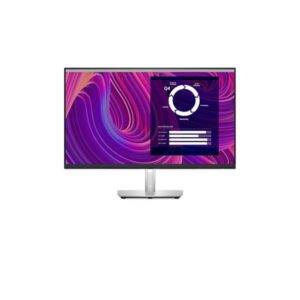
The Dell P2723DE pairs an IPS panel with a 2560 x 1440 pixels resolution and a 49 Hz - 75 Hz refresh range.
Dell●Monitor
Display
27 in, IPS, 2560 x 1440 pixels
27
Refresh Rate
49 Hz - 75 Hz
49 Hz
Brightness
350 cd/m²
350 cd
Contrast Ratio
1000 : 1
1000
Pros & Cons
Pros
- 49 Hz 75 Hz refresh range with 5 ms GtG response supports fast-paced use
- Built-in USB hub adds convenient peripheral connectivity
- Stand offers 150 mm (5.91 in) height adjustment, swivel, pivot
- 99% sRGB coverage is published for the panel
Cons
- No listed built-in speakers
Score & Ratings
7.2/10
Great
Model Information
5
| Specification | Value |
|---|---|
| Brand | Dell |
| Model | P2723DE |
| Full Product Name | Dell P2723DE |
| Model Year | 2022 |
| Available Colors | Black and Silver |
Display & Panel
10
| Specification | Value |
|---|---|
| Screen Size | 27 in |
| Exact Diagonal | 684.667 mm (26.96 in) |
| Aspect Ratio | 16:9 |
| Active Display Width | 596.736 mm (23.49 in) |
| Active Display Height | 335.664 mm (13.22 in) |
| Screen-to-Body Ratio | 90.77% |
| Panel Type | IPS |
| Backlight Type | W-LED |
| 3D Support | No |
| Screen Coating | Anti-glare / Matte (3H) |
27" Display Size (68.6 cm) 16:9
Resolution & Pixel Details
3
| Specification | Value |
|---|---|
| Native Resolution | 2560 x 1440 pixels |
| Pixel Density | 109 PPI |
| Pixel Pitch | 0.233 mm (millimeters) |
Resolution at a Glance
Picture Quality & Color
7
| Specification | Value |
|---|---|
| Panel Bit Depth | 8 bits |
| Display Colors | 16.8 million colors (24 bits) |
| Typical Brightness | 350 cd/m² |
| Static Contrast Ratio | 1000 : 1 |
| Horizontal Viewing Angle | 178 ° |
| Vertical Viewing Angle | 178 ° |
| sRGB Coverage | 99% |
DESK DISTANCE FIT
65cm
CompactIdeal FitWideUltra-Wide
Fills central vision comfortably at a typical desk distance — no head movement needed.
Refresh Rate, Response & Gaming
2
| Specification | Value |
|---|---|
| Refresh Rate Range | 49 Hz - 75 Hz |
| Minimum Response Time | 5 ms |
Ports & Connectivity
12
| Specification | Value |
|---|---|
| HDMI Ports | 1 |
| HDMI Version | 1.4 |
| DisplayPort Input | 2 |
| DisplayPort Output | 1x DisplayPort 1.4 (MST out) |
| DisplayPort Version | 1.4 |
| USB-C Video Input | 1× USB-C |
| DisplayPort Alt Mode | Yes |
| HDCP Support | Yes |
| HDCP Version | 2.2 |
| USB-C Input | 1× USB-C |
| USB-C Power Delivery | 90W |
| USB-A Ports | 4 |
Ports & Connections
Audio, Camera, Network & Smart Features
3
| Specification | Value |
|---|---|
| Built-In Camera | No |
| Ethernet | RJ45 |
| LAN | Yes |
Ergonomics & Stand
14
| Specification | Value |
|---|---|
| VESA Mount | 100 x 100 mm |
| VESA Size | 100 x 100 mm |
| Removable Stand | Yes |
| Height Adjustment | 150 mm |
| Height Adjustment Range | 150 mm (5.91 in) |
| Tilt Adjustment | Yes |
| Forward Tilt | 5 ° |
| Backward Tilt | 21 ° |
| Swivel Adjustment | Yes |
| Left Swivel | 45 ° |
| Right Swivel | 45 ° |
| Pivot Adjustment | Yes |
| Left Pivot | 90 ° |
| Right Pivot | 90 ° |
Dimensions, Weight & Design
7
| Specification | Value |
|---|---|
| Dimensions With Stand | 611.6 × 385.2 × 190.1 mm |
| Dimensions Without Stand | 611.6 × 360.8 × 52.18 mm |
| Weight With Stand | 7.34 kg (16.18 lbs) |
| Weight Without Stand | 5.07 kg (11.18 lbs) |
| Stand Width | 268 mm (10.55 in) |
| Stand Depth | 190.1 mm (7.48 in) |
| Security Lock Slot | Yes |
Power & Operating Conditions
15
| Specification | Value |
|---|---|
| Power Input | 100–240V |
| 110V Input Range | 100 V - 120 V |
| 220V Input Range | 220 V - 240 V |
| AC Frequency | 50 Hz - 60 Hz |
| Electric Current | 1.5 A |
| Average Power Consumption | 26 W |
| Maximum Power Consumption | 175 W |
| Sleep Consumption | 0.3 W |
| Off Consumption | 0.3 W |
| Operating Temperature | 0 °C - 40 °C (32 °F - 104 °F) |
| Operating Humidity | 10% – 80% |
| Operating Altitude | 5000 m |
| Storage Temperature | -20 °C - 60 °C (-4 °F - 140 °F) |
| Storage Humidity | 5% - 90% |
| Storage Altitude | 12192 m |
Eye Care, Protection & Additional Features
4
| Specification | Value |
|---|---|
| Flicker-Free | Yes |
| Low Blue Light | Yes |
| ComfortView Plus | Yes |
| Additional Monitor Features | 3-side bezelless design; Dell Display Manager; Dell Express Daisy Chaining; On-Screen Display (OSD) menu |
Certifications, Standards & Licenses
7
| Specification | Value |
|---|---|
| Energy Star | Yes |
| EPEAT | EPEAT Gold |
| TCO Certified | TCO Certified Edge |
| TCO Certified Edge | TCO Certified Edge |
| TÜV Flicker-Free | TUV Rheinland Flicker-free Certified |
| TÜV Low Blue Light | TUV Rheinland Low Blue Light Certified (Hardware Solution) |
| RoHS | Yes |
Included Accessories
2
| Specification | Value |
|---|---|
| DisplayPort Cable | Yes |
| USB Type-C Cable | Yes |
⚡
Estimated Running Cost
Based on this product's rated power draw, not an independent lab measurement — actual usage varies with settings and content.
Daily—
Monthly—
Annually—
Uses about 54% less power than the average we track in this category.
Reviews
DISPLAYINPUT · INDEPENDENT · SPEC-BASED · NO SPONSORED PLACEMENT
SHEET № P2723DE