
Skip to content
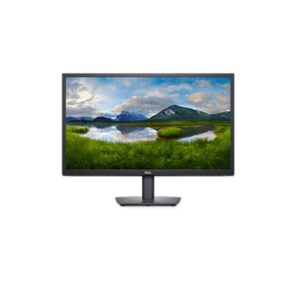
Dell Dell E2423HN – Specs & Features Monitor
RATED
Good
5/10

23.8″ Dell E2423HN – Specs & Features

At its core, the Dell E2423HN uses a VA panel offering 1920 x 1080 pixels and a 50 Hz - 75 Hz refresh range.

23.8″ · 16:9 · MODEL YEAR 2022
DellMonitor
Dell Monitor
Display
23.8 in, VA, 1920 x 1080 pixels
23.8
Refresh Rate
50 Hz - 75 Hz
50 Hz
Brightness
250 cd/m²
250 cd
Contrast Ratio
3000 : 1
3000

Overview

At its core, the Dell E2423HN uses a VA panel offering 1920 x 1080 pixels and a 50 Hz - 75 Hz refresh range. Response time is quoted at 5 ms GtG. For picture quality, expect 250 cd/m² typical brightness and 3000 : 1 contrast. On connectivity, you get 1x HDMI 1.4. Independent research on this model adds one useful note: Panel: VA, FHD 1920x1080 @60Hz, 250 cd/m², 3000:1 contrast, 5ms.

BrandDellPanel TypeVAResolution1920 x 1080 pixelsRefresh Rate50 Hz - 75 Hz

Key Highlights

  • Dell E2423HN speed | 50 Hz - 75 Hz refresh with 5 ms GtG response
  • Dell E2423HN image | 250 cd/m² brightness and 3000 : 1 contrast

Who Should Buy the Dell E2423HN

+ Best For
Primary-use buyers
a basic 23.8-inch Full HD VA monitor for low-cost office and home computing
Spec-conscious shoppers
Its 3000:1 contrast gives dark text and dark-room content more depth than a typical 1000:1 IPS office panel, and HDMI supports modern entry-level PCs
Desk planners
Positioning is limited to -5° to +21° tilt, with 100 x 100 mm VESA available for an arm
× Not Ideal For
HDR-first buyers
E2423HN has no published HDR tier
Feature-maximisers
The stand only tilts, refresh stops at 75 Hz, there are no speakers or HDR, and the connectivity list contains only HDMI 1.4 and VGA
Wrong-sibling shoppers
Choose the E2423HN when HDMI matters; the otherwise similar E2423H is the better fit for DisplayPort-equipped business desktops

Display Performance

Refresh Rate 50 Hz - 75 Hz Standard refresh range
Response Time 5 ms GtG Manufacturer-published transition time
Brightness 250 cd/m² Typical brightness as specified; peak figure not published
Contrast 3000 : 1 Strong VA dark-scene contrast

Gaming Performance

Refresh Rate50 Hz - 75 HzMatch frame rate to the monitor’s useful range
Response Time5 ms (GtG)Published claim without independent testing
GPU Requirement1920 x 1080 pixels up to 75 HzEntry-to-mid-range GPU is generally sufficient

HDR & Brightness Reality

No HDR format is listed for E2423HN, which is consistent with its 250 cd/m², 3000 : 1 panel specification. The display concentrates on everyday SDR clarity, refresh behaviour and connectivity. A peak-brightness window and local-dimming system are not published, so there is no hardware basis for high-impact HDR. This is not a missing badge to overlook; it defines the monitor’s intended use.

Connectivity & Ports

HDMI1x HDMI 1.4Published port count and version
DisplayPortNot publishedCheck before buying
USB-CNot publishedNo one-cable laptop or charging function
USB HubNot publishedNo listed peripheral expansion
Audio OutNot listedCheck before buying if you need audio from the monitor

Desk Fit & Ergonomics

Size / Footprint552.64 × 420.35 × 171 mmCheck desk width and depth before purchase
StandRemovable: YesA separate arm can replace the supplied base
VESA Mount100 x 100 mmUse a matching arm or wall mount
Tilt-5 ° to +21 °Covers the published forward and backward range
Height AdjustNoScreen height is fixed
Swivel / PivotNo swivel; No pivotMovement is limited by the supplied stand

Real-World Use Cases

Main role
a basic 23.8-inch Full HD VA monitor for low-cost office and home computing
Daily work
Its 3000:1 contrast gives dark text and dark-room content more depth than a typical 1000:1 IPS office panel, and HDMI supports modern entry-level PCs
Desk setup
HDMI 1.4 is the key distinction from the E2423H, which substitutes DisplayPort 1.2; both retain D-sub
Alternative choice
Choose the E2423HN when HDMI matters; the otherwise similar E2423H is the better fit for DisplayPort-equipped business desktops

Pros & Cons

Pros
  • 50 Hz 75 Hz refresh range with 5 ms GtG response supports fast-paced use
Cons
  • No listed built-in speakers

Score & Ratings

5/10 Good
Design
5
Display
6
Color Performance
7
Performance
5
Connectivity
4
Model Information 6
Specification Value
Brand Dell
Model E2423HN
Full Product Name Dell E2423HN
Model Year 2022
Available Colors Black
Warranty 3-Year Advanced Exchange Service and Limited Hardware Warranty
Display & Panel 10
Specification Value What It Means
Screen Size 23.8 in
Exact Diagonal 604.698 mm (23.81 in)
Aspect Ratio 16:9
Active Display Width 527.04 mm (20.75 in)
Active Display Height 296.46 mm (11.67 in)
Screen-to-Body Ratio 85.26%
Panel Type VA VA affects viewing angles, black depth and color consistency — each panel technology trades these off differently.
Backlight Type W-LED
3D Support No
Screen Coating Anti-glare/Matte (3H)
Resolution & Pixel Details 3
Specification Value What It Means
Native Resolution 1920 x 1080 pixels
Pixel Density 92 ppi 92 ppi indicates how much scaling may be needed in the operating system for comfortable reading.
Pixel Pitch 0.275 mm (0.01 in)
Picture Quality & Color 7
Specification Value
Panel Bit Depth 8 bits
FRC Yes
Display Colors 16.8 million colors (24 bits)
Typical Brightness 250 cd/m²
Static Contrast Ratio 3000 : 1
Horizontal Viewing Angle 178 °
Vertical Viewing Angle 178 °
Refresh Rate, Response & Gaming 2
Specification Value
Refresh Rate Range 50 Hz - 75 Hz
Minimum Response Time 5 ms
Ports & Connectivity 4
Specification Value
HDMI Ports
1
HDMI Version 1.4
HDCP Support Yes
HDCP Version 1.2
Audio, Camera, Network & Smart Features 1
Specification Value
Built-In Camera No
Ergonomics & Stand 9
Specification Value What It Means
VESA Mount Yes
VESA Size 100 x 100 mm
Removable Stand Yes
Height Adjustment No Not available on the stock stand; a VESA-mount arm is the usual workaround.
Tilt Adjustment Yes
Forward Tilt 5 °
Backward Tilt 21 °
Swivel Adjustment No
Pivot Adjustment No
Dimensions, Weight & Design 7
Specification Value
Dimensions With Stand 552.64 × 420.35 × 171 mm
Dimensions Without Stand 552.64 × 331.61 × 49.69 mm
Weight With Stand 3.85 kg (8.49 lbs)
Weight Without Stand 3.11 kg (6.86 lbs)
Stand Width 222.03 mm (8.74 in)
Stand Depth 171 mm (6.73 in)
Security Lock Slot Yes
Power & Operating Conditions 15
Specification Value
Power Input 100–240V
110V Input Range 100 V - 120 V
220V Input Range 220 V - 240 V
AC Frequency 50 Hz - 60 Hz
Average Power Consumption 16 W
Maximum Power Consumption 25 W
Sleep Consumption 0.5 W
Off Consumption 0.3 W
Annual Energy Consumption 45.73 kWh
Operating Temperature 0 °C - 40 °C (32 °F - 104 °F)
Operating Humidity 10% - 80%
Operating Altitude 5000 m
Storage Temperature -20 °C - 60 °C (-4 °F - 140 °F)
Storage Humidity 5% - 90%
Storage Altitude 12192 m
Eye Care, Protection & Additional Features 3
Specification Value
Flicker-Free Yes
Low Blue Light Yes
Additional Monitor Features ComfortView; Dell Display Manager
Certifications, Standards & Licenses 3
Specification Value
Energy Star Yes
EPEAT Yes
RoHS Yes

Frequently Asked Questions

01 What does the E2423HN's 1920 x 1080 panel mean at 23.8-inch? +
The sheet gives 92 PPI, which is the practical sharpness figure. Its 3000:1 contrast gives dark text and dark-room content more depth than a typical 1000:1 IPS office panel, and HDMI supports modern entry-level PCs.
02 How should buyers read the E2423HN's 50 Hz - 75 Hz specification? +
That is the exact published refresh range for this monitor. Source hardware must expose the matching mode; no different range should be assumed.
03 Which connections make the E2423HN useful on a real desk? +
HDMI 1.4 is the key distinction from the E2423H, which substitutes DisplayPort 1.2; both retain D-sub. Check USB-C roles carefully because downstream data ports are not automatically laptop video inputs.
04 What is the biggest compromise in the E2423HN specification? +
The stand only tilts, refresh stops at 75 Hz, there are no speakers or HDR, and the connectivity list contains only HDMI 1.4 and VGA. That limitation matters more than any generic feature badge.
05 How does the E2423HN differ from its closest sibling? +
Choose the E2423HN when HDMI matters; the otherwise similar E2423H is the better fit for DisplayPort-equipped business desktops. The choice should follow that concrete difference rather than the shared branding.

Reviews

NO REVIEWS YET Own this display? Your rating helps calibrate the score for everyone.
DISPLAYINPUT · INDEPENDENT · SPEC-BASED · NO SPONSORED PLACEMENT SHEET № E2423HN