
MSI MAG 321UP QD-OLED X24 vs ASUS ROG Strix OLED XG32UQDMS Comparison
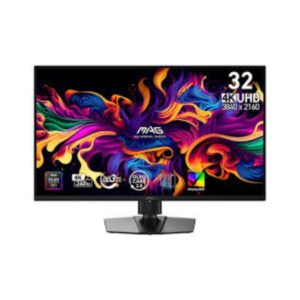
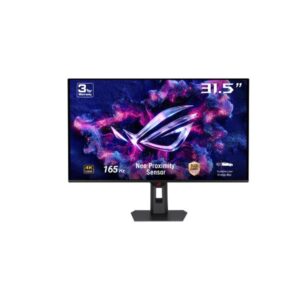
The MSI MAG 321UP QD-OLED X24 has a slight edge overall, mainly because it combines 4K 240Hz QD-OLED performance with higher listed peak brightness, DisplayHDR 500 True Black, USB-C video input, 15W power delivery, and KVM support. The ASUS ROG Strix OLED XG32UQDMS is extremely close, adding G-Sync compatibility, USB-A ports, Multi-View, and a broader set of gaming controls. Both deliver the same 31.5-inch 4K QD-OLED panel class, 240Hz refresh rate, and 0.03ms response time. Choose the MSI for connectivity and HDR brightness. Choose the ASUS for its broader gaming features and G-Sync support.
Both monitors use a 31.5-inch 4K QD-OLED panel with 240Hz refresh and 99% DCI-P3 coverage, so their core image quality is very similar. The MSI lists a higher 1300 cd/m² peak brightness and DisplayHDR 500 True Black, compared with 1000 cd/m² and DisplayHDR 400 True Black on the ASUS. The MSI therefore has the stronger specification for bright HDR highlights.
Neither monitor gives up much for high-speed gaming: both support 4K at 240Hz with a listed 0.03ms response time. The ASUS adds NVIDIA G-Sync support, Shadow Boost, Dynamic Crosshair, and GameVisual controls, while the MSI provides Adaptive-Sync, AMD FreeSync, Console Mode, and gaming assistance features. The better choice depends on your graphics card and preferred gaming tools.
This is one of the clearest differences. The MSI adds USB-C video input with DisplayPort Alt Mode, 15W power delivery, and a KVM switch, making it more useful for a laptop-and-desktop setup. The ASUS instead provides two USB-A ports and Multi-View, which can be more useful for connecting peripherals and viewing multiple sources.
Both displays include OLED protection, burn-in protection, thermal management, a custom heatsink, height adjustment, swivel, tilt, and VESA mounting. MSI adds a graphene cooling film and OLED Care, while ASUS offers OLED Care Pro, a proximity sensor, and additional features such as Uniform Brightness and Clear Pixel Edge. Both are well equipped for long-term OLED use.
| Specification | ||
|---|---|---|
| Overview | ||
| Rating | 8.4 / 10 | 8.4 / 10 |
| Brand | MSI | Asus |
| Category | Monitor | Monitor |
| Model Information | ||
| Brand | MSI | ASUS |
| Series | MAG | ROG Strix |
| Model | MAG 321UP QD-OLED X24 | ROG Strix OLED XG32UQDMS |
| Model Alias | MAG321UPQD-OLEDX24 | ROG Strix XG32UQDMS |
| Full Product Name | MSI MAG 321UP QD-OLED X24 | ASUS ROG Strix OLED XG32UQDMS |
| Model Year | 2026 | 2026 |
| Monitor Type | Gaming Monitor | Gaming Monitor |
| Monitor Category | Gaming Monitor | -- |
| Market Position | Mainstream Gaming | Upper-Mid to High-End Gaming |
| Primary Use | Competitive & Immersive Gaming | Competitive & Immersive Gaming |
| Region / Variant | Global (regional SKU suffixes may vary, e.g. US/EU/APAC) | -- |
| Launch Status | Announced 2026 (per manufacturer model-year data) | -- |
| Available Colors | Black | Black |
| Warranty | 3 years standard limited warranty (MSI global policy; exact term/region may vary by country - see msi.com/page/warranty) | 3 years (36 months) standard limited warranty from date of purchase |
| Panel Warranty | 3 years | 3 years |
| Burn-In Warranty | 3 years OLED burn-in coverage (MSI's OLED panel guarantee, backed by MSI OLED Care) | 3 years (36 months) OLED panel burn-in coverage on most models |
| Display & Panel | ||
| Screen Size | 31.5 in | 31.5 in |
| Exact Diagonal | 803 mm (31.61 in) | 803.2 mm (31.62 in) |
| Screen Format | 16:9 | -- |
| Aspect Ratio | 16:9 | 16:9 |
| Active Display Width | 699.48 mm (27.54 in) | 699.48 mm (27.54 in) |
| Active Display Height | 394.73 mm (15.54 in) | 394.73 mm (15.54 in) |
| Display Area | 79.35 % | 89.31 % |
| Panel Type? | QD-OLED | QD-OLED |
| Panel Technology | OLED | OLED |
| Panel Manufacturer | Samsung | Samsung |
| OLED Technology | QD-OLED | QD-OLED |
| Backlight Type? | Self-emissive (no backlight — OLED) | -- |
| Self-Emissive Display | Yes | Yes |
| Quantum Dot | Yes | Yes |
| 3D Support | No | No |
| Screen Coating | Anti-glare/Matte / EL Gen 3 technology / QD-OLED Penta Tandem / Dark Armor Film | -- |
| Resolution & Pixel Details | ||
| Native Resolution | 3840 x 2160 pixels / Ultra HD (UHD) / 4K / 2160p | 3840 x 2160 pixels / Ultra HD (UHD) / 4K / 2160p |
| Pixel Density | 139 ppi / 54 ppcm | 139 ppi / 54 ppcm |
| Pixel Pitch | 0.181 mm (0.01 in) | 0.181 mm (0.01 in) |
| Picture Quality & Color | ||
| Panel Bit Depth | 10 bits | 10 bits |
| FRC | No | No |
| Display Colors | 1073741824 colors / 30 bits | 1073741824 colors / 30 bits |
| Typical Brightness | 300 cd/m² | 250 cd/m² |
| Peak Brightness | 1300 cd/m² | 1000 cd/m² |
| Static Contrast Ratio | 1500000 : 1 | 1500000 : 1 |
| Horizontal Viewing Angle | 178 ° | 178 ° |
| Vertical Viewing Angle | 178 ° | 178 ° |
| HDR Support? | DisplayHDR 500 True Black /HDR10 |
DisplayHDR 400 True Black /HDR10 |
| HDR10? | Yes | Yes |
| sRGB Coverage | 138 % | -- |
| DCI-P3 Coverage | 99 % | 99 % |
| Adobe RGB Coverage | 97 % | -- |
| Color Accuracy | -- | Yes |
| Uniformity Compensation | Yes | -- |
| Gamma Adjustment | -- | Yes |
| Refresh Rate, Response & Gaming | ||
| Native Refresh Rate | 240 Hz | 240 Hz |
| Refresh Rate Range | 48 Hz - 240 Hz | 48 Hz - 240 Hz |
| Minimum Response Time | 0.03 ms | 0.03 ms |
| Adaptive-Sync? | Yes | -- |
| AMD FreeSync? | Yes | Yes |
| NVIDIA G-Sync? | -- | Yes |
| Motion Blur Reduction | Yes | Yes |
| Shadow Boost | -- | Yes |
| Crosshair | Yes | Yes |
| Dynamic Crosshair | -- | Yes |
| AI Gaming Features | Yes | Yes |
| Console Mode | Yes | -- |
| GameFast Input | -- | Yes |
| GameVisual | -- | Yes |
| Picture-by-Picture | Yes | Yes |
| Picture-in-Picture | Yes | Yes |
| Ports & Connectivity | ||
| HDMI Ports | 2 | 2 |
| HDMI Version | 2.1 | 2.1 |
| HDMI Bandwidth | 560.6 k Hz - 562.6 k Hz | 30 k Hz - 510 k Hz |
| HDMI FRL | -- | Yes |
| HDMI CEC | Yes | -- |
| DisplayPort Input | 1 | 1 |
| DisplayPort Version | 1.4 | 1.4 |
| DisplayPort Bandwidth | HBR3 | -- |
| USB-C Video Input | Yes | -- |
| DisplayPort Alt Mode | Yes | -- |
| Display Stream Compression | -- | Yes |
| HDCP Support | Yes | -- |
| USB-C Power Delivery | 15 W | -- |
| USB-A Ports | -- | 2 |
| KVM Switch | Yes | -- |
| Audio Output | 3.5 mm | 3.5 mm |
| Headphone Output | 3.5 mm Audio Out | 3.5 mm Audio Out |
| Audio, Camera, Network & Smart Features | ||
| Built-In Camera | No | No |
| Multi-View | -- | Yes |
| Ergonomics & Stand | ||
| VESA Mount | Yes | Yes |
| VESA Size | 100 x 100 mm | 100 x 100 mm |
| Removable Stand | Yes | Yes |
| Height Adjustment | Yes | Yes |
| Height Adjustment Range | 110 mm (4.33 in) | 110 mm (4.33 in) |
| Tilt Adjustment | Yes | Yes |
| Forward Tilt | 5 ° | 5 ° |
| Backward Tilt | 15 ° / Slant - from -10° to 10° | 20 ° / 1/4" Tripod Socket |
| Swivel Adjustment | Yes | Yes |
| Left Swivel | 30 ° | 25 ° |
| Right Swivel | 30 ° | 25 ° |
| Portrait Mode | No | No |
| Security Lock | Yes | Yes |
| Anti-Theft Lock | Kensington Lock | Kensington Lock |
| Dimensions, Weight & Design | ||
| Dimensions With Stand | 719.1 mm x 483.9 mm x 241.9 mm | 718.08 mm x 451.65 mm x 188.23 mm (W x H x D) |
| Dimensions Without Stand | 719.1 mm x 483.9 mm x 69.26 mm | 718.08 mm x 430.53 mm x 74 mm (W x H x D) |
| Weight With Stand | 7.7 kg (16.98 lbs) | 6.6 kg (14.55 lbs) |
| Weight Without Stand | -- | 4.5 kg (9.92 lbs) |
| Stand Depth | 241.9 mm (9.52 in) | 188.23 mm (7.41 in) |
| Power & Operating Conditions | ||
| Power Input | 100–240V | 100 V - 120 V / 220 V - 240 V |
| 110V Input Range | 100 V - 120 V | 100 V - 120 V |
| 220V Input Range | 220 V - 240 V | 220 V - 240 V |
| AC Frequency | 50 Hz - 60 Hz | 50 Hz - 60 Hz |
| Average Power Consumption | -- | 44 W |
| Sleep Consumption | 0.5 W | 0.5 W |
| Off Consumption | 0.3 W | 0.3 W |
| Operating Temperature | 0 °C - 40 °C / 32 °F - 104 °F | 0 °C - 40 °C / 32 °F - 104 °F |
| Operating Humidity | 10 % - 90 % | 20 % - 80 % |
| Operating Altitude | 5000 m / 16404.2 ft | 3658 m / 12001.3 ft |
| Storage Temperature | -20 °C - 60 °C / -4 °F - 140 °F | -20 °C - 60 °C / -4 °F - 140 °F |
| Storage Humidity | 10 % - 80 % | 10 % - 90 % |
| Storage Altitude | 12192 m / 40000 ft | 12192 m / 40000 ft |
| Eye Care, Protection & Additional Features | ||
| Flicker-Free | Yes | Yes |
| Low Blue Light | Yes | Yes |
| Proximity Sensor | -- | Yes |
| OLED Protection | Yes | Yes |
| OLED Care | Yes | Yes |
| Burn-In Protection | Yes (MSI OLED Care) | Yes (ASUS OLED Care / OLED Care Pro) |
| Thermal Management | Yes | Yes |
| Custom Heatsink | Yes | Yes |
| Graphene Cooling Film | Yes | -- |
| Desktop Control Software | -- | Yes |
| Monitor Management Software | -- | Yes |
| OSD Software | Yes | -- |
| On-Screen Display | Yes | -- |
| Screen Split | Yes | Yes |
| Uniformity Mode | Yes | -- |
| AI Visual | Yes | -- |
| Anti-Theft Slot | Yes (Kensington lock slot) | Yes (Kensington lock slot) |
| Additional Monitor Features | 5-way Joystick Navigator; AI Vision; Aspect Ratio Options; Optix Scope | 6-axis adjustment; Adjustable HDR; AI Visual; Aspect Ratio Control; AsusDisplay Widget Center; Asus Power Sync; Clear Pixel Edge; Color Accuracy; Custom Heatsink; Game Fast InputGame Plus; Game Visual; Multi Screen; Neo Proximity Sensor; ROG Gaming AI technology; ROG OLED Anti-Flicker 2.0; Trace Freen technology; Uniform Brightness; Vivid Pixel; Other certifications: CB; CCC; CEC; KCC; KMPES |
| Certifications, Standards & Licenses | ||
| TÜV Flicker-Free | TÜV Rheinland Flicker Free Certification | Yes |
| TÜV Low Blue Light | Yes | Yes |
| VESA DisplayHDR? | DisplayHDR 500 True Black | DisplayHDR 400 True Black |
| VESA AdaptiveSync? | -- | Display 240Hz |
| ClearMR | 13000 | -- |
| RoHS | Yes | Yes |
| CE | Yes | -- |
| FCC | Yes | Yes |
| FCC-B | Yes | -- |
| ErP | -- | Yes |
| J-Moss | -- | Yes |
| UL | -- | Yes |
| BSMI | -- | Yes |
| WEEE | Yes | Yes |
| Included Accessories | ||
| DisplayPort Cable | DisplayPort cable | DisplayPort cable |
| USB Upstream Cable | -- | USB Type-A cable |
| Packaging Information | ||
| Package Dimensions | -- | 870 mm x 510 mm x 188 mm (W x H x D) |
| Package Width | 975 mm (38.39 in) | 870 mm (34.25 in) |
| Package Height | 515 mm (20.28 in) | 510 mm (20.08 in) |
| Package Depth | 185 mm (7.28 in) | 188 mm (7.40 in) |
| Package Weight | 12.38 kg (27.29 lbs) | 9.8 kg (21.61 lbs) |
Methodology: The verdict and comparison notes on this page are written by an editor after reviewing the full specification table below; they are not generated by an automated scoring formula. Conclusions are based on manufacturer-listed specifications only - no benchmark testing, measured brightness or hands-on use is claimed unless stated. Missing values are left blank rather than estimated. Report an error.
Updated: August 2026
Frequently Asked Questions
The MSI has a slight advantage for connectivity and HDR specifications, while the ASUS is stronger for advanced gaming features. Both offer excellent 4K 240Hz QD-OLED performance.
On the listed specifications, yes. It reaches 1300 cd/m² peak brightness and DisplayHDR 500 True Black, compared with 1000 cd/m² and DisplayHDR 400 True Black on the ASUS.
The ASUS has the advantage because it specifically lists NVIDIA G-Sync support. The MSI still supports AMD FreeSync and Adaptive-Sync.
Yes. It includes USB-C video input with DisplayPort Alt Mode and 15W power delivery, giving it an advantage for connecting compatible laptops.
The MSI is better suited to switching between a desktop and laptop because it includes USB-C video and a KVM switch. The ASUS offers Multi-View and USB-A ports, which can be more useful for other workflows.