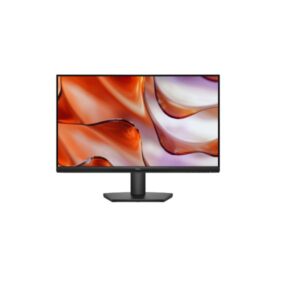
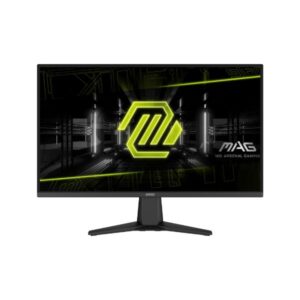
Dell SE2425HM vs MSI MAG 275QF E21
The clearest split between the Dell SE2425HM and the MSI MAG 275QF E21 is refresh rate. MSI MAG 275QF E21 runs at 210Hz versus 100Hz on the Dell SE2425HM. That gap is meaningful in fast-paced games — enemies move more smoothly, tracking feels more responsive, and the transition from 60fps to higher frame rates is clearly visible. For everyday desktop use and productivity, both feel identically fluid.
Buy the Dell SE2425HM if you need Full HD (1080p resolution — sharp everyday display).
- Full HD — 1080p resolution — sharp everyday display
- IPS panel — wide 178°/178° viewing angles with accurate, consistent color reproduction
- Anti-glare matte coating — effective reflections control for comfortable all-day use
- Full HD (1920 x 1080) at 92 PP — sharp, clear image for everyday work and entertainment
Buy the MSI MAG 275QF E21 if you need QHD (sharp, high-density display for detailed productiv).
- QHD — sharp, high-density display for detailed productivity work
- 300 cd/m² — brightness — better visibility in bright office environments
Dell SE2425HM
- Dell SE2425HM -- Refresh Rate: 100Hz (max) -- lower max Hz -- less fluid gameplay
- Dell SE2425HM -- Response Time: 5 ms (GtG) -- slower GtG response -- more visible blur in fast scenes
- Dell SE2425HM -- Brightness (Typical): 250 cd/m² -- ⚠️ lower typical brightness -- HDR scenes still benefit from panel contrast, but bright-room visibility is reduced versus higher-nit alternatives
- Dell SE2425HM -- Pixel Density: 92 PPI -- lower pixel density -- softer at close viewing distances
- Dell SE2425HM -- Display Size: 23.8-inch -- smaller screen
MSI MAG 275QF E21
- MSI MAG 275QF E21 -- Refresh Rate: 210Hz (max) -- higher max Hz -- smoother motion, competitive advantage
- MSI MAG 275QF E21 -- Response Time: -0.5 ms (MPRT) -- faster GtG response -- sharper motion, less ghosting
- MSI MAG 275QF E21 -- Brightness (Typical): 300 cd/m² -- brighter -- better HDR impact and bright-room visibility
- MSI MAG 275QF E21 -- Pixel Density: 109 PPI -- sharper image -- more pixels per inch
- MSI MAG 275QF E21 -- Display Size: 27-inch -- bigger screen -- more immersive for gaming and media
- IPS panel — wide 178°/178° viewing angles with accurate, consistent color reproduction
- Anti-glare matte coating — effective reflections control for comfortable all-day use
- Full HD (1920 x 1080) at 92 PPI — sharp, clear image for everyday work and entertainment
- 100Hz refresh rate — standard rate suitable for productivity and media consumption
- 5.0 ms (GtG) — clean pixel transitions for everyday content and media
- 250 cd/m² brightness — adequate luminance for typical indoor lighting conditions
- Calibrated color display with 72% NTSC coverage
- Flicker-free backlight technology — reduces eye fatigue during extended use sessions
- 8-bit color panel — accurate standard-gamut color for everyday content consumption
- VESA 100×100 mm compatible — works with monitor arms and aftermarket mounting solutions
- IPS contrast ratio (1000 : 1) — blacks look grey in dark viewing environments vs VA/OLED
- Full HD only — limits sharpness for detailed productivity work at this screen size
- Tilt-only stand — no height, swivel or portrait pivot adjustment available
- No USB-C or Thunderbolt — cannot connect modern laptops with single-cable convenience
- No integrated speakers — an external audio solution (speakers or headphones) is required
- 1000:1 static contrast — noticeably limited compared to VA (3000:1) or OLED panels
- No HDR certification — standard dynamic range only; HDR content will be tone-mapped
- 100Hz max refresh — not competitive for fast-paced gaming; limits motion smoothness
- No built-in Ethernet — network hub functionality absent; separate adapter required
- No DisplayPort — HDMI-only video; may limit resolution/refresh on older GPU outputs
- IPS panel — consistent 178°/178° viewing angles with accurate color reproduction
- HDR support (DisplayHDR 400) — expanded brightness range for vivid, lifelike imagery
- QHD resolution (2560 x 1440) — 78% more pixels than FHD for sharper visuals
- 210Hz refresh rate — noticeably fluid gameplay over standard 144Hz monitors
- 0.5 ms (MPRT) — sharp, clear moving images reducing blur perception significantly
- 400 cd/m² peak brightness — sufficient for comfortable daytime HDR viewing
- 95% DCI-P3 color coverage — vibrant, accurate colors beyond the sRGB standard
- Variable refresh rate (VESA AdaptiveSync) — eliminates tearing and stutter for smooth gameplay
- 10-bit color depth (1.07 billion colors) — smoother gradients with no visible banding
- VESA-compatible — supports wall mounting for flexible display positioning
- IPS contrast ratio (1200 : 1) — blacks appear grey in dark environments compared to VA or OLED
- Stand offers tilt adjustment only — no height, swivel or pivot ergonomic customisation
- No USB-C connectivity — cannot receive video or power from modern USB-C laptops in a single cable
- No built-in speakers — requires a separate audio solution (speakers or headphones)
- DisplayHDR 400 is the entry tier — lacks local dimming; HDR uplift is modest at best
- No Ethernet port — monitor lacks network hub functionality; separate network adapter needed
- No USB hub — cannot connect peripherals through the monitor; reduces desk cable management
- No USB hub functionality — peripherals must connect directly to the host computer
- IPS glow in dark corners — common panel characteristic visible during dark scenes or black screens
- On-screen display navigation requires familiarisation — multi-press joystick menus can feel unintuitive initially
MSI MAG 275QF E21 at 210Hz versus 100Hz -- 110Hz more smoothness for fast-paced games. Gaming-ready.
🏆 MSI MAG 275QF E21MSI MAG 275QF E21 at QHD offers noticeably sharper text and more screen real estate than FHD -- a real advantage for long coding or document sessions.
🏆 MSI MAG 275QF E21Colour accuracy depends on gamut coverage -- see the specification table for DCI-P3 and sRGB figures. Wide-gamut panels benefit photo editors and video colourists working in HDR workflows. Neither includes a factory calibration cert — colour-critical work may require professional calibration post-purchase.
🏆 MSI MAG 275QF E21HDR support differs: MSI MAG 275QF E21 (DisplayHDR 400) versus -. For HDR movie content and gaming, the higher-tier HDR certification translates to more dynamic highlight detail.
🏆 MSI MAG 275QF E21| Specification | ||
|---|---|---|
| Overview | ||
| Rating | 7.2/10★★★★★ |
8.2/10★★★★★ |
| Brand | Dell | MSI |
| Category | Monitor | Monitor |
| Basic Information | ||
| Brand | Dell | MSI |
| Model | SE2425HM | MAG 275QF E21 |
| Series | - | MAG |
| Model Alias | - | MAG275QF E21 |
| Model Year | 2025 | 2025 |
| Display | ||
| Size Class | 23.8-inch | 27-inch |
| Panel Type ? | IPS | IPS |
| Curvature | -- | -- |
| Resolution | 1920 x 1080 | 2560 x 1440 |
| Aspect Ratio | 16:9 | 16:9 |
| Pixel Density | 92 PPI | 109 PPI |
| Pixel Pitch | 0.275 mm (millimeters) | 0.233 mm (millimeters) |
| Display Area | 89.49 % (percent) | 90.07 % (percent) |
| Color & HDR | ||
| Color Depth | 8 bits | 10 bits (8 bits + FRC) (FRC: Yes) |
| Colors | 16777216 colors | 1073741824 colors |
| sRGB | - | 121% |
| DCI-P3 Coverage | - | 95% |
| HDR Support ? | - | DisplayHDR 400 |
| Brightness & Contrast | ||
| Brightness (Typical) | 250 cd/m² | 300 cd/m² |
| Peak Brightness | - | 400 cd/m² |
| Contrast | 1000 : 1 | 1200 : 1 |
| Performance | ||
| Refresh Rate | 50 Hz - 100 Hz | 48 Hz - 210 Hz |
| Response Time | 5 ms (GtG) | -0.5 ms (MPRT) |
| Adaptive Sync ? | - | VESA AdaptiveSync |
| Display Technologies | ||
| Advanced Display Technologies | Panel Technology: - Backlight: W-LED Viewing Angles: 178° / 178° (Horizontal / Vertical) MPRT Response: - Dynamic Contrast: - Input Lag: - Screen Coating: Anti-glare/Matte (3H) |
Panel Technology: - Backlight: W-LED Viewing Angles: 178° / 178° (Horizontal / Vertical) MPRT Response: 0.5 ms (MPRT) Dynamic Contrast: 100000000 : 1 Screen Coating: Anti-glare/Matte |
| Camera | ||
| Camera | No | No |
| Audio | ||
| Audio | - | 3.5 mm Audio Out |
| Connectivity & Ports | ||
| Ports | 1 x HDMI 1.4 1 x D-sub High-bandwidth Digital Content Protection (HDCP) 1.4 |
2 x HDMI 2.0 (b; CEC) 1 x DisplayPort 1.4 (a; HBR3) 1 x 3.5 mm Audio Out |
| Wireless | - | - |
| Ergonomics | ||
| VESA Mount | 100 x 100 mm | 100 x 100 mm |
| Height Adjustment | No | No |
| Pivot | No | No |
| Swivel | No | No |
| Tilt | -5° to +21° | -5° to +20° |
| Removable Stand | Yes | Yes |
| Gaming Features | ||
| Gaming Features | - | Adaptive-Sync technology AI Crosshair Console Mode Game Mode HDR Ready |
| Smart & Software Features | ||
| Operating System | - | - |
| Smart Features | Flicker-free technology Low Blue Light |
5-way Navi Key AI Navigator AI Vision Flicker-free technology Low Blue Light Picture-by-Picture Picture-in-Picture Rapid IPS Wide Color Gamut |
| Power Consumption | ||
| Voltage | 100–240V | 100–240V |
| Frequency | 50/60Hz | 50/60Hz |
| Average Consumption | 14.3W | - |
| Maximum Consumption | 28.5W | - |
| Standby | 0.3W | 0.3W |
| Certificates | ||
| Certificates | ENERGY STAR 8.0 EPEAT RoHS TCO Certified TÜV Rheinland Eye Comfort - 3 star TÜV Rheinland Flicker Free Certified TÜV Rheinland Low Blue Light Certified |
CB CE EMC FCC RoHS TUV Rheinland Flicker-free Certified TUV Rheinland Low Blue Light Certified |
| Design, Build & Dimensions | ||
| Without Stand Width | 538.73 mm | 613.5 mm |
| Without Stand Height | 324.1 mm | 362.5 mm |
| Without Stand Depth | 47.75 mm | 62.08 mm |
| Without Stand Weight | 2.8 kg | - |
| With Stand Width | 538.73 mm | 613.5 mm |
| With Stand Height | 412.24 mm | 439.05 mm |
| With Stand Depth | 178.82 mm | 249.7 mm |
| With Stand Weight | 3.47 kg | 4.4 kg |
| Color | Black | Metallic Black |
| Operating Conditions | ||
| Temperature | 0°C – 40°C | 0°C – 40°C |
| Humidity | 10% – 80% | 20% – 90% |
Both displays use IPS panel technology, so panel-level contrast and viewing angles are comparable. The differences come down to calibration, brightness, and HDR tier.
Refresh rate is the headline gaming spec. MSI MAG 275QF E21 runs at 210Hz versus 100Hz on Dell SE2425HM -- a 110Hz gap. 165Hz is a strong gaming refresh -- noticeably smoother than 144Hz and significantly better than 100Hz for fast-paced titles.On response time: Dell SE2425HM (5 ms (GtG)) versus MSI MAG 275QF E21 (-0.5 ms (MPRT)) (backlight strobe). Note: GtG (gray-to-gray) measures actual pixel switching speed, while MPRT (Moving Picture Response Time) measures backlight strobe duration -- these are different technologies and not directly comparable. VRR (Variable Refresh Rate) eliminates screen tearing by syncing the monitor to your GPU's frame output. Both monitors support adaptive sync: Dell SE2425HM with -, and MSI MAG 275QF E21 with VESA AdaptiveSync.
Only MSI MAG 275QF E21 carries an HDR certification (DisplayHDR 400). HDR certification not disclosed for Dell SE2425HM -- assume SDR-only unless confirmed by the manufacturer.
MSI MAG 275QF E21 at QHD gives noticeably sharper text than FHD -- more pixels per inch means finer fonts and crisper UI at close desk distances. Neither monitor offers full ergonomic adjustment. A VESA monitor arm is recommended for proper positioning if you spend long hours at your desk.
These two monitors have different resolution targets, so GPU requirements differ. Dell SE2425HM at FHD (1080p) and 100Hz demands more GPU headroom than MSI MAG 275QF E21 at QHD (1440p) and 210Hz. GPU tiers below cover both monitors.
MSI MAG 275QF E21 has a significantly richer connectivity package. The Dell SE2425HM covers standard display inputs but lacks these hub and convenience features -- if you work at a desk and connect a laptop daily, this gap matters considerably.
Connectivity score methodology: USB-C Power Delivery (2 pts) · USB hub ports (2 pts) · Ethernet (1 pt) · HDMI 2.1 (1 pt) · KVM switch (2 pts) · Thunderbolt (2 pts). Higher score = more complete connectivity package. Ties broken in favour of USB-C power delivery.
Both monitors have basic stand adjustment. If you need precise positioning, a VESA-compatible monitor arm is recommended -- check the spec table for VESA mount support (typically 75×75mm or 100×100mm).
Use our free screen size comparison tool, PPI calculator, and power consumption calculator to go deeper than spec numbers alone. These display comparison tools help you accurately compare monitors and TVs beyond what a spec table shows -- from physical dimensions to real-world electricity costs.
Dell SE2425HM vs MSI MAG 275QF E21: What Actually Matters
The headline difference is refresh rate: Dell SE2425HM runs at 50Hz versus 48Hz on MSI MAG 275QF E21. That gap matters most in competitive gaming where consistent frame delivery reduces perceived input lag. For everyday desktop use, movies, and productivity work, both feel comparably fluid.
On the sharpness question: QHD resolution on the MSI MAG 275QF E21 renders noticeably crisper text and finer detail than Full HD -- particularly visible on a 27-inch panel where pixel density directly affects how clean fonts and fine UI elements look at normal viewing distances. The trade-off is GPU demand; pushing QHD at high refresh rates requires meaningfully more graphics horsepower.
Strengths Worth Knowing
The Dell SE2425HM stands out for ips panel — wide 178°/178° viewing angles with accurate, consistent color reproduction and anti-glare matte coating — effective reflections control for comfortable all-day use. The main compromise: ips contrast ratio (1000 : 1) — blacks look grey in dark viewing environments vs va/oled.
The MSI MAG 275QF E21 stands out for ips panel — consistent 178°/178° viewing angles with accurate color reproduction and hdr support (displayhdr 400) — expanded brightness range for vivid, lifelike imagery. The main compromise: ips contrast ratio (1200 : 1) — blacks appear grey in dark environments compared to va or oled.
❓ Frequently Asked Questions
For gaming, the MSI MAG 275QF E21 has the edge thanks to its 210Hz maximum refresh rate. Higher refresh rates produce smoother motion and reduce perceived input lag -- critical advantages in competitive shooters and action titles. If both share the same Hz, compare response time in the spec table above.
Both the Dell SE2425HM and MSI MAG 275QF E21 use IPS -- the differences lie in resolution: 1080p versus QHD. Resolution affects pixel sharpness, screen real estate, and the GPU horsepower needed to run games at full Hz.
The MSI MAG 275QF E21 runs at QHD versus 1080p on the other. QHD resolution means more pixels per inch -- sharper detail in games and more screen real estate for multitasking. The trade-off is that QHD gaming requires more GPU or console horsepower to maintain high frame rates. If you are on a mid-range setup, 1080p will achieve higher, smoother frame rates more easily.
For all-day productivity work -- documents, spreadsheets, coding, and content creation -- resolution and panel colour accuracy matter most. The MSI MAG 275QF E21 is the stronger daily driver based on overall specification score. For long hours, also look for a model with flicker-free backlight and low blue-light mode -- check the spec table above for those details.
The MSI MAG 275QF E21 is the stronger all-round choice based on its overall score of 4.1/5. That said, if your priority is specifically competitive gaming at the highest possible refresh rate, see the Quick Answer section at the top of this page for use-case-specific recommendations. The Dell SE2425HM is not a bad choice -- it simply trails on overall specification weight, which may not reflect the single spec most important to your setup.
IPS (In-Plane Switching) panels are the most common in quality monitors -- they offer wide viewing angles and accurate colour reproduction, making them ideal for design work, general use, and brightly lit rooms. VA (Vertical Alignment) panels have a higher native contrast ratio, producing deeper blacks, which benefits dark-room gaming and movie watching. OLED panels work differently: each pixel emits its own light, enabling true blacks, near-infinite contrast, and perfect viewing angles -- at the cost of higher price and some burn-in risk with static content.
For non-gaming use -- web browsing, documents, video calls -- 60Hz to 75Hz is completely adequate and you will not feel the difference from a 144Hz or 240Hz panel. Where higher refresh rates genuinely improve the experience beyond gaming is in cursor smoothness during scrolling and desktop navigation, which some users appreciate. In short: the step from 60Hz to 75Hz has minimal benefit; the step from 60Hz to 144Hz is noticeable but not essential for productivity.
Disclaimer: You can write your own disclaimer from APS Settings -> General -> Disclaimer Note.