
Skip to content
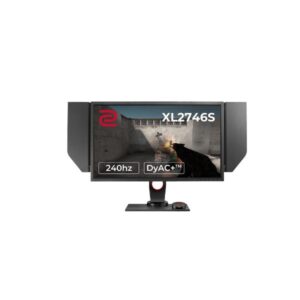
Benq BenQ ZOWIE XL2746S – Specs & Features Monitor
RATED
Great
7.4/10

27″ BenQ ZOWIE XL2746S – Specs & Features

On a larger competitive canvas, the 27" BenQ ZOWIE XL2746S is a large 27-inch 240 Hz esports monitor with DyAc+ and extensive legacy connectivity.

27″ · 16:9 · MODEL YEAR 2019
BenqMonitor
Benq Monitor
Display
27-inch, TN, 1920 x 1080
27
Refresh Rate
48 Hz - 240 Hz
48 Hz
Brightness
320 cd/m²
320 cd
Contrast Ratio
1000 : 1 / Dynamic 12000000 : 1
1000

Overview

On a larger competitive canvas, the 27" BenQ ZOWIE XL2746S is a large 27-inch 240 Hz esports monitor with DyAc+ and extensive legacy connectivity. The 0.5 ms GtG TN panel, 240 Hz refresh, USB hub, DVI-D Dual Link, microphone input and S Switch make it unusually flexible for older tournament and multi-device setups. At 81 PPI, Full HD looks coarse on a 27-inch desktop, and the TN panel lacks HDR, wide-gamut coverage and modern high-resolution versatility. The XL2746S carries more legacy ports and a three-way S Switch, whereas the XL2746K uses a newer stand, three HDMI 2.0 inputs and XL Setting to Share. For competitive players wanting a larger 240 Hz screen and legacy ports, the trade-offs are coherent. For buyers expecting crisp desktop text, HDR or creator-grade colour, they are not.

BrandBenQPanel TypeTNResolution1920 x 1080Refresh Rate48 Hz - 240 Hz

Key Highlights

  • ZOWIE XL2746S resolution | 1920 x 1080 at 81 PPI defines its exact workspace and density
  • ZOWIE XL2746S motion | 48 Hz - 240 Hz refresh with 0.5 ms (GtG) response; no range is borrowed from BenQ ZOWIE XL2746K
  • ZOWIE XL2746S image baseline | 320 cd/m² brightness and 1000 : 1 contrast
  • ZOWIE XL2746S key advantage | The 0.5 ms GtG TN panel, 240 Hz refresh, USB hub, DVI-D Dual Link, microphone input and S Switch make it unusually flexible for older tournament and multi-device setups
  • Closest sibling | The XL2746S carries more legacy ports and a three-way S Switch, whereas the XL2746K uses a newer stand, three HDMI 2.0 inputs and XL Setting to Share

Who Should Buy the Benq ZOWIE XL2746S

+ Best For
ZOWIE XL2746S audience
competitive players wanting a larger 240 Hz screen and legacy ports
ZOWIE XL2746S display case
Practical advantage: the 0.5 ms GtG TN panel, 240 Hz refresh, USB hub, DVI-D Dual Link, microphone input and S Switch make it unusually flexible for older tournament and multi-device setups
ZOWIE XL2746S desk fit
The stand lists 140 mm height adjustment, ±45° swivel, no functional pivot and -5° to +20° tilt.
× Not Ideal For
ZOWIE XL2746S mismatch
buyers expecting crisp desktop text, HDR or creator-grade colour
ZOWIE XL2746S limitation
The main trade-off is that at 81 PPI, Full HD looks coarse on a 27-inch desktop, and the TN panel lacks HDR, wide-gamut coverage and modern high-resolution versatility
Choose against BenQ ZOWIE XL2746K carefully
The deciding difference is that the XL2746S carries more legacy ports and a three-way S Switch, whereas the XL2746K uses a newer stand, three HDMI 2.0 inputs and XL Setting to Share

Display Performance

Refresh Rate 48 Hz - 240 Hz Exact published motion range for ZOWIE XL2746S
Response Time 0.5 ms (GtG) 0.5 ms (GtG) is the published GtG timing for ZOWIE XL2746S; it is the most relevant figure here for normal pixel-transition comparisons.
Brightness 320 cd/m² ZOWIE XL2746S's typical SDR figure; peak output is separate when published
Contrast 1000 : 1 ZOWIE XL2746S's native black-to-white separation
Colour Gamut 8 bits Colour depth and coverage published for ZOWIE XL2746S
HDR Not published No HDR tier is published for ZOWIE XL2746S; its SDR hardware is assessed below

Gaming Performance

Refresh Rate48 Hz - 240 HzZOWIE XL2746S's own published range, distinct from BenQ ZOWIE XL2746K
Response Time0.5 ms (GtG)0.5 ms (GtG) is the published GtG timing for ZOWIE XL2746S; it is the most relevant figure here for normal pixel-transition comparisons.
VRR / Adaptive SyncNot publishedZOWIE XL2746S reduces tearing only when this support is explicitly listed
GPU Requirement1920 x 1080; ceiling 240 HzZOWIE XL2746S's published 48 Hz - 240 Hz mode needs a matching source, cable and frame rate

HDR & Brightness Reality

No HDR tier is published for 27" BenQ ZOWIE XL2746S. The ZOWIE XL2746S's TN panel is rated at 320 cd/m² and 1000 : 1, so the evidence supports treating it as an SDR monitor. For ZOWIE XL2746S, HDR games and films receive no documented local dimming, certified peak brightness or HDR-specific colour-volume claim; its suitability rests on the intended office, creator or esports role instead.

Connectivity & Ports

HDMI1 x HDMI 1.4 / 1 x HDMI 2.0ZOWIE XL2746S's exact HDMI count and version for consoles or media sources
DisplayPort1 x DisplayPort 1.2ZOWIE XL2746S's published DisplayPort path; do not assume an unlisted version
USB-CNot publishedOn ZOWIE XL2746S, charging, video and data apply only where wattage or DP Alt Mode is stated
Hub / Legacy1 x USB 3.0 (Type-B; upstream) / 2 x USB 3.0 (Type-A; downstream) / 1 x DVI-D Dual Link / 1 x 3.5 mm Microphone InZOWIE XL2746S's additional data, network or legacy links; compare them with BenQ ZOWIE XL2746K
Audio / HDCP1 x 3.5 mm Audio Out / High-bandwidth Digital Content Protection (HDCP) 1.4ZOWIE XL2746S's headphone, audio-input and copy-protection provision exactly as published

Desk Fit & Ergonomics

Size / Footprint632.5 mm wide / 225 mm deepZOWIE XL2746S's desk footprint should be checked alongside its diagonal
StandRemovable: YesZOWIE XL2746S's supplied base can be replaced only when removal and VESA details agree
VESA Mount100 x 100 mmPublished arm or wall-mount pattern for ZOWIE XL2746S
Tilt-5° to +20°ZOWIE XL2746S's vertical adjustment; compare the range with BenQ ZOWIE XL2746K
Height Adjust140 mmZOWIE XL2746S's stand either reaches eye level directly or needs a riser
Swivel / Pivot±45° / ±0°Lateral and portrait movement published for ZOWIE XL2746S

Real-World Use Cases

ZOWIE XL2746S primary role
a large 27-inch 240 Hz esports monitor with DyAc+ and extensive legacy connectivity
ZOWIE XL2746S strongest use
In practical terms, the 0.5 ms GtG TN panel, 240 Hz refresh, USB hub, DVI-D Dual Link, microphone input and S Switch make it unusually flexible for older tournament and multi-device setups
ZOWIE XL2746S desk plan
The connection set covers 1 x HDMI 1.4, 1 x HDMI 2.0; 1 x DisplayPort 1.2; 3 additional USB connections; DVI-D. The stand lists 140 mm height adjustment, ±45° swivel, no functional pivot and -5° to +20° tilt.
ZOWIE XL2746S alternative
The choice against BenQ ZOWIE XL2746K turns on this: The XL2746S carries more legacy ports and a three-way S Switch, whereas the XL2746K uses a newer stand, three HDMI 2.0 inputs and XL Setting to Share

Pros & Cons

Pros
  • ZOWIE XL2746S core strength The 0.5 ms GtG TN panel, 240 Hz refresh, USB hub, DVI-D Dual Link, microphone input and S Switch make it unusually flexible for older tournament and multi-device setups
  • ZOWIE XL2746S's 1920 x 1080 and 81 PPI clearly define its workspace and sharpness
  • ZOWIE XL2746S connectivity The connection set covers 1 x HDMI 1.4, 1 x HDMI 2.0; 1 x DisplayPort 1.2; 3 additional USB connections; DVI-D.
  • ZOWIE XL2746S ergonomics The stand lists 140 mm height adjustment, ±45° swivel, no functional pivot and -5° to +20° tilt.
  • ZOWIE XL2746S's closest comparison is BenQ ZOWIE XL2746K; the XL2746S carries more legacy ports and a three-way S Switch, whereas the XL2746K uses a newer stand, three HDMI 2.0 inputs and XL Setting to Share
Cons
  • ZOWIE XL2746S main compromise At 81 PPI, Full HD looks coarse on a 27-inch desktop, and the TN panel lacks HDR, wide-gamut coverage and modern high-resolution versatility
  • ZOWIE XL2746S's missing values remain unpublished rather than being copied from BenQ ZOWIE XL2746K.
  • Before choosing ZOWIE XL2746S over BenQ ZOWIE XL2746K, verify that its exact ports, stand and motion ceiling match the intended use

Score & Ratings

7.4/10 Great
Design
8
Display
7
Color Performance
7
Performance
9
Connectivity
8
Model Information 6
Specification Value
Brand BenQ
Series ZOWIE
Model ZOWIE XL2746S
Full Product Name BenQ ZOWIE XL2746S
Model Year 2019
Available Colors Black
Display & Panel 5
Specification Value What It Means
Screen Size 27-inch
Aspect Ratio 16:9
Display Area 84.97 % (percent)
Panel Type TN TN favours fast competitive motion, but the buyer should expect narrower viewing angles and weaker off-axis colour consistency than IPS.
Backlight Type W-LED
Resolution & Pixel Details 3
Specification Value What It Means
Native Resolution 1920 × 1080
Pixel Density 81 PPI 81 PPI is coarse for close desktop text; scaling and viewing distance will affect the result.
Pixel Pitch 0.311 mm (millimeters)
Picture Quality & Color 2
Specification Value
Panel Bit Depth 8 bits
Display Colors 16777216 colors
Refresh Rate, Response & Gaming 1
Specification Value
Refresh Rate Range 48 Hz - 240 Hz
Ports & Connectivity 5
Specification Value
HDMI Ports
1× HDMI 1.4 · 1× HDMI 2.0
HDMI Version HDMI 1.4
DisplayPort Input 1× DisplayPort 1.2
DisplayPort Version DisplayPort 1.2
HDCP Support Yes
Audio, Camera, Network & Smart Features 1
Specification Value
Built-In Camera No
Ergonomics & Stand 5
Specification Value What It Means
VESA Mount 100 × 100 mm
VESA Size 100 × 100 mm
Removable Stand Yes
Height Adjustment 140 mm 140 mm shows whether the supplied stand can reach a comfortable eye line; it matters more on long work sessions than bezel styling.
Height Range 140 mm
Dimensions, Weight & Design 1
Specification Value
Weight With Stand 8.7 kg
Power & Operating Conditions 4
Specification Value
Power Input 100–240V
AC Frequency 50/60Hz
Maximum Power Consumption 55W
Sleep Consumption 0.5W
Certifications, Standards & Licenses 1
Specification Value
Energy Star ENERGY STAR

Frequently Asked Questions

01 What does the ZOWIE XL2746S's 1920 x 1080 resolution mean at 27-inch? +
The sheet gives 81 PPI, which is the practical sharpness figure for ZOWIE XL2746S. That density supports competitive players wanting a larger 240 Hz screen and legacy ports without changing the panel's other limitations.
02 How should buyers interpret the ZOWIE XL2746S's 48 Hz - 240 Hz refresh specification? +
That is the exact range or ceiling published for ZOWIE XL2746S. 0.5 ms (GtG) is the published GtG timing for ZOWIE XL2746S; it is the most relevant figure here for normal pixel-transition comparisons.
03 Which connections define the ZOWIE XL2746S's desk use? +
The full published line is 1 x USB 3.0 (Type-B; upstream) / 2 x USB 3.0 (Type-A; downstream) / 1 x HDMI 1.4 / 1 x HDMI 2.0 / 1 x DisplayPort 1.2 / 1 x DVI-D Dual Link / 1 x 3.5 mm Microphone In / 1 x 3.5 mm Audio Out / High-bandwidth Digital Content Protection (HDCP) 1.4. On ZOWIE XL2746S, USB-C data, video and charging roles must be read separately rather than treated as interchangeable.
04 What is the most important weakness in the ZOWIE XL2746S specification? +
The main trade-off is that at 81 PPI, Full HD looks coarse on a 27-inch desktop, and the TN panel lacks HDR, wide-gamut coverage and modern high-resolution versatility. ZOWIE XL2746S's missing values remain unpublished rather than being copied from BenQ ZOWIE XL2746K.
05 How does the ZOWIE XL2746S compare with the BenQ ZOWIE XL2746K? +
The deciding distinction is that the XL2746S carries more legacy ports and a three-way S Switch, whereas the XL2746K uses a newer stand, three HDMI 2.0 inputs and XL Setting to Share. The ZOWIE XL2746S decision should follow the real panel, stand and port differences rather than the shared brand.

Reviews

NO REVIEWS YET Own this display? Your rating helps calibrate the score for everyone.
DISPLAYINPUT · INDEPENDENT · SPEC-BASED · NO SPONSORED PLACEMENT SHEET № ZOWIE XL2746S