
Skip to content
Dell Dell P2726DEB – Specs & Features Monitor
RATED
Great
8.2/10

27″ Dell P2726DEB – Specs & Features

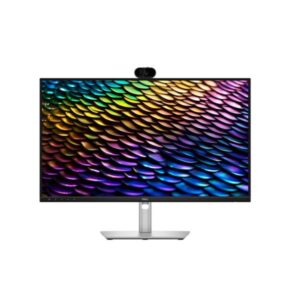
A camera, speakers and a full laptop dock turn the 27-inch Dell P2726DEB into a QHD collaboration monitor rather than a bare display.

27″ · 16:9 · MODEL YEAR 2026
DellMonitor
Dell Monitor
Display
27", IPS, 2560 × 1440 (QHD)
27
Refresh Rate
48Hz – 100Hz
48Hz
Brightness
350 nits
Contrast Ratio
1,500:1
1

Overview

A camera, speakers and a full laptop dock turn the 27-inch Dell P2726DEB into a QHD collaboration monitor rather than a bare display. The IPS panel runs at 2560 x 1440 and up to 100 Hz, with 350 cd/m² brightness, 1500:1 contrast and 99% sRGB for documents, dashboards and video calls. Its 3.69MP camera includes AI auto framing and IR face recognition, while dual microphones and two 5W speakers complete the conferencing package. USB-C supplies 90W and sits beside Gigabit Ethernet, three USB-A ports, downstream USB-C, USB-B, HDMI 1.4 and DisplayPort 1.4 in and out for MST. The published with-stand and without-stand measurements appear inconsistent, so physical fit should be checked separately. Buy it if you want QHD conferencing and docking in one screen; skip it if you need HDR, high-refresh gaming or reliable dimensional data from this sheet.

BrandDellPanel TypeIPSResolution2560 × 1440 (QHD)Refresh Rate48Hz – 100Hz

Key Highlights

  • QHD IPS panel with a smoother 100 Hz ceiling
  • Integrated 3.69MP IR camera, microphones and 10W speakers
  • 90W USB-C, Gigabit Ethernet and KVM-ready USB hub
  • DisplayPort 1.4 output supports MST daisy chaining
  • Fully adjustable stand with pivot

Who Should Buy the Dell P2726DEB

+ Best For
Hybrid workers
camera, microphones and speakers handle meetings without add-ons
Laptop users
90W USB-C and Ethernet create a one-cable desk
Multi-monitor offices
DisplayPort output supports MST chains
Document-heavy work
QHD at 27 inches gives useful text and workspace density
× Not Ideal For
HDR buyers
no HDR standard is published
Fast gaming
100 Hz and 5 ms are office-oriented
Colour-critical wide-gamut work
only 99% sRGB is stated
Tight desk planning
the supplied physical measurements conflict

Display Performance

Refresh Rate 48Hz – 100Hz Smooth office motion
Response Time 5 ms GtG Normal productivity speed
Brightness 350 cd/m² typical Good for standard offices
Contrast 1,500:1 Above basic IPS contrast
Colour Gamut 99% sRGB Suitable for mainstream business colour
HDR Not published No HDR claim

Gaming Performance

Refresh Rate100 Hz maximumFine for casual play
Response Time5 ms GtGNot an esports response target
VRR / Adaptive SyncNot publishedNo VRR support stated
GPU RequirementModest QHD GPUNative resolution is easy for office hardware

HDR & Brightness Reality

The Dell P2726DEB has no published HDR support, and its hardware is specified for office consistency rather than high dynamic range. Brightness is 350 cd/m² and contrast is 1500:1, useful figures for normal work but not evidence of strong highlights or controlled black levels. The 8-bit colour path also keeps the emphasis on standard sRGB content. HDR should not influence the purchase decision.

Connectivity & Ports

HDMI1 x HDMI 1.4Secondary source connection
DisplayPort1 x DisplayPort 1.4 in, 1 x DisplayPort 1.4 out MSTSupports daisy chaining
USB-C1 x upstream USB-C, 90W DP Alt Mode; 1 x downstream USB-C, 15WLaptop docking and device charging
USB Hub1 x USB-B upstream, 3 x USB-A downstream, Gigabit EthernetFull office hub and KVM support
Audio Out1 x 3.5 mmComplements the built-in 10W speakers

Desk Fit & Ergonomics

Size / FootprintPublished with-stand and without-stand dimensions conflictVerify final installation measurements
StandHeight, swivel, tilt and pivotComprehensive office adjustment
VESA Mount100 × 100 mmStandard arm support
Tilt-5° to +21°Normal range
Height Adjust150 mmGenerous for eye-line and camera placement
Swivel / Pivot±45° / ±90°Wide movement and portrait support

Real-World Use Cases

Hybrid meetings
camera, IR login, microphones and speakers form a complete call setup
Laptop workstation
90W USB-C, Ethernet and USB hub replace several cables
Multi-monitor productivity
DisplayPort MST output simplifies a daisy chain
QHD office work
109 PPI balances workspace and readable text

Pros & Cons

Pros
  • Complete camera, microphone and speaker package
  • 90W USB-C dock with Ethernet
  • DisplayPort MST output
  • QHD 100 Hz office panel
  • Excellent ergonomic adjustment
Cons
  • No HDR support
  • HDMI 1.4 is dated
  • Not configured for serious gaming
  • Published physical dimensions need verification

Score & Ratings

8.2/10 Great
Design
9
Display
8
Color Performance
7
Performance
7
Connectivity
10
Model Information 6
Specification Value
Brand Dell
Series Pro
Model P2726DEB
Full Product Name Dell P2726DEB
Model Year 2026
Available Colors Black and Silver
Display & Panel 5
Specification Value What It Means
Screen Size 27-inch
Aspect Ratio 16:9
Display Area 83.32%
Panel Type IPS IPS supports consistent colour and clear viewing during shared meetings, with 1500:1 contrast that is good for office IPS.
Panel Technology
IPS panel with wide 178°/178° viewing anglesQHD resolution (2560×1440)Edge LED backlight99% sRGB color coverageAnti-glare/Matte (3H) coatingFlicker-free technologyComfortView Plus
Resolution & Pixel Details 3
Specification Value What It Means
Native Resolution 2560 × 1440 (QHD)
Pixel Density 109 PPI 109 PPI normally works comfortably at standard desktop scaling.
Pixel Pitch 0.233 mm
Picture Quality & Color 2
Specification Value
Panel Bit Depth 8-bit
Display Colors 16.7 Million
Refresh Rate, Response & Gaming 1
Specification Value
Refresh Rate Range 48Hz – 100Hz
Ports & Connectivity 9
Specification Value
HDMI Ports
1× HDMI 1.4
HDMI Version HDMI 1.4
DisplayPort Input 1× DisplayPort 1.4
DisplayPort Output 1× DisplayPort 1.4
DisplayPort Version DisplayPort 1.4
USB-C Video Input 1× USB-C
DisplayPort Alt Mode Yes
HDCP Support Yes
HDCP Version HDCP 1.4
Audio, Camera, Network & Smart Features 10
Specification Value
Built-In Camera Yes
Camera Resolution 2560 × 1440
Camera Image Resolution 2560 × 1440
Camera Video Resolution 2560 × 1440
Camera Megapixels 3.69 MP
Camera Field of View 81°
IR Camera Yes
Windows Hello Yes
Auto Framing Yes
Privacy Shutter Yes
Ergonomics & Stand 5
Specification Value What It Means
VESA Mount 100 × 100 mm
VESA Size 100 × 100 mm
Removable Stand Yes
Height Adjustment 150 mm 150 mm helps align both the screen and camera with the user's eye line.
Height Range 150 mm
Dimensions, Weight & Design 2
Specification Value
Weight With Stand 7.13 kg
Weight Without Stand 5.16 kg
Power & Operating Conditions 6
Specification Value
Power Input 100–240V
AC Frequency 50/60Hz
Typical Power Consumption 20.9W
Average Power Consumption 20.9W
Maximum Power Consumption 205W
Sleep Consumption 0.3W
Certifications, Standards & Licenses 9
Specification Value
Energy Star Energy Star 8.0
EPEAT EPEAT Climate+
EPEAT Climate+ EPEAT Climate+
TCO Certified TCO Certified 10.0
TCO Certified Edge TCO Certified Edge
TÜV Flicker-Free TÜV Rheinland Flicker-free Certified
TÜV Low Blue Light TÜV Rheinland Low Blue Light Certified
RoHS RoHS
CECP CECP

Frequently Asked Questions

01 What makes the Dell P2726DEB more than a standard QHD office monitor? +
It combines a 3.69MP IR camera, dual microphones, two 5W speakers and a 90W USB-C dock. Ethernet, KVM functions and DisplayPort output further reduce separate desk hardware.
02 How practical is the P2726DEB for daisy-chained displays? +
It includes both DisplayPort 1.4 input and output with MST. That allows a compatible second monitor to connect through the Dell rather than directly to the computer.
03 What should buyers verify before fitting the P2726DEB into a monitor bay? +
The published stand and panel dimensions and weights do not follow normal with-stand relationships. Dell's final technical drawing should be checked before relying on those measurements.
04 Why is the P2726DEB not a strong gaming choice despite 100 Hz? +
The smoother refresh is pleasant, but the response time is 5 ms and no adaptive-sync support is stated. Its strengths are conferencing and docking rather than gaming features.
05 Can the P2726DEB power and connect a business laptop through one cable? +
✓ Yes, the upstream USB-C port carries DisplayPort video, data and up to 90W. The same connection can expose Ethernet and the downstream USB hub.

Reviews

NO REVIEWS YET Own this display? Your rating helps calibrate the score for everyone.
DISPLAYINPUT · INDEPENDENT · SPEC-BASED · NO SPONSORED PLACEMENT SHEET № P2726DEB