
Skip to content
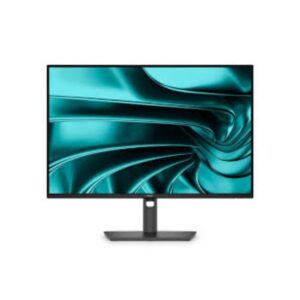
Dell Dell P2426H – Specs & Features Monitor
RATED
Great
7.4/10

23.8″ Dell P2426H – Specs & Features

Compact size matters more than headline resolution on the 23.8" Dell P2426H, a compact 120 Hz Full HD office monitor with a fully adjustable stand and USB hub.

23.8″ · 16:9 · MODEL YEAR 2026
DellMonitor
Dell Monitor
Display
23.8", IPS, 1920 × 1080 (Full HD)
23.8
Refresh Rate
48Hz – 120Hz
48Hz
Brightness
300 nits
Contrast Ratio
1,500:1
1

Overview

Compact size matters more than headline resolution on the 23.8" Dell P2426H, a compact 120 Hz Full HD office monitor with a fully adjustable stand and USB hub. Its 23.8-inch IPS panel reaches 92 PPI, so text looks finer than on the 27-inch P2726H while retaining the same 120 Hz upper refresh rate. One HDMI 1.4, one DisplayPort 1.4, Type-B upstream, two USB-A ports and two data-only USB-C ports cover routine desk peripherals. The USB-C sockets are downstream data ports with 15 W output rather than one-cable laptop inputs, and no HDR or speakers are published. Choose the P2426H over the P2726H when desk space and 92 PPI clarity matter more than a larger image. Choose it when sharper text and a smaller footprint matter; move to the P2726H only for a physically larger image.

BrandDellPanel TypeIPSResolution1920 × 1080 (Full HD)Refresh Rate48Hz – 120Hz

Key Highlights

  • 1920 × 1080 (Full HD) at 92 PPI - P2426H's core clarity and workspace specification
  • 48Hz – 120Hz refresh - exact motion range, not a reused generic ceiling
  • 1,500:1 contrast with 300 cd/m² typical brightness
  • One HDMI 1.4, one DisplayPort 1.4, Type-B upstream, two USB-A ports and two data-only USB-C ports cover routine desk peripherals
  • Choose the P2426H over the P2726H when desk space and 92 PPI clarity matter more than a larger image

Who Should Buy the Dell P2426H

+ Best For
Primary-use buyers
a compact 120 Hz Full HD office monitor with a fully adjustable stand and USB hub
Spec-conscious shoppers
Its 23.8-inch IPS panel reaches 92 PPI, so text looks finer than on the 27-inch P2726H while retaining the same 120 Hz upper refresh rate
Desk planners
The 150 mm stand pivots through ±90°, swivels ±45° and tilts from -5° to +21°
× Not Ideal For
HDR-first buyers
P2426H has no published HDR tier
Feature-maximisers
The USB-C sockets are downstream data ports with 15 W output rather than one-cable laptop inputs, and no HDR or speakers are published
Wrong-sibling shoppers
Choose the P2426H over the P2726H when desk space and 92 PPI clarity matter more than a larger image

Display Performance

Refresh Rate 48Hz – 120Hz Published operating range for P2426H
Response Time 5 ms (GtG) Use GtG for normal comparison; MPRT is strobed when listed
Brightness 300 cd/m² Typical SDR brightness
Contrast 1,500:1 Native panel separation
Colour Gamut 8-bit Published colour coverage or depth
HDR Not published Hardware limits are explained below

Gaming Performance

Refresh Rate48Hz – 120HzExact published range for P2426H
Response Time5 ms (GtG)Published pixel-transition figure
VRR / Adaptive SyncNot publishedNo adaptive-sync standard is published
GPU Requirement1920 × 1080 (Full HD)Source must output 1920 × 1080 (Full HD) at up to 120 Hz; frame rates near 120 fps use the ceiling best

HDR & Brightness Reality

P2426H has no published HDR tier. Its IPS panel is specified at 300 cd/m² and 1,500:1 contrast, so the money is going into the stated resolution, refresh and practical features rather than HDR processing. Without a peak-brightness figure or local dimming, HDR claims would add little. Judge it as an SDR monitor and match expectations to its office or legacy role.

Connectivity & Ports

HDMI1 × HDMI 1.4Digital video input available
DisplayPort1 × DisplayPort 1.4DisplayPort connectivity available
USB-C2 × USB 3.2 Type-C (downstream; 15W; data only)Check upstream, downstream, video and wattage roles carefully
USB Hub1 × USB 3.2 Type-B (upstream; 5 Gbps) / 2 × USB 3.2 Type-A (downstream; 5 Gbps)Peripheral hub is included
Audio OutNot publishedNo 3.5 mm output is published Ports match the 27-inch P2726H sibling exactly - the real difference between them is screen size and sharpness, not connectivity.

Desk Fit & Ergonomics

Size / Footprint538.64 mm wide / 50.03 mm deepCheck desk depth as well as diagonal size
StandRemovable: YesSupplied base can be replaced when listed
VESA Mount100 × 100 mmArm or wall-mount option
Tilt-5° to +21°Vertical viewing-angle adjustment
Height Adjust150 mmUseful vertical travel
Swivel / Pivot±45° / ±90°Published lateral and portrait movement

Real-World Use Cases

Main role
a compact 120 Hz Full HD office monitor with a fully adjustable stand and USB hub
Daily work
Its 23.8-inch IPS panel reaches 92 PPI, so text looks finer than on the 27-inch P2726H while retaining the same 120 Hz upper refresh rate
Desk setup
One HDMI 1.4, one DisplayPort 1.4, Type-B upstream, two USB-A ports and two data-only USB-C ports cover routine desk peripherals
Alternative choice
Choose the P2426H over the P2726H when desk space and 92 PPI clarity matter more than a larger image

Pros & Cons

Pros
  • Its 23.8-inch IPS panel reaches 92 PPI, so text looks finer than on the 27-inch P2726H while retaining the same 120 Hz upper refresh rate
  • One HDMI 1.4, one DisplayPort 1.4, Type-B upstream, two USB-A ports and two data-only USB-C ports cover routine desk peripherals
  • The 150 mm stand pivots through ±90°, swivels ±45° and tilts from -5° to +21°
  • Published 48Hz 120Hz refresh matches its intended role
  • 1,500:1 contrast is clearly stated rather than inferred
Cons
  • The USB-C sockets are downstream data ports with 15 W output rather than one-cable laptop inputs, and no HDR or speakers are published
  • HDR position: Not published with 300 cd/m² typical brightness
  • Closest alternative: Choose the P2426H over the P2726H when desk space and 92 PPI clarity matter more than a larger image
  • The dimension rows appear reversed: 181.75 mm and 4.87 kg are listed without the stand, while 50.03 mm and 2.96 kg are listed with it; verify the source labels.

Score & Ratings

7.4/10 Great
Design
8
Display
7
Color Performance
7
Performance
7
Connectivity
8
Model Information 6
Specification Value
Brand Dell
Series Pro
Model P2426H
Full Product Name Dell P2426H
Model Year 2026
Available Colors Dark Gray
Display & Panel 5
Specification Value What It Means
Screen Size 23.8-inch
Aspect Ratio 16:9
Display Area 92.31%
Panel Type IPS IPS gives wide viewing angles for desk use; black depth still follows the published 1,500:1 contrast.
Panel Technology
IPS panel with wide 178°/178° viewing anglesEdge LED backlight99% sRGB color coverageAnti-glare/Matte (3H) coatingFlicker-free technologyComfortView Plus (Low Blue Light)
Resolution & Pixel Details 3
Specification Value What It Means
Native Resolution 1920 × 1080 (Full HD)
Pixel Density 92 PPI 92 PPI is adequate for routine desktop work; scaling needs depend on eyesight and operating-system settings.
Pixel Pitch 0.275 mm
Picture Quality & Color 2
Specification Value
Panel Bit Depth 8-bit
Display Colors 16.7 Million
Refresh Rate, Response & Gaming 1
Specification Value
Refresh Rate Range 48Hz – 120Hz
Ports & Connectivity 7
Specification Value
HDMI Ports
1× HDMI 1.4
HDMI Version HDMI 1.4
DisplayPort Input 1× DisplayPort 1.4
DisplayPort Version DisplayPort 1.4
USB-C Video Input 1× USB-C
HDCP Support Yes
HDCP Version HDCP 1.4
Audio, Camera, Network & Smart Features 1
Specification Value
Built-In Camera No
Ergonomics & Stand 5
Specification Value What It Means
VESA Mount 100 × 100 mm 100 100 mm lets buyers replace the stand with an arm or wall mount when desk ergonomics need improvement.
VESA Size 100 × 100 mm
Removable Stand Yes
Height Adjustment 150 mm 150 mm gives useful vertical travel for eye-level placement and shared desks.
Height Range 150 mm
Dimensions, Weight & Design 2
Specification Value
Weight With Stand 4.87 kg
Weight Without Stand 2.96 kg
Power & Operating Conditions 6
Specification Value
Power Input 100–240V
AC Frequency 50/60Hz
Typical Power Consumption 11.7W
Average Power Consumption 11.7W
Maximum Power Consumption 74W
Sleep Consumption 0.3W
Certifications, Standards & Licenses 7
Specification Value
Energy Star ENERGY STAR
EPEAT EPEAT Climate+
EPEAT Climate+ EPEAT Climate+
TCO Certified TCO Certified Displays
TCO Certified Edge TCO Certified Edge
TÜV Eye Comfort TÜV Eye Comfort - 4 star
RoHS RoHS

Frequently Asked Questions

01 What does the P2426H's 1920 × 1080 (Full HD) panel mean at 23.8-inch? +
The sheet gives 92 PPI, which is the practical sharpness figure. Its 23.8-inch IPS panel reaches 92 PPI, so text looks finer than on the 27-inch P2726H while retaining the same 120 Hz upper refresh rate.
02 How should buyers read the P2426H's 48Hz – 120Hz specification? +
That is the exact published refresh range for this monitor. Source hardware must expose the matching mode; no different range should be assumed.
03 Which connections make the P2426H useful on a real desk? +
One HDMI 1.4, one DisplayPort 1.4, Type-B upstream, two USB-A ports and two data-only USB-C ports cover routine desk peripherals. Check USB-C roles carefully because downstream data ports are not automatically laptop video inputs.
04 What is the biggest compromise in the P2426H specification? +
The USB-C sockets are downstream data ports with 15 W output rather than one-cable laptop inputs, and no HDR or speakers are published. That limitation matters more than any generic feature badge. The dimension rows appear reversed: 181.75 mm and 4.87 kg are listed without the stand, while 50.03 mm and 2.96 kg are listed with it; verify the source labels.
05 How does the P2426H differ from its closest sibling? +
Choose the P2426H over the P2726H when desk space and 92 PPI clarity matter more than a larger image. The choice should follow that concrete difference rather than the shared branding.

Reviews

NO REVIEWS YET Own this display? Your rating helps calibrate the score for everyone.
DISPLAYINPUT · INDEPENDENT · SPEC-BASED · NO SPONSORED PLACEMENT SHEET № P2426H