
Skip to content
Dell Dell P2726H – Specs & Features Monitor
RATED
Great
7.4/10

27″ Dell P2726H – Specs & Features

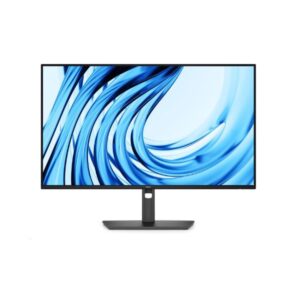
For desks that need smoother everyday movement, the 27" Dell P2726H is a 27-inch Full HD office monitor with a 120 Hz panel and a practical peripheral hub.

27″ · 16:9 · MODEL YEAR 2026
DellMonitor
Dell Monitor
Display
27", IPS, 1920 × 1080 (Full HD)
27
Refresh Rate
48Hz – 120Hz
48Hz
Brightness
300 nits
Contrast Ratio
1,500:1
1

Overview

For desks that need smoother everyday movement, the 27" Dell P2726H is a 27-inch Full HD office monitor with a 120 Hz panel and a practical peripheral hub. The 120 Hz IPS panel makes scrolling and cursor movement smoother than a standard 60 Hz office display, and the fully adjustable stand suits shared desks. HDMI 1.4 and DisplayPort 1.4 handle video, while Type-B upstream feeds two USB-A and two 15 W data-only USB-C downstream ports. At 81 PPI, text is visibly coarser than on the 23.8-inch P2426H; there is no HDR, speaker system or laptop-charging video input. The Dell P2426H uses the same ports and 120 Hz specification in a smaller, sharper 92 PPI format. This is a sensible large office screen when smooth scrolling matters more than fine text.

BrandDellPanel TypeIPSResolution1920 × 1080 (Full HD)Refresh Rate48Hz – 120Hz

Key Highlights

  • 1920 × 1080 (Full HD) at 81 PPI - P2726H's core clarity and workspace specification
  • 48Hz – 120Hz refresh - exact motion range, not a reused generic ceiling
  • 1,500:1 contrast with 300 cd/m² typical brightness
  • HDMI 1.4 and DisplayPort 1.4 handle video, while Type-B upstream feeds two USB-A and two 15 W data-only USB-C downstream ports
  • The Dell P2426H uses the same ports and 120 Hz specification in a smaller, sharper 92 PPI format

Who Should Buy the Dell P2726H

+ Best For
Primary-use buyers
a 27-inch Full HD office monitor with a 120 Hz panel and a practical peripheral hub
Spec-conscious shoppers
The 120 Hz IPS panel makes scrolling and cursor movement smoother than a standard 60 Hz office display, and the fully adjustable stand suits shared desks
Desk planners
The 150 mm stand adds ±90° pivot, ±45° swivel and -5° to +21° tilt
× Not Ideal For
HDR-first buyers
P2726H has no published HDR tier
Feature-maximisers
At 81 PPI, text is visibly coarser than on the 23.8-inch P2426H; there is no HDR, speaker system or laptop-charging video input
Wrong-sibling shoppers
The Dell P2426H uses the same ports and 120 Hz specification in a smaller, sharper 92 PPI format

Display Performance

Refresh Rate 48Hz – 120Hz Published operating range for P2726H
Response Time 5 ms (GtG) Use GtG for normal comparison; MPRT is strobed when listed
Brightness 300 cd/m² Typical SDR brightness
Contrast 1,500:1 Native panel separation
Colour Gamut 8-bit Published colour coverage or depth
HDR Not published Hardware limits are explained below

Gaming Performance

Refresh Rate48Hz – 120HzExact published range for P2726H
Response Time5 ms (GtG)Published pixel-transition figure
VRR / Adaptive SyncNot publishedNo adaptive-sync standard is published
GPU Requirement1920 × 1080 (Full HD)Source must output 1920 × 1080 (Full HD) at up to 120 Hz; frame rates near 120 fps use the ceiling best

HDR & Brightness Reality

HDR is absent from the P2726H specification. With 300 cd/m² typical brightness and 1,500:1 native contrast, the panel is better judged on ordinary desktop work than on highlight intensity. There is no published local dimming or HDR peak, so enabling an HDR signal would not create extra hardware capability. Its value lies elsewhere, particularly in the features stated for this exact model.

Connectivity & Ports

HDMI1 × HDMI 1.4Digital video input available
DisplayPort1 × DisplayPort 1.4DisplayPort connectivity available
USB-C2 × USB 3.2 Type-C (downstream; 15W; data only)Check upstream, downstream, video and wattage roles carefully
USB Hub1 × USB 3.2 Type-B (upstream; 5 Gbps) / 2 × USB 3.2 Type-A (downstream; 5 Gbps)Peripheral hub is included
Audio OutNot publishedNo 3.5 mm output is published Ports match the 23.8-inch P2426H sibling exactly - the real difference between them is screen size and sharpness, not connectivity.

Desk Fit & Ergonomics

Size / Footprint610.69 mm wide / 50.03 mm deepCheck desk depth as well as diagonal size
StandRemovable: YesSupplied base can be replaced when listed
VESA Mount100 × 100 mmArm or wall-mount option
Tilt-5° to +21°Vertical viewing-angle adjustment
Height Adjust150 mmUseful vertical travel
Swivel / Pivot±45° / ±90°Published lateral and portrait movement

Real-World Use Cases

Main role
a 27-inch Full HD office monitor with a 120 Hz panel and a practical peripheral hub
Daily work
The 120 Hz IPS panel makes scrolling and cursor movement smoother than a standard 60 Hz office display, and the fully adjustable stand suits shared desks
Desk setup
HDMI 1.4 and DisplayPort 1.4 handle video, while Type-B upstream feeds two USB-A and two 15 W data-only USB-C downstream ports
Alternative choice
The Dell P2426H uses the same ports and 120 Hz specification in a smaller, sharper 92 PPI format

Pros & Cons

Pros
  • The 120 Hz IPS panel makes scrolling and cursor movement smoother than a standard 60 Hz office display, and the fully adjustable stand suits shared desks
  • HDMI 1.4 and DisplayPort 1.4 handle video, while Type-B upstream feeds two USB-A and two 15 W data-only USB-C downstream ports
  • The 150 mm stand adds ±90° pivot, ±45° swivel and -5° to +21° tilt
  • Published 48Hz 120Hz refresh matches its intended role
  • 1,500:1 contrast is clearly stated rather than inferred
Cons
  • At 81 PPI, text is visibly coarser than on the 23.8-inch P2426H; there is no HDR, speaker system or laptop-charging video input
  • HDR position: Not published with 300 cd/m² typical brightness
  • Closest alternative: The Dell P2426H uses the same ports and 120 Hz specification in a smaller, sharper 92 PPI format
  • The dimension rows appear reversed: the sheet gives 192.28 mm depth and 6.06 kg without the stand, but 50.03 mm and 3.99 kg with it; verify those labels before publishing.

Score & Ratings

7.4/10 Great
Design
8
Display
7
Color Performance
7
Performance
7
Connectivity
8
Model Information 6
Specification Value
Brand Dell
Series Pro
Model P2726H
Full Product Name Dell P2726H
Model Year 2026
Available Colors Dark Gray
Display & Panel 5
Specification Value What It Means
Screen Size 27-inch
Aspect Ratio 16:9
Display Area 92.83%
Panel Type IPS IPS gives wide viewing angles for desk use; black depth still follows the published 1,500:1 contrast.
Panel Technology
IPS panel with wide 178°/178° viewing anglesEdge LED backlight99% sRGB color coverageAnti-glare/Matte (3H) coatingFlicker-free technologyComfortView Plus (Low Blue Light)
Resolution & Pixel Details 3
Specification Value What It Means
Native Resolution 1920 × 1080 (Full HD)
Pixel Density 81 PPI 81 PPI is coarse at close desk distance; scaling needs depend on eyesight and operating-system settings.
Pixel Pitch 0.311 mm
Picture Quality & Color 2
Specification Value
Panel Bit Depth 8-bit
Display Colors 16.7 Million
Refresh Rate, Response & Gaming 1
Specification Value
Refresh Rate Range 48Hz – 120Hz
Ports & Connectivity 7
Specification Value
HDMI Ports
1× HDMI 1.4
HDMI Version HDMI 1.4
DisplayPort Input 1× DisplayPort 1.4
DisplayPort Version DisplayPort 1.4
USB-C Video Input 1× USB-C
HDCP Support Yes
HDCP Version HDCP 1.4
Audio, Camera, Network & Smart Features 1
Specification Value
Built-In Camera No
Ergonomics & Stand 5
Specification Value What It Means
VESA Mount 100 × 100 mm 100 100 mm lets buyers replace the stand with an arm or wall mount when desk ergonomics need improvement.
VESA Size 100 × 100 mm
Removable Stand Yes
Height Adjustment 150 mm 150 mm gives useful vertical travel for eye-level placement and shared desks.
Height Range 150 mm
Dimensions, Weight & Design 2
Specification Value
Weight With Stand 6.06 kg
Weight Without Stand 3.99 kg
Power & Operating Conditions 6
Specification Value
Power Input 100–240V
AC Frequency 50/60Hz
Typical Power Consumption 13.5W
Average Power Consumption 13.5W
Maximum Power Consumption 74W
Sleep Consumption 0.3W
Certifications, Standards & Licenses 8
Specification Value
Energy Star Energy Star 8.0
EPEAT EPEAT Climate+
EPEAT Climate+ EPEAT Climate+
TCO Certified TCO Certified 10.0
TCO Certified Edge TCO Certified Edge
TÜV Flicker-Free TÜV Rheinland Flicker Free Certified
TÜV Low Blue Light TÜV Rheinland Low Blue Light Certified
RoHS RoHS

Frequently Asked Questions

01 What does the P2726H's 1920 × 1080 (Full HD) panel mean at 27-inch? +
The sheet gives 81 PPI, which is the practical sharpness figure. The 120 Hz IPS panel makes scrolling and cursor movement smoother than a standard 60 Hz office display, and the fully adjustable stand suits shared desks.
02 How should buyers read the P2726H's 48Hz – 120Hz specification? +
That is the exact published refresh range for this monitor. Source hardware must expose the matching mode; no different range should be assumed.
03 Which connections make the P2726H useful on a real desk? +
HDMI 1.4 and DisplayPort 1.4 handle video, while Type-B upstream feeds two USB-A and two 15 W data-only USB-C downstream ports. Check USB-C roles carefully because downstream data ports are not automatically laptop video inputs.
04 What is the biggest compromise in the P2726H specification? +
At 81 PPI, text is visibly coarser than on the 23.8-inch P2426H; there is no HDR, speaker system or laptop-charging video input. That limitation matters more than any generic feature badge. The dimension rows appear reversed: the sheet gives 192.28 mm depth and 6.06 kg without the stand, but 50.03 mm and 3.99 kg with it; verify those labels before publishing.
05 How does the P2726H differ from its closest sibling? +
The Dell P2426H uses the same ports and 120 Hz specification in a smaller, sharper 92 PPI format. The choice should follow that concrete difference rather than the shared branding.

Reviews

NO REVIEWS YET Own this display? Your rating helps calibrate the score for everyone.
DISPLAYINPUT · INDEPENDENT · SPEC-BASED · NO SPONSORED PLACEMENT SHEET № P2726H