
RATED
Excellent
9.6/10
31.5″ LG 32GX870B – Specs & Features
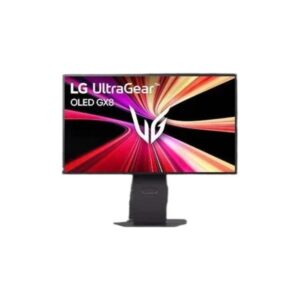
The LG UltraGear 32GX870B is the most ambitious all-round gaming monitor in this 2026 LG group.
LG●Monitor
Display
31.5 in, OLED, 3840 × 2160
31.5
Refresh Rate
48–240 Hz
48
Brightness
335 nits
Contrast Ratio
1850000:1
1850000
Pros & Cons
Pros
- 4K OLED at 240 Hz
- Full HD 480 Hz dual mode
- Excellent wide-gamut and HDR specification
- DisplayPort 2.1, HDMI 2.1 and 90W USB-C
- Full ergonomic stand, speakers and webOS
Cons
- Premium hardware will require a powerful GPU
- OLED care remains important
- Large and relatively heavy with stand
- Typical brightness is lower than Mini-LED full-screen output
- Feature set may be excessive for basic users
Score & Ratings
9.6/10
Great
Model Information
11
| Specification | Value |
|---|---|
| Brand | LG |
| Series | UltraGear |
| Model | 32GX870B |
| Model Alias | UltraGear 32GX870B32" UltraGear OLED GX8 |
| Full Product Name | LG UltraGear 32GX870B |
| Model Year | 2026 |
| Monitor Type | Gaming Monitor |
| Region / Variant | US / Hong Kong / Japan |
| Launch Status | Available |
| Available Colors | Black |
| Warranty | 2 years (US) |
Display & Panel
13
| Specification | Value |
|---|---|
| Screen Size | 31.5 in |
| Exact Diagonal | 31.52 in |
| Aspect Ratio | 16:9 |
| Active Display Width | 697 mm |
| Active Display Height | 392 mm |
| Display Area | 92.88% |
| Panel Type | OLED |
| Panel Technology | Primary RGB Tandem OLED |
| Panel Manufacturer | LG Display |
| OLED Technology | 4-stack Primary RGB Tandem |
| OLED Generation | 4th Generation OLED |
| 3D Support | No |
| Screen Coating | Anti-glare / Matte |
31.5" Display Size (80 cm) 16:9
Resolution & Pixel Details
4
| Specification | Value |
|---|---|
| Native Resolution | 3840 × 2160 |
| Resolution Name | Ultra HD (UHD) / 4K / 2160p |
| Pixel Density | 140 ppi |
| Pixel Pitch | 0.181 mm |
Picture Quality & Color
13
| Specification | Value |
|---|---|
| Panel Bit Depth | 10-bit |
| FRC | No |
| Display Colors | 1.07 billion |
| Total Color Bits | 30-bit |
| Typical Brightness | 335 nits |
| Peak Brightness | 1500 nits |
| Minimum Brightness | 300 nits |
| HDR Support | Yes |
| HDR Formats | HDR10 |
| HDR Certification | Display / HDR 500 True Black |
| DCI-P3 Coverage | 99.5% |
| Factory Calibration | Yes |
| Hardware Calibration | Ready |
DESK DISTANCE FIT
65cm
CompactIdeal FitWideUltra-Wide
Fills more of your view — great for productivity, may need slight head turns toward the edges.
Refresh Rate, Response & Gaming
13
| Specification | Value |
|---|---|
| Refresh Rate Range | 48–240 Hz |
| Dual Mode | Yes |
| Primary Dual Mode | 4K at 240Hz |
| Secondary Dual Mode | FHD at 480Hz |
| Minimum Response Time | 0.03 ms |
| AMD FreeSync | Premium Pro |
| NVIDIA G-Sync | Compatible |
| Black Stabilizer | Yes |
| Crosshair | Yes |
| FPS Counter | Yes |
| Dynamic Action Sync | Yes |
| Picture-by-Picture | Yes |
| Picture-in-Picture | Yes |
Ports & Connectivity
13
| Specification | Value |
|---|---|
| HDMI Ports | 2× HDMI 2.1 |
| HDMI Version | HDMI 2.1 |
| DisplayPort Input | 1× DisplayPort 2.1 (UHBR20) |
| DisplayPort Version | DisplayPort 2.1 |
| DisplayPort Bandwidth | UHBR20 |
| DisplayPort Alt Mode | Yes |
| Display Stream Compression | DSC |
| HDCP Support | Yes |
| HDCP Version | HDCP 2.3 |
| USB-C Input | 1× USB-C 3.2 |
| USB-C Power Delivery | 90W |
| USB-A Ports | 2× USB-A 3.0 |
| Audio Output | 3.5 mm (4-pole for headphones; DTS Headphone:X) |
Ports & Connections
Audio, Camera, Network & Smart Features
5
| Specification | Value |
|---|---|
| Built-In Speakers | Yes |
| Speaker Configuration | 2 × 7 W |
| Audio Technologies | AI SoundDTS Headphone:X |
| Built-In Camera | No |
| Operating System | webOS |
Ergonomics & Stand
13
| Specification | Value |
|---|---|
| VESA Mount | Yes |
| Removable Stand | Yes |
| Height Adjustment | Yes |
| Height Adjustment Range | 110 mm |
| Tilt Adjustment | Yes |
| Forward Tilt | 8° |
| Backward Tilt | 15° |
| Swivel Adjustment | Yes |
| Left Swivel | 30° |
| Right Swivel | 30° |
| Pivot Adjustment | Yes |
| Left Pivot | 0° |
| Right Pivot | 90° |
Dimensions, Weight & Design
7
| Specification | Value |
|---|---|
| Weight With Stand | 9.8 kg |
| Weight Without Stand | 5.6 kg |
| Stand Depth | 250 mm |
| Bezel Design | 4-Side Virtually Borderless Design |
| RGB Lighting | Yes |
| Lighting System | RGB Hexagon LED Lighting |
| External Power Adapter | Yes |
Power & Operating Conditions
12
| Specification | Value |
|---|---|
| 110V Input Range | 100–120V |
| 220V Input Range | 220–240V |
| AC Frequency | 50–60 Hz |
| Average Power Consumption | 47.53 W |
| Sleep Consumption | 0.5 W |
| Off Consumption | 0.3 W |
| Operating Temperature | 0–40°C |
| Operating Humidity | 10–90% |
| Operating Altitude | 5000 m |
| Storage Temperature | -20–60°C |
| Storage Humidity | 10–80% |
| Storage Altitude | 12192 m |
Eye Care, Protection & Additional Features
12
| Specification | Value |
|---|---|
| Flicker-Free | UL-verified |
| Low Blue Light | Eyesafe 3.0 |
| Reader Mode | Yes |
| OLED Protection | OLED Care |
| OLED Care | Yes |
| Screen Saver | Yes |
| Desktop Control Software | Dual Controller |
| Monitor Management Software | LG Switch |
| Auto Input Switching | Yes |
| AI Visual | 4K AI UpscalingAI Scene Optimization |
| Smart Energy Saving | Yes |
| Additional Monitor Features | Color Weakness ModeDual ControllerHDR EffectPicture ModeTrue Color ProUser Define Key |
Certifications, Standards & Licenses
9
| Specification | Value |
|---|---|
| ClearMR | ClearMR 13000 |
| RoHS | Compliant |
| CE | Certified |
| FCC-B | Certified |
| J-Moss | Compliant |
| PSE | Certified |
| UL | UL (cUL) |
| VCCI | Certified |
| TÜV Type Approval | TÜV Type |
Included Accessories
4
| Specification | Value |
|---|---|
| HDMI Cable | Included |
| DisplayPort Cable | Included |
| USB-C Cable | Included |
| USB Type-C Cable | Included |
Packaging Information
4
| Specification | Value |
|---|---|
| Package Width | 973 mm |
| Package Height | 544 mm |
| Package Depth | 183 mm |
| Package Weight | 13.9 kg |
⚡
Estimated Running Cost
Based on this product's rated power draw, not an independent lab measurement — actual usage varies with settings and content.
Daily—
Monthly—
Annually—
Uses about 54% less power than the average we track in this category.
Reviews
DISPLAYINPUT · INDEPENDENT · SPEC-BASED · NO SPONSORED PLACEMENT
SHEET № 32GX870B