
Skip to content
Dell Dell S3225QC – Specs & Features Monitor
RATED
Excellent
8.8/10

31.5″ Dell S3225QC – Specs & Features

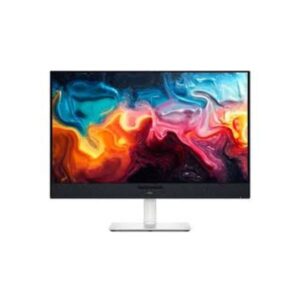
The Dell S3225QC is a 31.5-inch 4K QD-OLED aimed at people who want one screen for work, films and gaming - not a pure esports panel.

31.5″ · 16:9 · MODEL YEAR 2025
DellMonitor
Dell Monitor
Display
31.5-inch, QD-OLED, 3840 x 2160
31.5
Refresh Rate
48 Hz - 120 Hz
48 Hz
Brightness
250 cd/m² (peak 1000 cd/m²)
250 cd
Contrast Ratio
1500000 : 1
1500000

Overview

The Dell S3225QC is a 31.5-inch 4K QD-OLED aimed at people who want one screen for work, films and gaming - not a pure esports panel. That intent shows in the details: it is the rare monitor with Dolby Vision support, it has a five-driver 25 W speaker system built in, and its USB-C port delivers 90 W, enough to run and charge a laptop over one cable. The QD-OLED panel brings 1,500,000:1 contrast, 99% DCI-P3 and a 1000 cd/m2 peak at 139 PPI. Refresh tops out at 120 Hz with FreeSync Premium, which is plenty for console and single-player gaming but short of the 240 Hz panels competitive players want. Best as a premium all-rounder; not the pick if frame rate is your priority.

BrandDellPanel TypeQD-OLEDResolution3840 x 2160Refresh Rate48-120 Hz

Key Highlights

  • Dolby Vision support - almost unheard of on a desktop monitor
  • Five-driver 25 W speaker system, so films work without external speakers
  • 90 W USB-C - runs and charges a laptop over a single cable
  • QD-OLED with 1,500,000:1 contrast, 99% DCI-P3 and 100% sRGB
  • 4K at 31.5 inches works out to 139 PPI - sharp text without heavy scaling

Who Should Buy the Dell S3225QC

+ Best For
One-screen households
work, films and gaming on a single panel
Film watchers
Dolby Vision plus QD-OLED black levels at a desk
Laptop-first setups
90 W USB-C covers video, data and charging
Console gamers
120 Hz with FreeSync Premium suits PS5 and Xbox
× Not Ideal For
Competitive esports
120 Hz is well below the 240 Hz+ panels built for that
Bright sunlit rooms
250 cd/m2 full-screen brightness prefers controlled light
Static-UI all-day work
OLED still needs care against burn-in
Portrait layouts
there is no pivot on this stand

Display Performance

Refresh Rate 48-120 Hz ample for console and single-player gaming, not for esports
Response Time 0.03 ms (GtG) instant transitions - motion is clean despite 120 Hz
Brightness 250 cd/m2 typical / 1000 peak highlights punch, full-screen stays modest
Contrast 1,500,000:1 true self-lit blacks, ideal for film
Colour Gamut 99% DCI-P3, 100% sRGB accurate for both creative work and cinema
HDR DisplayHDR 400 True Black / Dolby Vision / HDR10 Dolby Vision is the standout

Gaming Performance

Refresh Rate120 Hzmatches PS5 and Xbox Series X performance modes
Response Time0.03 msOLED-instant, so 120 Hz still looks clean
VRR / Adaptive SyncAMD FreeSync Premiumtear-free across the 48-120 Hz range
GPU Requirementa mid-to-high-end card for 4K gaming, or simply a current console

HDR & Brightness Reality

Dolby Vision on a desktop monitor is genuinely unusual, and paired with QD-OLED black levels it makes films look closer to a good TV than a typical desk screen. The certification here is DisplayHDR 400 True Black, which sounds modest but is an OLED-specific tier judged on black level - and the panel still peaks at 1000 cd/m2 on small highlights. The honest limit is full-screen brightness at 250 cd/m2: in a dim room this looks excellent, in a sunlit room the HDR effect flattens out. Treat it as a controlled-lighting display.

Connectivity & Ports

HDMI2 x HDMI 2.14K120 from consoles or a second PC
DisplayPortvia USB-C DP Alt Modethe 90 W port doubles as the display input
USB-C1 x USB-C upstream with 90 Wone cable for picture, data and laptop charging
USB Hub2 x USB-C downstream (5 Gbps)peripherals run through the monitor
Audio Outfive-driver 25 W system built inno external speakers needed for casual use

Desk Fit & Ergonomics

Size / Footprint31.5-inch 16:9, 719 mm wideneeds a reasonably deep desk
StandIncluded, removable10 kg with the stand
VESA Mount100 x 100 mmstandard arm fit
Tilt-5 to +21 degreesa generous forward and back range
Height Adjust110 mmenough to reach eye level for most desks
Swivel / PivotSwivel +/-30 degrees, no pivotturns well, but landscape only

Real-World Use Cases

Film Nights
Dolby Vision with true OLED blacks and 25 W of built-in sound
Laptop Docking
one 90 W USB-C cable for picture, peripherals and charging
Console Gaming
4K120 over HDMI 2.1 with FreeSync Premium
Creative Work
99% DCI-P3 and 100% sRGB at 139 PPI for editing and layout

Pros & Cons

Pros
  • Dolby Vision support rare and genuinely useful on a monitor
  • QD-OLED contrast of 1,500,000:1 with 99% DCI-P3 and 100% sRGB
  • Five-driver 25 W speaker system
  • 90 W USB-C for single-cable laptop docking
  • 4K at 139 PPI with a 0.03 ms response
Cons
  • 120 Hz ceiling not a competitive gaming panel
  • 250 cd/m2 full-screen brightness prefers a controlled-light room
  • No pivot for portrait orientation
  • OLED burn-in care still applies to static desktop elements

Score & Ratings

8.8/10 Great
Design
9
Display
9
Color Performance
7
Performance
8
Connectivity
9
Model Information 6
Specification Value
Brand Dell
Model S3225QC
Model Alias Dell 32 Plus 4K QD-OLED
Full Product Name Dell 32 Plus 4K QD-OLED (S3225QC)
Model Year 2025
Available Colors White
Display & Panel 5
Specification Value What It Means
Screen Size 31.5-inch
Aspect Ratio 16:9
Display Area 83.94 % (percent)
Panel Type QD-OLED (Samsung) QD-OLED (Samsung) - self-lit quantum-dot pixels, so blacks are true black and colour stays rich.
Backlight Type Self-emissive (no backlight — OLED)
Resolution & Pixel Details 3
Specification Value
Native Resolution 3840 × 2160
Pixel Density 139 PPI
Pixel Pitch 0.181 mm (millimeters)
Picture Quality & Color 2
Specification Value
Panel Bit Depth 10 bits
Display Colors 1073741824 colors
Refresh Rate, Response & Gaming 1
Specification Value
Refresh Rate Range 48 Hz - 120 Hz
Ports & Connectivity 5
Specification Value
HDMI Ports
1× HDMI 2.1
HDMI Version HDMI 2.1
HDMI FRL Yes
USB-C Video Input 1× USB-C
DisplayPort Alt Mode Yes
Audio, Camera, Network & Smart Features 1
Specification Value
Built-In Camera No
Ergonomics & Stand 5
Specification Value
VESA Mount 100 × 100 mm
VESA Size 100 × 100 mm
Removable Stand Yes
Height Adjustment 110 mm
Height Range 110 mm
Dimensions, Weight & Design 2
Specification Value
Weight With Stand 10 kg
Weight Without Stand 6.95 kg
Power & Operating Conditions 6
Specification Value
Power Input 100–240V
AC Frequency 50/60Hz
Typical Power Consumption 40W
Average Power Consumption 40W
Maximum Power Consumption 320W
Sleep Consumption 0.3W
Certifications, Standards & Licenses 5
Specification Value
Energy Star Energy Star
TÜV Flicker-Free TÜV Rheinland Flicker-free Certified
TÜV Low Blue Light TÜV Rheinland Low Blue Light Certified (Hardware Solution)
RoHS RoHS
FCC FCC

Frequently Asked Questions

01 Does Dolby Vision actually work on a monitor? +
✓ Yes, and it is rare here. Dolby Vision adjusts tone mapping scene by scene, so supported films from Netflix, Disney+ and Apple TV+ look closer to how they do on a good TV. Most desktop monitors only handle basic HDR10.
02 Are the built-in speakers usable? +
Unusually, yes. It has five 5 W drivers, 25 W in total, which is far beyond the 2 x 2 W token speakers most monitors ship with. Fine for films, video calls and casual music.
03 Is 120 Hz enough for gaming? +
For console and single-player gaming, yes - it matches PS5 and Xbox 120 fps modes, and the 0.03 ms OLED response keeps motion clean. Competitive shooter players will want a 240 Hz panel instead.
04 Can this replace my laptop dock? +
✓ Yes, at up to 90 W over USB-C with DP Alt Mode, so most laptops run and charge on a single cable.
05 How bright is it really? +
Peak is 1000 cd/m2, but that applies to small highlights. A full white screen sits nearer 250 cd/m2, so it is best in a room where you control the light.

Reviews

NO REVIEWS YET Own this display? Your rating helps calibrate the score for everyone.
DISPLAYINPUT · INDEPENDENT · SPEC-BASED · NO SPONSORED PLACEMENT SHEET № S3225QC