
LG 24G411A vs Lenovo Legion R24s Comparison
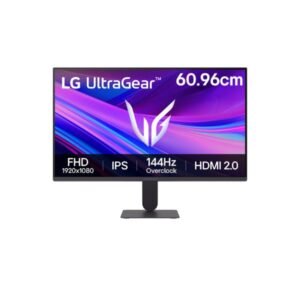
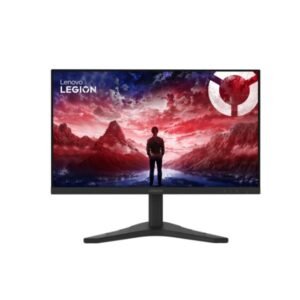
Strip away the badges and the LG 24G411A vs Lenovo Legion R24s matchup looks almost identical on paper. Both are 23.8-inch 1920 × 1080 IPS panels with 250 nits, 1500:1 contrast and 99% sRGB. The split is in the sockets and refresh behaviour. The Legion R24s adds HDMI 2.1 next to DisplayPort 1.2, runs 48-144 Hz natively and accepts HDR10. The 24G411A pairs HDMI 2.0 with DisplayPort 1.4 and reaches 144 Hz only by overclocking from 120 Hz native, but it adds G-Sync Compatible support and a 5 ms response time. The Lenovo is slightly lighter at 3.5 kg with stand, against 3.81 kg.
| Specification | ||
|---|---|---|
| Overview | ||
| Rating | 6.8 / 10 | 6.6 / 10 |
| Brand | LG | Lenovo |
| Category | Monitor | Monitor |
| Model Information | ||
| Brand | LG | Lenovo |
| Series | Ultra Gear | -- |
| Model | 24G411A | Legion R24s |
| Model Alias | Ultra Gear 24G411A 24G411A-B | 68CBGAC2 |
| Full Product Name | LG Ultra Gear 24G411A | Lenovo Legion R24s |
| Model Year | 2025 | 2025 |
| Monitor Type | Gaming Monitor | -- |
| Available Colors | Black | Black |
| Display & Panel | ||
| Screen Size | 23.8 in | 23.8 in |
| Exact Diagonal | 23.807 in (604.698 mm) | -- |
| Aspect Ratio | 16:9 (1.778:1) | 16:9 |
| Active Display Width | 527.04 mm | -- |
| Active Display Height | 296.46 mm | -- |
| Display Area | 91.39% | 90.06% |
| Panel Type? | IPS | IPS |
| Panel Technology | IPS | IPS |
| Backlight Type? | W-LED | W-LED |
| 3D Support | No | -- |
| Screen Coating | Anti-glare / Matte (3H) | Anti-glare / Matte |
| Coating Hardness | 3H | -- |
| Resolution & Pixel Details | ||
| Native Resolution | 1920 × 1080 pixels | 1920 × 1080 pixels (Full HD / 1080p) |
| Resolution Name | Full HD / 1080p | -- |
| Aspect Ratio Resolution | 16:9 | -- |
| Pixel Density | 92 ppi (36 ppcm) | 92 PPI |
| Pixel Pitch | 0.275 mm | 0.275 mm |
| Picture Quality & Color | ||
| Panel Bit Depth | 8 bits | 8 bits (6 bits + FRC) |
| FRC | -- | Yes |
| Display Colors | 16,777,216 colors | 16777216 colors (24-bit) |
| Total Color Bits | 24 bits | -- |
| Typical Brightness | 250 cd/m² | -- |
| Static Contrast Ratio | 1500:1 | -- |
| Horizontal Viewing Angle | 178° | -- |
| Vertical Viewing Angle | 178° | -- |
| HDR Support? | HDR10 | -- |
| HDR Formats? | HDR10 | -- |
| HDR10? | Yes | -- |
| sRGB Coverage | 99% | -- |
| Factory Calibration | Yes | -- |
| Refresh Rate, Response & Gaming | ||
| Native Refresh Rate | 120 Hz | -- |
| Refresh Rate Range | 48–144 Hz | 48 Hz - 144 Hz |
| Overclocked Refresh Rate | 144 Hz | -- |
| Minimum Response Time | 5 ms | -- |
| MPRT Response Time | 1 ms | -- |
| Variable Refresh Rate | Yes | -- |
| Adaptive-Sync? | Adaptive-Sync technology | -- |
| AMD FreeSync? | AMD FreeSync technology | -- |
| NVIDIA G-Sync? | NVIDIA G-Sync Compatible | -- |
| Motion Blur Reduction | Motion Blur Reduction | -- |
| Black Stabilizer | Yes | -- |
| Crosshair | Yes | -- |
| FPS Counter | Yes | -- |
| Dynamic Action Sync | Yes | -- |
| Ports & Connectivity | ||
| HDMI Ports |
|
|
| HDMI Version | HDMI 2.0 | HDMI 2.1 |
| DisplayPort Input | 1 × DisplayPort 1.4 | 1× DisplayPort 1.2 |
| DisplayPort Version | DisplayPort 1.4 | DisplayPort 1.2 |
| HDCP Support | Yes | -- |
| Audio Output | 1 × 3.5 mm Audio Out (3-pole) | -- |
| Headphone Output | Yes | -- |
| Audio, Camera, Network & Smart Features | ||
| Built-In Speakers | No | -- |
| Built-In Camera | No | No |
| Ergonomics & Stand | ||
| VESA Mount | Yes | 100 x 100 mm |
| VESA Size | 100 × 100 mm | 100 × 100 mm |
| Removable Stand | Yes | Yes |
| Height Adjustment | No | No |
| Tilt Adjustment | Yes | -- |
| Forward Tilt | 5° | -- |
| Backward Tilt | 21° | -- |
| Swivel Adjustment | No | -- |
| Pivot Adjustment | No | -- |
| Portrait Mode | No | -- |
| Security Lock | Kensington anti-theft stand lock slot | -- |
| Dimensions, Weight & Design | ||
| Dimensions With Stand | 538.5 × 411.5 × 221 mm | -- |
| Dimensions Without Stand | 538.5 × 317.5 × 38.1 mm | -- |
| Weight With Stand | 3.81 kg | 3.5 kg |
| Weight Without Stand | 2.4 kg | 3.1 kg |
| Stand Depth | 221 mm | -- |
| Chassis Color | Black | -- |
| Power & Operating Conditions | ||
| Power Input | 100–240 V AC | 100 V - 120 V (110V) / 220 V - 240 V (220V) |
| 110V Input Range | 100–120 V | -- |
| 220V Input Range | 220–240 V | -- |
| AC Frequency | 50–60 Hz | 50 Hz - 60 Hz |
| Electric Current | 1.5 A | -- |
| Typical Power Consumption | -- | 12 W |
| Average Power Consumption | 24.47 W | 12 W |
| Maximum Power Consumption | -- | 28.5 W |
| Sleep Consumption | 0.5 W | 0.5 W |
| Off Consumption | 0.3 W | -- |
| Operating Temperature | 5–35 °C | -- |
| Operating Humidity | 10–80% | -- |
| Storage Temperature | -20–60 °C | -- |
| Storage Humidity | 5–85% | -- |
| Eye Care, Protection & Additional Features | ||
| Flicker-Free | Yes | -- |
| Low Blue Light | Yes | -- |
| Reader Mode | Yes | -- |
| Monitor Management Software | LG Switch | -- |
| Auto Input Switching | Yes | -- |
| Smart Energy Saving | Yes | -- |
| Additional Monitor Features | Color Weakness Mode Deep Black HDR Effect | -- |
| Certifications, Standards & Licenses | ||
| Energy Star | Energy Star | -- |
| TÜV Flicker-Free | -- | TÜV Rheinland Flicker-free Certified |
| TÜV Low Blue Light | -- | TÜV Rheinland Low Blue Light Certified (Hardware Solution) |
| RoHS | Ro HS | Ro HS |
| CE | CE | -- |
| ErP | Er P | -- |
| PSE | PSE | -- |
| WEEE | WEEE | -- |
| VCCI | VCCI-B | -- |
| TÜV Type Approval | TÜV-Bauart | -- |
| Included Accessories | ||
| HDMI Cable | HDMI cable | -- |
| Packaging Information | ||
| Package Dimensions | 620 × 386 × 134.6 mm | -- |
| Package Width | 620 mm | -- |
| Package Height | 386 mm | -- |
| Package Depth | 134.6 mm | -- |
| Package Weight | 4.58 kg | -- |
Go with the 24G411A if you game on a PC with an Nvidia or AMD card and want DisplayPort 1.4 plus G-Sync Compatible. The Legion R24s is the better fit for console players, thanks to its HDMI 2.1 input and 144 Hz range. The deciding factor is HDMI 2.1.
- DisplayPort 1.4 for a PC with bandwidth to spare
- G-Sync Compatible and FreeSync both supported
- 2.4 kg without the stand eases desk moves
- HDMI 2.1 input suits current consoles
- 144 Hz range without any overclocking
- VESA 100 mount and a 3.1 kg body
| Use case | Better pick | Why |
|---|---|---|
| Console gaming | Lenovo Legion R24s | HDMI 2.1 input for consoles |
| PC gaming on Nvidia | LG 24G411A | G-Sync Compatible plus DisplayPort 1.4 |
| Competitive gaming | Lenovo Legion R24s | 144 Hz range without overclocking |
| Photo & colour work | Tie | Both cover 99% sRGB |
| Dark-room contrast | Tie | Both IPS at 1500:1 |
| Small desks | LG 24G411A | 2.4 kg without the stand |
Methodology: The verdict and comparison notes on this page were written and checked by an editor working from the full specification table below. Conclusions are based on manufacturer-listed specifications only - no benchmark testing, measured brightness or hands-on use is claimed unless stated. Missing values are left blank rather than estimated. Report an error.
Updated: July 2026