
MONITOR COMPARISON · UPDATED SEPTEMBER 2026
Add as preferred source
Dell SE2725HM vs Dell S2725DSM Comparison
IPS
Dell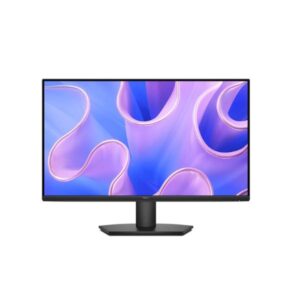
5.0
/10
IPSPanel Type
W-LEDBacklight Type
81 PPIPixel Density
27 inScreen Size
IPS
Dell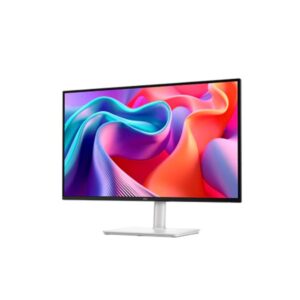
6.8
/10
SupportedAMD FreeSync
IPSPanel Type
W-LEDBacklight Type
109 PPIPixel Density
Full Specification Comparison
| Specification | ||
|---|---|---|
| Overview | ||
| Rating | 5 / 10 | 6.8 / 10 |
| Brand | Dell | Dell |
| Category | Monitor | Monitor |
| Model Information | ||
| Brand | Dell | Dell |
| Model | SE2725HM | S2725DSM |
| Full Product Name | Dell SE2725HM | Dell S2725DSM |
| Model Year | 2025 | 2025 |
| Available Colors | Black | Ash White |
| Display & Panel | ||
| Screen Size | 27 in | 27 in |
| Exact Diagonal | 685.99 mm (27.01 in) | 684.7 mm (26.96 in) |
| Aspect Ratio | 16:9 | 16:9 |
| Active Display Width | 597.888 mm (23.54 in) | 596.736 mm (23.49 in) |
| Active Display Height | 336.312 mm (13.24 in) | 335.664 mm (13.22 in) |
| Screen-to-Body Ratio | 90.91% | 92.04% |
| Panel Type? | IPS | IPS |
| Backlight Type? | W-LED | W-LED |
| 3D Support | No | No |
| Screen Coating | Anti-glare / Matte (3H) | Anti-glare / Matte (3H) |
| Resolution & Pixel Details | ||
| Native Resolution | 1920 x 1080 pixels | 2560 x 1440 pixels |
| Pixel Density | 81 PPI | 109 PPI |
| Pixel Pitch | 0.311 mm (millimeters) | 0.233 mm (millimeters) |
| Picture Quality & Color | ||
| Panel Bit Depth | 8 bits | 8 bits |
| FRC | No | No |
| Display Colors | 16.8 million colors (24 bits) | 16.8 million colors (24 bits) |
| Typical Brightness | 250 cd/m² | 350 cd/m² |
| Static Contrast Ratio | 1000 : 1 | 1500 : 1 |
| Horizontal Viewing Angle | 178 ° | 178 ° |
| Vertical Viewing Angle | 178 ° | 178 ° |
| sRGB Coverage | -- | 99% |
| Refresh Rate, Response & Gaming | ||
| Refresh Rate Range | 48 Hz - 100 Hz | 48 Hz - 144 Hz |
| Minimum Response Time | 5 ms | 4 ms |
| MPRT Response Time | -- | 1 ms |
| Adaptive-Sync? | -- | AMD FreeSync |
| AMD FreeSync? | -- | Supported |
| Ports & Connectivity | ||
| HDMI Ports | 1 | 1 |
| HDMI Version | 1.4 | 2.1 |
| DisplayPort Input | -- | 1 |
| DisplayPort Version | -- | 1.4 |
| HDCP Support | Yes | Yes |
| HDCP Version | 1.4 | 1.4 |
| Audio, Camera, Network & Smart Features | ||
| Built-In Camera | No | No |
| Ergonomics & Stand | ||
| VESA Mount | 100 x 100 mm | 100 x 100 mm |
| VESA Size | 100 x 100 mm | 100 x 100 mm |
| Removable Stand | Yes | Yes |
| Height Adjustment | No | 110 mm |
| Height Adjustment Range | -- | 110 mm (4.33 in) |
| Tilt Adjustment | Yes | Yes |
| Forward Tilt | 5 ° | 5 ° |
| Backward Tilt | 21 ° | 21 ° |
| Swivel Adjustment | No | Yes |
| Left Swivel | -- | 30 ° |
| Right Swivel | -- | 30 ° |
| Pivot Adjustment | No | Yes |
| Left Pivot | -- | 90 ° |
| Right Pivot | -- | 90 ° |
| Dimensions, Weight & Design | ||
| Dimensions With Stand | 611 × 453.6 × 200 mm | 611.34 × 390.13 × 201.83 mm |
| Dimensions Without Stand | 611 × 362 × 49.3 mm | 611.34 × 355.98 × 58.87 mm |
| Weight With Stand | 4.4 kg (9.7 lbs) | 6.39 kg (14.09 lbs) |
| Weight Without Stand | 3.56 kg (7.85 lbs) | 4.34 kg (9.57 lbs) |
| Stand Width | 290 mm (11.42 in) | 256 mm (10.08 in) |
| Stand Depth | 200 mm (7.87 in) | 201.83 mm (7.95 in) |
| Power & Operating Conditions | ||
| Power Input | 100–240V | 100–240V |
| 110V Input Range | 100 V - 120 V | 100 V - 120 V |
| 220V Input Range | 220 V - 240 V | 220 V - 240 V |
| AC Frequency | 50 Hz - 60 Hz | 50 Hz - 60 Hz |
| Electric Current | 1.5 A | 1.5 A |
| Average Power Consumption | 16.3 W | 21.4 W |
| Maximum Power Consumption | 28 W | 65 W |
| Sleep Consumption | 0.3 W | 0.3 W |
| Off Consumption | 0.3 W | 0.3 W |
| Operating Temperature | 0 °C - 40 °C (32 °F - 104 °F) | 0 °C - 40 °C (32 °F - 104 °F) |
| Operating Humidity | 10% – 80% | 10% – 80% |
| Operating Altitude | 5000 m | 5000 m |
| Storage Temperature | -20 °C - 60 °C (-4 °F - 140 °F) | -20 °C - 60 °C (-4 °F - 140 °F) |
| Storage Humidity | 5% - 90% | 5% - 90% |
| Storage Altitude | 12192 m | 12192 m |
| Eye Care, Protection & Additional Features | ||
| Flicker-Free | Yes | Yes |
| Low Blue Light | Yes | Yes |
| ComfortView Plus | -- | Yes |
| Additional Monitor Features | Dell Display Manager with Easy Arrange; Anti-theft stand lock slot - Kensington | 3-sided bezelless design; Dell Display Manager with Easy Arrange; Anti-theft stand lock slot - Kensington |
| Certifications, Standards & Licenses | ||
| Energy Star | ENERGY STAR 8.0 | ENERGY STAR 8.0 |
| EPEAT | Yes | -- |
| TCO Certified | Yes | -- |
| TÜV Flicker-Free | TÜV Rheinland Flicker Free Certified | TÜV Rheinland Flicker Free Certified |
| TÜV Low Blue Light | TÜV Rheinland Low Blue Light Certified | TÜV Rheinland Low Blue Light Certified (Hardware Solution) |
| RoHS | Yes | Yes |
| Included Accessories | ||
| HDMI Cable | Yes | Yes |
Data & scoring note
Methodology: The verdict and comparison notes on this page were written and checked by an editor working from the full specification table below. Conclusions are based on manufacturer-listed specifications only - no benchmark testing, measured brightness or hands-on use is claimed unless stated. Missing values are left blank rather than estimated. Report an error.
Updated: August 2026
Editorial
Display Input -- Monitor & TV Comparison Database
Verified Specs
No Paid Placements
✓ 14 Spec Groups