
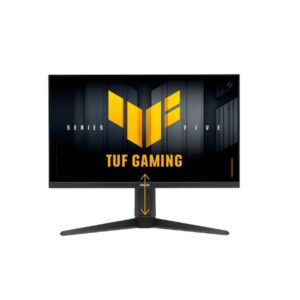
27″ Asus TUF Gaming VG279QM5A – Specs & Features
Built around an IPS panel, the ASUS TUF Gaming VG279QM5A runs at 1920 x 1080 pixels / Full HD / 1080p with a 48 Hz - 240 Hz refresh range.
Overview
Built around an IPS panel, the ASUS TUF Gaming VG279QM5A runs at 1920 x 1080 pixels / Full HD / 1080p with a 48 Hz - 240 Hz refresh range. On motion, the panel is rated 1 ms GtG and 0.3 ms (MPRT) MPRT; GtG and MPRT use different test methods, so treat them separately. For adaptive sync, it supports FreeSync, G-Sync. Colour and light output come in at 300 cd/m² typical brightness, 1000 : 1 contrast and 99 % sRGB coverage. Ports include 2x HDMI 2.0, 1x DisplayPort 1.4.
Key Highlights
- IPS panel at 1920 x 1080 pixels / Full HD / 1080p
- 48 Hz - 240 Hz refresh range — built for competitive, fast-paced gaming
- 1 ms GtG / 0.3 ms (MPRT) MPRT response time
- 1000 : 1 contrast ratio
- 300 cd/m² typical brightness
- 99 % sRGB colour coverage
- FreeSync, G-Sync
- Connectivity: 2x HDMI 2.0, 1x DisplayPort 1.4
Who Should Buy the Asus TUF Gaming VG279QM5A
Display Performance
Gaming Performance
HDR & Brightness Reality
HDR10 support does not make the VG279QM5A an HDR display in practical terms. The sheet lists 300 cd/m² typical brightness, 1,000:1 contrast and no peak-brightness figure or local-dimming system. Those specifications suit ordinary SDR gaming but provide no evidence of strong highlight brightness or deep blacks. HDR content may be accepted, yet buyers should choose this model for 240 Hz speed and adaptive sync, not for an expanded HDR image.
Connectivity & Ports
Desk Fit & Ergonomics
Real-World Use Cases
Pros & Cons
- 48 Hz 240 Hz refresh range with 1 ms GtG response is built for competitive, fast-paced gaming
- FreeSync, G-Sync give broad adaptive-sync compatibility
- 99 % sRGB coverage solid coverage for everyday colour accuracy
- Backed by 3 years
- IPS panel gives consistent colour and wide viewing angles
- 81 ppi / 32 ppcm is on the low side for sharp text at typical desk distance
- Stand has no height adjustment
- Stand doesn’t swivel or pivot
- No USB-C or USB hub for peripheral connectivity
- No KVM switch for controlling two PCs from one keyboard/mouse
Score & Ratings
| Specification | Value |
|---|---|
| Brand | ASUS |
| Series | TUF Gaming |
| Model | TUF Gaming VG279QM5A |
| Full Product Name | ASUS TUF Gaming VG279QM5A |
| Model Year | 2025 |
| Monitor Type | Gaming Monitor |
| Market Position | Value / Budget-Friendly Gaming |
| Primary Use | Competitive & Everyday Gaming on a Budget |
| Launch Status | 2025 |
| Available Colors | Black |
| Warranty | 3 years (36 months) standard limited warranty from date of purchase |
| Burn-In Warranty | Not applicable (non-OLED panel) |
| Specification | Value | What It Means |
|---|---|---|
| Screen Size | 27 in | |
| Exact Diagonal | 685.655 mm (26.99 in) | |
| Aspect Ratio | 16:9 | |
| Active Display Width | 596.736 mm (23.49 in) | |
| Active Display Height | 335.664 mm (13.22 in) | |
| Display Area | 88.26 % | |
| Panel Type | IPS | IPS affects viewing angles, black depth and color consistency — each panel technology trades these off differently. |
| Backlight Type | W-LED | |
| 3D Support | No | |
| Screen Coating | Anti-glare/Matte |
| Specification | Value | What It Means |
|---|---|---|
| Native Resolution | 1920 x 1080 pixels / Full HD / 1080p | |
| Pixel Density | 81 ppi / 32 ppcm | 81 ppi / 32 ppcm indicates how much scaling may be needed in the operating system for comfortable reading. |
| Pixel Pitch | 0.311 mm (0.01 in) |
| Specification | Value | What It Means |
|---|---|---|
| Panel Bit Depth | 8 bits | |
| FRC | No | |
| Display Colors | 16777216 colors / 24 bits | |
| Typical Brightness | 300 cd/m² | |
| Static Contrast Ratio | 1000 : 1 | |
| Horizontal Viewing Angle | 178 ° | |
| Vertical Viewing Angle | 178 ° | |
| HDR Support | HDR10 |
|
| HDR10 | Yes | |
| sRGB Coverage | 99 % | 99 % indicates how much of that color space the panel can reproduce, which affects color accuracy for photo/video work. |
| Specification | Value |
|---|---|
| Native Refresh Rate | 240 Hz |
| Refresh Rate Range | 48 Hz - 240 Hz |
| Minimum Response Time | 1 ms |
| MPRT Response Time | 0.3 ms (MPRT) |
| Adaptive-Sync | Yes |
| AMD FreeSync | Yes |
| NVIDIA G-Sync | Yes |
| Motion Blur Reduction | Yes |
| Shadow Boost | Yes |
| Crosshair | Yes |
| Dynamic Crosshair | Yes |
| FPS Counter | Yes |
| AI Gaming Features | Yes |
| GameFast Input | Yes |
| GameVisual | Yes |
| Specification | Value |
|---|---|
| HDMI Ports | 2 |
| HDMI Version | 2.0 |
| HDMI Bandwidth | 30 kHz - 267 kHz |
| DisplayPort Input | 1 |
| DisplayPort Version | 1.4 |
| HDCP Support | Yes |
| Audio Output | 3.5 mm |
| Headphone Output | 3.5 mm Audio Out |
| Specification | Value |
|---|---|
| Built-In Speakers | 2 x 2 W |
| Built-In Camera | No |
| Specification | Value | What It Means |
|---|---|---|
| VESA Mount | Yes | |
| VESA Size | 100 x 100 mm | |
| Removable Stand | Yes | |
| Height Adjustment | No | Not available on the stock stand; a VESA-mount arm is the usual workaround. |
| Tilt Adjustment | Yes | |
| Forward Tilt | 5 ° | |
| Backward Tilt | 23 ° | |
| Swivel Adjustment | No | |
| Portrait Mode | No | |
| Security Lock | Yes | |
| Anti-Theft Lock | Kensington Lock |
| Specification | Value |
|---|---|
| Dimensions With Stand | 615 mm x 453 mm x 193 mm (W x H x D) |
| Dimensions Without Stand | 615 mm x 369 mm x 59 mm (W x H x D) |
| Weight With Stand | 4.5 kg (9.92 lbs) |
| Weight Without Stand | 3.7 kg (8.16 lbs) |
| Stand Depth | 193 mm (7.60 in) |
| Specification | Value |
|---|---|
| Power Input | 100–240V |
| 110V Input Range | 100 V - 120 V |
| 220V Input Range | 220 V - 240 V |
| AC Frequency | 50 Hz - 60 Hz |
| Average Power Consumption | 18 W |
| Sleep Consumption | 0.5 W |
| Off Consumption | 0.3 W |
| Operating Temperature | 0 °C - 40 °C / 32 °F - 104 °F |
| Storage Temperature | -20 °C - 60 °C / -4 °F - 140 °F |
| Specification | Value |
|---|---|
| Flicker-Free | Yes |
| Low Blue Light | Yes |
| Desktop Control Software | Yes |
| Monitor Management Software | Yes |
| Anti-Theft Slot | Yes (Kensington lock slot) |
| Additional Monitor Features | AI VIsual; Asus DisplayWidget Center; Asus Power Sync; Color Temperature Selection (4 modes); Fast IPS; GameFast Input; GameVisual; Trace Free Technology; Variable Overdrive |
| Specification | Value |
|---|---|
| TÜV Flicker-Free | Yes |
| TÜV Low Blue Light | Yes |
| Specification | Value |
|---|---|
| DisplayPort Cable | DisplayPort cable |
| Specification | Value |
|---|---|
| Package Dimensions | 680 mm x 450 mm x 171 mm (W x H x D) |
| Package Width | 680 mm (26.77 in) |
| Package Height | 450 mm (17.72 in) |
| Package Depth | 171 mm (6.73 in) |
| Package Weight | 6.1 kg (13.45 lbs) |