
BenQ EW3290U vs BenQ EX321UX Comparison
BenQ EW3290U vs BenQ EX321UX compares two monitors with different strengths for picture quality, motion, and everyday use. BenQ EW3290U is specified with 32-inch / IPS / 4K / W-LED, while BenQ EX321UX uses 31.5-inch / IPS-ADS (BOE) / 4K / Mini LED. The listed refresh rate is 60 Hz on BenQ EW3290U and 120 Hz on BenQ EX321UX. BenQ EW3290U lists 98% DCI-P3 coverage, while BenQ EX321UX lists 99% DCI-P3 coverage. BenQ EW3290U’s clearest advantages are built-in speakers. BenQ EX321UX’s clearest advantages are higher 120Hz-class refresh rate, faster listed pixel response, and higher listed peak brightness. The better choice depends on which of those differences matters most in your setup.
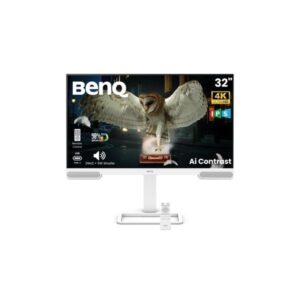
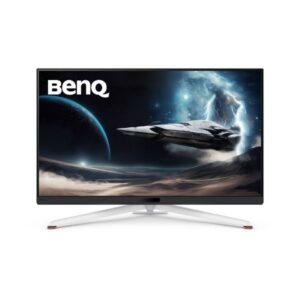
| Specification | ||
|---|---|---|
| Overview | ||
| Rating | 7.8 / 10 | 8.2 / 10 |
| Brand | Benq | Benq |
| Category | Monitor | Monitor |
| Model Information | ||
| Brand | Ben Q | Ben Q |
| Series | MOBIUZ | MOBIUZ |
| Model | EW3290U | EX321UX |
| Model Alias | -- | MOBIUZ EX321UX |
| Full Product Name | Ben Q EW3290U | Ben Q MOBIUZ EX321UX |
| Model Year | 2024 | 2024 |
| Monitor Type | Business / General-Purpose Monitor | Gaming Monitor |
| Monitor Category | Productivity Monitor | Gaming Monitor |
| Market Position | Mainstream Home & Office | Mainstream Immersive Gaming |
| Primary Use | Home Office, Productivity & Everyday Use | Immersive & Everyday Gaming |
| Region / Variant | Not specified | Not specified |
| Launch Status | Model year 2024 | Model year 2024 |
| Available Colors | White | White |
| Warranty | 3 years (36 months) | 3 years (36 months) |
| Burn-In Warranty | Not applicable (non-OLED panel) | Not applicable (non-OLED panel) |
| Display & Panel | ||
| Screen Size | 32-inch | 31.5-inch |
| Exact Diagonal | 812.87 mm / 81.287 cm / 32.0028 in / 2.6669 ft | 801 mm / 80.1 cm / 31.5354 in / 2.628 ft |
| Screen Format | 16:9 | 16:9 |
| Aspect Ratio | 16:9 | 16:9 |
| Active Display Width | 708.48 mm / 70.848 cm / 27.8929 in / 2.3244 ft | 697.344 mm / 69.7344 cm / 27.4545 in / 2.2879 ft |
| Active Display Height | 398.52 mm / 39.852 cm / 15.6898 in / 1.3075 ft | 392.256 mm / 39.2256 cm / 15.4431 in / 1.2869 ft |
| Display Area | 89.02 % (percent) | 88.43 % (percent) |
| Panel Type? | IPS | IPS-ADS (BOE) |
| Panel Technology | IPS | α-MLED technology | COG glass-based technology | Local dimming zones - 1152 | Number of mini LEDs - 4608 |
| Panel Manufacturer | -- | BOE |
| Backlight Type? | W-LED | Mini LED |
| Local Dimming | -- | Yes |
| Local Dimming Zones | -- | 1152 |
| 3D Support | No | No |
| Screen Coating | Anti-glare / Matte | Anti-glare / Matte (3H) / α-MLED technology / COG glass-based technology / Number of mini LEDs - 4608 |
| Resolution & Pixel Details | ||
| Native Resolution | 3840 × 2160 | 3840 × 2160 |
| Pixel Density | 137 PPI | 140 PPI |
| Pixel Pitch | 0.182 mm (millimeters) | 0.182 mm (millimeters) |
| Picture Quality & Color | ||
| Panel Bit Depth | 10 bits | 10 bits (8 bits + FRC) (FRC: Yes) |
| FRC | -- | Yes |
| Display Colors | 1073741824 colors | 1073741824 colors |
| Typical Brightness | 350 cd/m² | 700 cd/m² |
| Peak Brightness | 400 cd/m² | 1000 cd/m² |
| Static Contrast Ratio | 1000 : 1 | 1000 : 1 |
| Horizontal Viewing Angle | 178 ° | 178 ° |
| Vertical Viewing Angle | 178 ° | 178 ° |
| HDR Support? | Display / HDR 400 /HDR10 |
HDR10 / Display / HDR 1000 |
| HDR10? | Yes | Yes |
| Dynamic Tone Mapping | Yes | Yes |
| DCI-P3 Coverage | 98% | 99% |
| Adobe RGB Coverage | -- | 99 % |
| Refresh Rate, Response & Gaming | ||
| Native Refresh Rate | 60 Hz | 120 Hz |
| Refresh Rate Range | 60 Hz (hertz) | 48 Hz - 144 Hz |
| Minimum Response Time | 5 ms / 0.0050 s | 1 ms / 0.0010 s |
| MPRT Response Time | -- | 1 ms (MPRT) |
| Input Lag | -- | 4.3 ms / 0.0043 s |
| AMD FreeSync? | -- | Premium Pro |
| Motion Blur Reduction | Yes | Supported |
| Black Equalizer | -- | Yes |
| Ports & Connectivity | ||
| HDMI Ports | 3×HDMI 2.0 |
3×HDMI 2.1 |
| HDMI Version | HDMI 2.0 | HDMI 2.1 |
| DisplayPort Input | -- | 1× DisplayPort 2.1 |
| DisplayPort Version | -- | DisplayPort 2.1 |
| USB-C Video Input | 1× USB-C | 1× USB-C |
| DisplayPort Alt Mode | Yes | Yes |
| HDCP Support | Yes | Yes |
| USB-C Data Speed | 5 Gbps (USB 3.2 Gen 1) | 5 Gbps (USB 3.2 Gen 1) |
| USB-C Power Delivery | 65W | 65W |
| USB-A Ports | 3 | 3 |
| USB-B Upstream | -- | 1× USB-B |
| KVM Switch | -- | Yes |
| Audio Output | 3.5 mm | 3.5 mm |
| Headphone Output | 3.5 mm Audio Out | 3.5 mm Audio Out |
| Audio, Camera, Network & Smart Features | ||
| Built-In Speakers | 2 x 2 W | -- |
| Built-In Subwoofer | 1 x 5 W / 2.1 CH / 6 Audio Scenarios / Scenario Hotkey / True Sound by tre Volo / Front-firing speakers | -- |
| Built-In Camera | No | No |
| Ergonomics & Stand | ||
| VESA Mount | 100 x 100 mm | 100 x 100 mm |
| VESA Size | 100 × 100 mm | 100 × 100 mm |
| Removable Stand | Yes | Yes |
| Height Adjustment | 110 mm | 100 mm |
| Height Range | 110 mm | 100 mm |
| Height Adjustment Range | 110 mm / 11 cm / 4.3307 in / 0.3609 ft | 100 mm / 10 cm / 3.937 in / 0.3281 ft |
| Tilt Adjustment | Yes | Yes |
| Forward Tilt | 5 ° | 5 ° |
| Backward Tilt | 20 ° | 15 ° |
| Swivel Adjustment | Yes | Yes |
| Left Swivel | 20 ° | 15 ° |
| Right Swivel | 20 ° | 15 ° |
| Left Pivot | 0 ° | -- |
| Right Pivot | 90 ° | -- |
| Portrait Mode | Yes | No |
| Security Lock | Yes | Yes |
| Anti-Theft Lock | Kensington Lock | Kensington Lock |
| Dimensions, Weight & Design | ||
| Dimensions With Stand | 714.5 mm x 483.3 mm x 211.2 mm (W x H x D) | 714.4 mm x 498.7 mm x 306 mm (W x H x D) |
| Dimensions Without Stand | 714.5 mm x 443.9 mm x 67.8 mm (W x H x D) | 714.4 mm x 433 mm x 98.1 mm (W x H x D) |
| Weight With Stand | 8.1 kg | 9.7 kg |
| Weight Without Stand | 6 kg | 7.2 kg |
| Stand Width | 241.76 mm / 24.176 cm / 9.5181 in / 0.7932 ft | -- |
| Stand Depth | 211.2 mm / 21.12 cm / 8.315 in / 0.6929 ft | 306 mm / 30.6 cm / 12.0472 in / 1.0039 ft |
| Power & Operating Conditions | ||
| Power Input | 100–240V | 100–240V |
| 110V Input Range | 90 V - 120 V | 100 V - 120 V |
| 220V Input Range | 220 V - 240 V | 220 V - 240 V |
| AC Frequency | 50/60Hz | 50/60Hz |
| Typical Power Consumption | 29W | 80W |
| Average Power Consumption | 29W | 80W |
| Maximum Power Consumption | 180W | 274W |
| Sleep Consumption | 0.3W | 0.5W |
| Off Consumption | 0.3 W | 0.5 W |
| Eye Care, Protection & Additional Features | ||
| Flicker-Free | Yes | Yes |
| Low Blue Light | Yes | Yes |
| Reader Mode | Yes | Yes |
| Auto Brightness | Yes | Yes |
| Desktop Control Software | Yes | -- |
| Monitor Management Software | Yes | -- |
| Anti-Theft Slot | Yes (Kensington lock slot) | Yes (Kensington lock slot) |
| Additional Monitor Features | AI ContrastAI Picture Optimization TechnologyAMA (Advanced Motion Accelerator)Brightness Intelligence Plus Gen2 (B.I.+ Gen2)Color Weakness ModeDisplay Pilot 2Display Quickite PaperFlicker-free technology, HDRiLow Blue Light Plus; Anti-theft stand lock slot - Kensington; Other certifications: Eyesafe Certified 2.0 |
AMA (Advanced Motion Accelerator)AMDFreeSync Premium ProBlack e QualizerBrightness Intelligence Plus Gen 2 technologyColor VibranceColor Weakness Modee PaperFlicker-free technology, FPS Mode, HDRi, IR sensorKVM Switch, Light TunerLow Blue LightMotion Blur ReductionScenario Mapping; Anti-theft stand lock slot - Kensington |
| Certifications, Standards & Licenses | ||
| EPEAT | EPEAT | EPEAT |
| TÜV Flicker-Free | TÜV Rheinland Flicker-free Certified | -- |
| TÜV Low Blue Light | TÜV Rheinland Low Blue Light Certified (Hardware Solution) | TUV Rheinland Low Blue Light Certified (Software Solution) |
| VESA DisplayHDR? | Display / HDR 400 | Display / HDR 1000 |
| Included Accessories | ||
| HDMI Cable | HDMI cable | HDMI cable (optional) |
| DisplayPort Cable | -- | DisplayPort cable (optional) |
| USB-C Cable | USB Type-C to Type-A cable | USB Type-C cable (optional) |
| USB Upstream Cable | -- | USB 3.2 cable (optional) |
| Packaging Information | ||
| Package Dimensions | -- | 955 mm x 528 mm x 208 mm (W x H x D) |
| Package Width | -- | 955 mm / 95.5 cm / 37.5984 in / 3.1332 ft |
| Package Height | -- | 528 mm / 52.8 cm / 20.7874 in / 1.7323 ft |
| Package Depth | -- | 208 mm / 20.8 cm / 8.189 in / 0.6824 ft |
| Package Weight | -- | 15.7 kg / 34.61 lbs |
Methodology: The verdict and comparison notes on this page were written and checked by an editor working from the full specification table below. Conclusions are based on manufacturer-listed specifications only - no benchmark testing, measured brightness or hands-on use is claimed unless stated. Missing values are left blank rather than estimated. Report an error.
Updated: September 2026