
Skip to content
Benq BenQ PD3420Q – Specs & Features Monitor
RATED
Great
7.8/10

34″ BenQ PD3420Q – Specs & Features

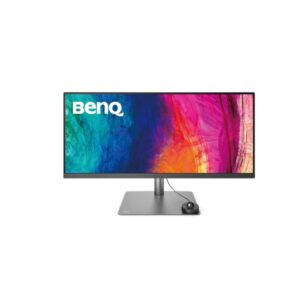
Ultrawide workspace defines 34" BenQ PD3420Q, a 34-inch 3440 x 1440 IPS creator monitor with 98% DCI-P3 coverage and USB-C.

34″ · MODEL YEAR 2019
BenqMonitor
Benq Monitor
Display
34-inch, IPS, 3440 x 1440
34
Refresh Rate
60 Hz (hertz)
60 Hz
Brightness
350 cd/m² (peak 400 cd/m²)
350 cd
Contrast Ratio
1000 : 1
1000

Overview

Ultrawide workspace defines 34" BenQ PD3420Q, a 34-inch 3440 x 1440 IPS creator monitor with 98% DCI-P3 coverage and USB-C. 98% DCI-P3, 10 bits (8 bits + FRC) (FRC: Yes) and 350 cd/m² brightness support photo, video and design work that benefits from broad gamut and QHD or ultrawide space, while 3440 x 1440 supplies the working space. The height and swivel adjustable stand and 2 x HDMI 2.0 connection define the desk setup. The main limits are DisplayHDR 400 without brightness headroom. 109 PPI is the clearest guide to text sharpness at desk distance. Average power is not published, relevant for an all-day screen. Buy it if you value colour coverage and a productivity-friendly panel; skip it if you expect true HDR impact or very high refresh.

BrandBenQPanel TypeIPSResolution3440 x 1440Refresh Rate60 Hz (hertz)

Key Highlights

  • 3440 x 1440 on a 34-inch IPS panel gives 109 PPI for desktop detail.
  • 60 Hz (hertz) refresh with 5 ms (GtG) response sets the motion ceiling.
  • 98% DCI-P3 and 10 bits (8 bits + FRC) (FRC: Yes) define the available colour range.
  • 2 x HDMI 2.0; 1 x USB (Type-C; DisplayPort 1.4; 65W) / 1 x DisplayPort 1.4 cover the main video inputs.
  • USB-C provides 65W power, making laptop connection a central feature.

Who Should Buy the Benq PD3420Q

+ Best For
Photo, video and design work that benefits from broad gamut and QHD or ultrawide space
3440 x 1440 and 60 Hz (hertz) match this use.
Buyers who value USB-C docking
power delivery and data are built in.
Users comfortable with 109 PPI
it sets practical text sharpness at desk distance.
Shared or adjustable desks
150 mm height adjustment and ±30° swivel improve positioning.
× Not Ideal For
Buyers prioritising high-impact HDR or esports-class refresh
the specification does not serve that priority well.
Portrait workflows
pivot is No, despite the otherwise adjustable stand.
High-impact HDR buyers
DisplayHDR 400 and 400 cd/m² leave little luminance headroom.

Display Performance

Refresh Rate 60 Hz (hertz) Smoother than 60 Hz where the source can supply it.
Response Time 5 ms (GtG) 5 ms (GtG) is the published GtG figure and is more representative of normal pixel transitions than MPRT.
Brightness 350 cd/m² This is the published luminance baseline for normal use.
Contrast 1000 : 1 This sets black depth before room lighting and panel glow affect it.
Colour Gamut 98% DCI-P3 Coverage indicates range, not guaranteed calibration accuracy.
HDR DisplayHDR 400 The panel brightness and contrast decide whether the label has visible impact.

Gaming Performance

Refresh Rate60 Hza productivity panel, not a gaming one
Response Time5 ms GtGadequate for general use
VRR / Adaptive SyncNot listedno variable refresh
GPU Requirementminimal - buy this for the 65W USB-C dock and DisplayHDR 400, not gaming

HDR & Brightness Reality

34" BenQ PD3420Q carries DisplayHDR 400, but the hardware leaves limited room for dramatic HDR. Peak brightness is 400 cd/m², only a small step above the 350 cd/m² level, while 1000 : 1 contrast and the IPS panel do not provide OLED blacks or strong local dimming. 98% DCI-P3 is useful for colour range, yet the badge should be treated as format support and basic highlight handling rather than a major HDR upgrade.

Connectivity & Ports

HDMI2 x HDMI 2.0Suitable for consoles or secondary computers; version limits still apply.
DisplayPort1 x USB (Type-C; DisplayPort 1.4; 65W) / 1 x DisplayPort 1.4Usually the preferred PC link when available.
USB-C1 x USB (Type-C; DisplayPort 1.4; 65W)Charging wattage and DP Alt Mode decide laptop usefulness.
USB HubNot listedNo built-in USB data hub is listed.
Audio Out1 x 3.5 mm Audio OutLets headphones or speakers receive display audio.

Desk Fit & Ergonomics

Size / Footprint34-inch; 825.8 mm wideCheck desk width and viewing distance before purchase.
StandHeight and swivel adjustableThe movement range determines whether a riser or arm is needed.
VESA Mount100 x 100 mmMatch this pattern when choosing an arm or wall bracket.
Tilt-5° to +20°Provides basic vertical angle correction.
Height Adjust150 mmLets the panel meet eye level without a separate riser.
Swivel / Pivot±30° / NoUseful for shared desks, but portrait rotation is unavailable.

Real-World Use Cases

Primary Use
Photo, video and design work that benefits from broad gamut and QHD or ultrawide space; 3440 x 1440 and 60 Hz (hertz) support this role.
Work
109 PPI, a height and swivel adjustable stand and USB-C docking shape daily productivity.
Gaming
60 Hz (hertz), 5 ms (GtG) and no published VRR set the realistic ceiling.
Media
DisplayHDR 400 and 2 x 2.5 W (watts) define film and streaming expectations.

Pros & Cons

Pros
  • 3440 x 1440 resolution at 109 PPI gives the stated balance of workspace and sharpness.
  • 60 Hz (hertz) refresh suits conventional office use.
  • 98% DCI-P3 and 10 bits (8 bits + FRC) (FRC: Yes) provide the listed colour capability.
  • 65W USB-C power delivery supports one-cable laptop use.
  • 150 mm height adjustment improves desk ergonomics.
Cons
  • DisplayHDR 400 has little headroom at 400 cd/m².
  • 60 Hz (hertz) is not intended for competitive high-refresh gaming.
  • 10 bits (8 bits + FRC) (FRC: Yes) does not prove factory calibration.

Score & Ratings

7.8/10 Great
Design
8
Display
9
Color Performance
7
Performance
5
Connectivity
8
Model Information 6
Specification Value
Brand BenQ
Series DesignVue
Model PD3420Q
Full Product Name BenQ PD3420Q
Model Year 2019
Available Colors Gray
Display & Panel 4
Specification Value What It Means
Screen Size 34-inch
Display Area 87.28 % (percent)
Panel Type IPS IPS supports wide viewing angles, while 1000 : 1 contrast sets the dark-scene limit.
Backlight Type W-LED
Resolution & Pixel Details 3
Specification Value What It Means
Native Resolution 3440 × 1440
Pixel Density 109 PPI 109 PPI produces crisp text and useful detail at normal desk distance.
Pixel Pitch 0.233 mm (millimeters)
Picture Quality & Color 3
Specification Value
Panel Bit Depth 10 bits (8 bits + FRC) (FRC: Yes)
FRC Yes
Display Colors 1073741824 colors
Refresh Rate, Response & Gaming 1
Specification Value
Refresh Rate Range 60 Hz (hertz)
Ports & Connectivity 6
Specification Value
HDMI Ports
2× HDMI 2.0
HDMI Version HDMI 2.0
DisplayPort Input 1× DisplayPort 1.4
DisplayPort Version DisplayPort 1.4
USB-C Video Input 1× USB-C
HDCP Support Yes
Audio, Camera, Network & Smart Features 1
Specification Value
Built-In Camera No
Ergonomics & Stand 5
Specification Value What It Means
VESA Mount 100 × 100 mm
VESA Size 100 × 100 mm
Removable Stand Yes
Height Adjustment 150 mm 150 mm lets the panel meet eye level without a riser.
Height Range 150 mm
Dimensions, Weight & Design 2
Specification Value
Weight With Stand 9.3 kg
Weight Without Stand 6.9 kg
Power & Operating Conditions 4
Specification Value
Power Input 100–240V
AC Frequency 50/60Hz
Maximum Power Consumption 185W
Sleep Consumption 0.5W

Frequently Asked Questions

01 Where does 34" BenQ PD3420Q make the strongest buying case? +
It suits photo, video and design work that benefits from broad gamut and QHD or ultrawide space. The 3440 x 1440 panel, 60 Hz (hertz) refresh and fully adjustable stand show where the product spends its budget.
02 Is the refresh ceiling on 34" BenQ PD3420Q useful outside gaming? +
The ceiling is 60 Hz (hertz), so smoother motion depends on the source delivering enough frames. 5 ms (GtG) is the published GtG figure and is more representative of normal pixel transitions than MPRT.
03 How complete is the connection set on 34" BenQ PD3420Q? +
HDMI is 2 x HDMI 2.0, DisplayPort is 1 x USB (Type-C; DisplayPort 1.4; 65W) / 1 x DisplayPort 1.4, and USB-C is 1 x USB (Type-C; DisplayPort 1.4; 65W). That combination determines whether it works as a simple screen or a practical laptop hub.
04 What does the stand design mean for long sessions on 34" BenQ PD3420Q? +
Height adjustment is 150 mm, swivel is ±30° and pivot is No. A 100 x 100 mm mount provides an alternative where the stand is restrictive.
05 Which weakness matters most before ordering 34" BenQ PD3420Q? +
The biggest limitation is entry-level HDR hardware. Buyers should weigh that against 60 Hz (hertz) refresh and 98% DCI-P3.

Reviews

NO REVIEWS YET Own this display? Your rating helps calibrate the score for everyone.
DISPLAYINPUT · INDEPENDENT · SPEC-BASED · NO SPONSORED PLACEMENT SHEET № PD3420Q